What Is Recruitment Automation? A Powerful Guide for High-Volume Recruitment

What is recruitment automation?
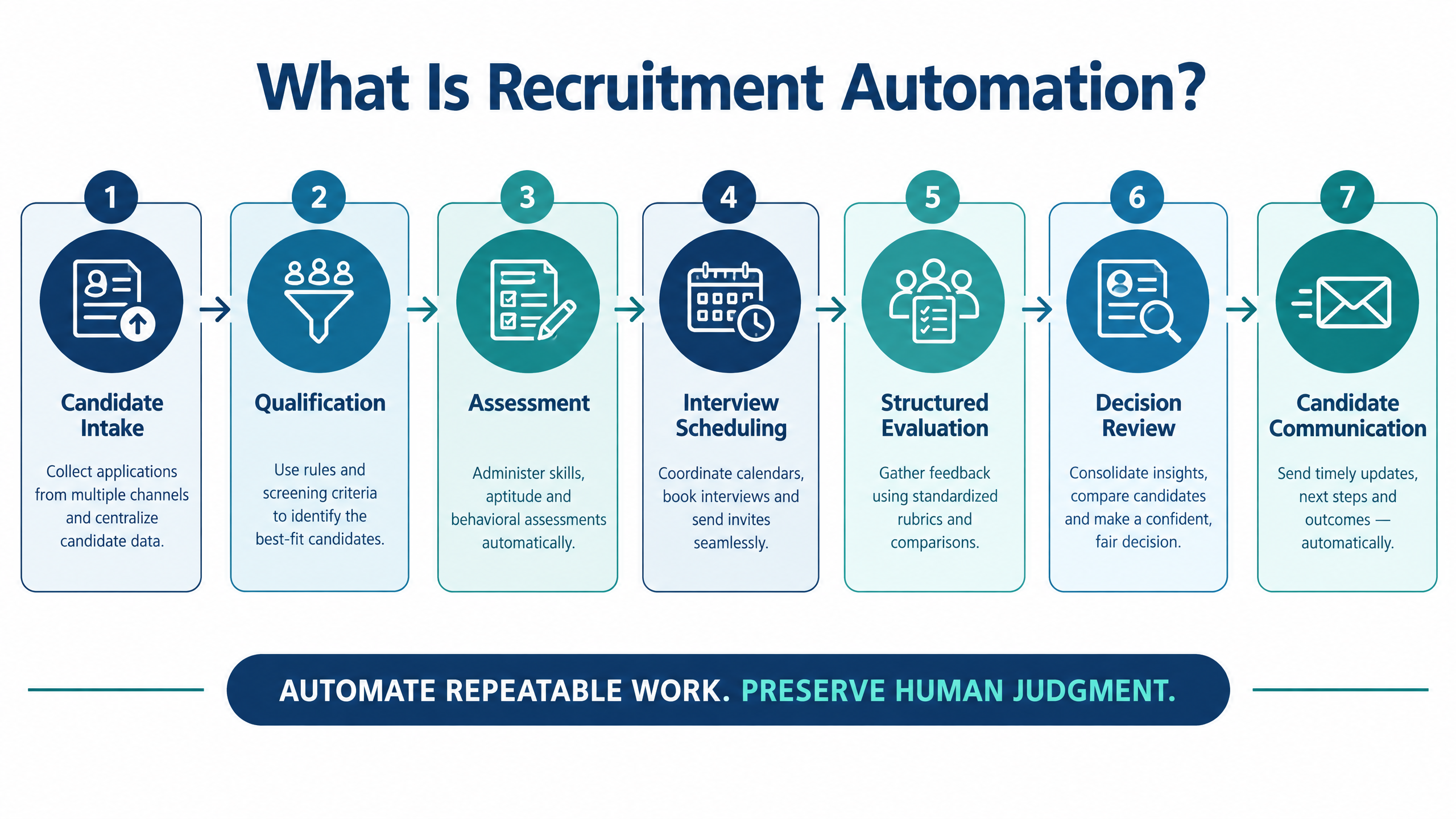
Recruitment automation is the use of software, workflow rules, integrations, and AI-assisted tools to reduce repetitive work across the hiring process. It can support candidate intake, resume screening, qualification, assessments, interview scheduling, reminders, interviewer coordination, feedback collection, reporting, and next-step communication.
The answer to “what is recruitment automation?” is not simply “using AI to hire people.” The more accurate definition is an operating model in which technology manages repeatable actions while recruiters, hiring managers, and interviewers remain responsible for requirements, evidence, exceptions, and consequential decisions.
For example, a candidate can enter a structured profile, receive a role-relevant assessment, get an automated scheduling invitation, complete an interview, and trigger a report for recruiter review. The system can manage the handoffs, reminders, status changes, and notifications. A human should still decide whether the evaluation criteria are appropriate, whether the evidence is sufficient, and whether the candidate progresses.
The best recruitment automation programs begin with a process problem rather than a feature list. Teams should identify where candidates wait, where recruiters repeat the same task, where interviewers miss feedback deadlines, and where information is copied between disconnected systems. Automation is valuable when it makes the complete workflow more reliable.
What is recruitment automation showing the connected hiring workflow from candidate intake to decision review

Why high-volume recruitment needs automation

High-volume recruitment creates a coordination problem before it becomes a technology problem. A hiring team may need to process hundreds or thousands of candidates across several roles, locations, time zones, interview panels, and assessment stages. Each step creates messages, status updates, scheduling decisions, reports, and follow-up work.
Manual processes can still function at low volume. At higher volume, they often produce predictable symptoms:
Workflow symptom
Operational consequence
Candidate details are copied between systems
Errors, duplicate work, and incomplete reporting
Availability is collected by email or phone
Longer scheduling cycles and more rescheduling
Interview feedback arrives in different formats
Slow hiring-manager decisions and weak comparisons
Recruiters send reminders manually
Missed follow-ups and inconsistent candidate communication
Assessments and interviews are managed separately
Broken handoffs and unclear candidate status
Hiring data is spread across files and inboxes
Limited visibility into bottlenecks and workload
Candidates wait without updates
Drop-off and damage to the employer experience
Recruitment automation creates a shared operating layer around these activities. It can help the team see what has happened, what should happen next, who owns the next action, and which cases require manual attention.
Automation should not make the process feel impersonal. Clear messages, relevant assessments, transparent instructions, and a human support path are essential. A faster workflow is valuable only when candidates can complete it and decision-makers can trust the evidence.

What recruitment automation can include

The scope depends on the organization’s hiring model and technology stack. A mature workflow may connect the following capabilities.

Candidate intake and data normalization

Automation can collect applications, import profiles, identify duplicate records, capture source information, and create a consistent candidate status model. The goal is to make each candidate record usable across screening, assessment, interview, and decision stages.

Resume and job-description matching

AI-assisted matching can compare a candidate profile with defined job requirements and surface relevant experience or gaps. This should help prioritize review, not create an uninspectable rejection rule. Recruiters need to understand which requirements were considered and how exceptions are handled.

Candidate outreach and qualification

Recruitment workflows can send approved invitations, collect basic information, confirm interest, and route qualified candidates to the next stage. If a voice or conversational system is used, teams should test language, pronunciation, interruptions, consent, and escalation to a person.

Assessments and skills validation

A system can send assessments, apply deadlines, issue reminders, track completion, score objective responses, and make reports available to reviewers. For technical roles, the workflow may include coding environments or role-specific simulations.
Teams evaluating skills validation can review the and .

Interview scheduling and reminders

Scheduling automation can match candidate availability with interviewer calendars, handle time zones, send invitations, issue reminders, and support rescheduling. It may also notify interviewers and recruiters when a session is completed, missed, or requires attention.

Structured interviews and evaluation

Interview templates, question libraries, scorecards, transcripts, reports, and feedback reminders can make evidence easier to compare. Standardization should improve consistency without preventing an interviewer from exploring a relevant answer.

Reporting and next-step triggers

Automation can consolidate results, notify hiring managers, update candidate status, and trigger the next stage. Reports should show the evidence behind a recommendation and make it possible to identify incomplete or conflicting information.
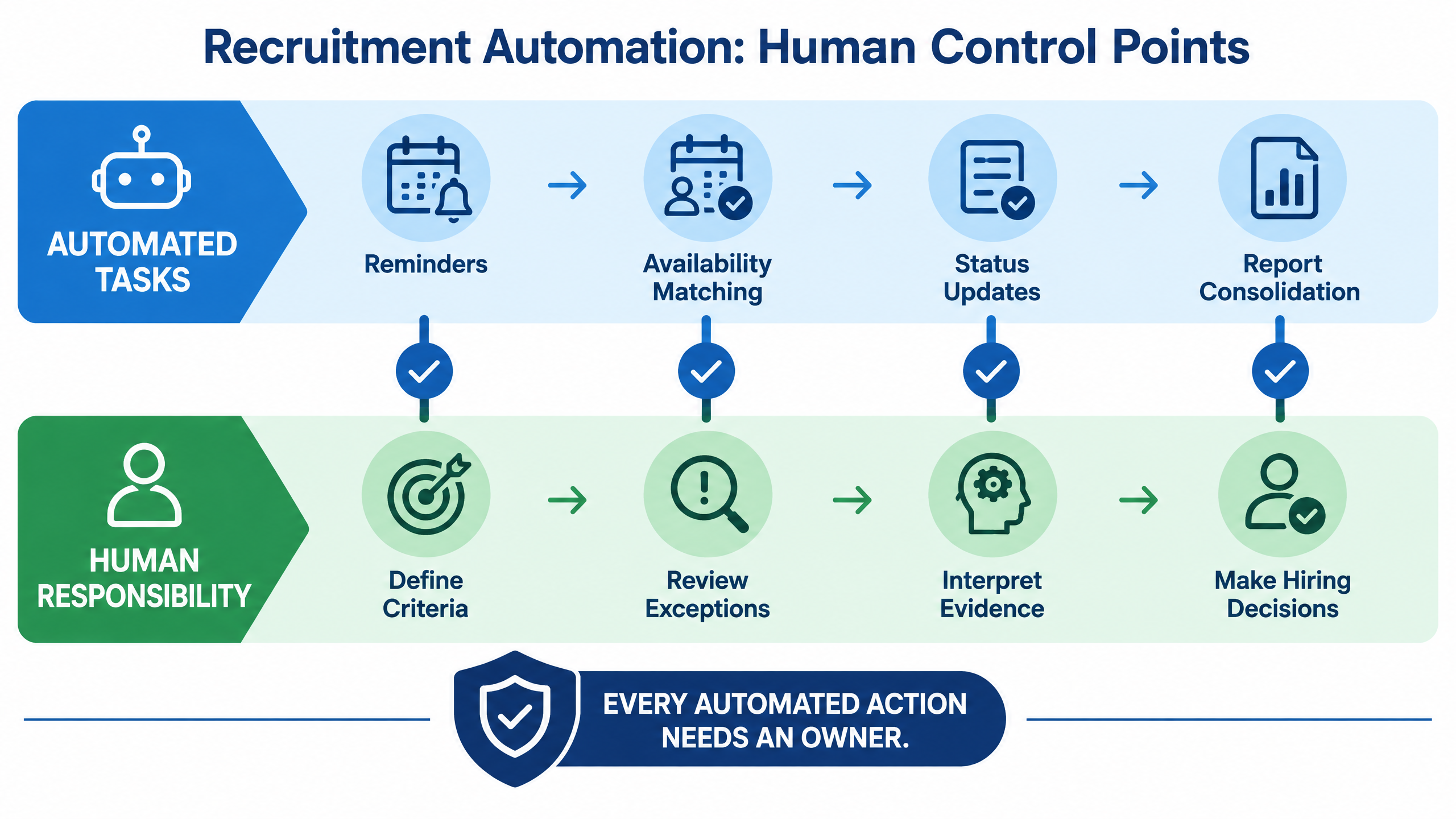
Recruitment automation human control points showing automated tasks and human responsibilities

7 powerful ways recruitment automation improves hiring

1. It reduces repetitive coordination

Recruiters often spend substantial time sending invitations, checking calendars, reminding interviewers, collecting feedback, and updating candidate status. Automation can handle these repeatable actions according to approved rules.
The benefit is not merely fewer emails. It is a more predictable process. Candidates know what to expect, interviewers receive timely information, and recruiters can focus on roles, stakeholders, and exceptions that require judgment.

2. It shortens time between hiring stages

A candidate can lose interest when there is a long gap between application, screening, assessment, interview, and feedback. Automated triggers can reduce avoidable waiting by sending the next invitation as soon as the required stage is complete.
Teams should measure time-to-stage rather than only time-to-hire. A workflow may improve overall hiring speed by removing small delays at several handoffs.

3. It supports more consistent evaluation

A defined interview plan, role-relevant question set, and structured scorecard give reviewers a common frame of reference. This can make candidate comparisons more defensible and reveal when interviewers are missing required evidence.
Consistency does not mean asking every candidate irrelevant questions. The hiring team should approve the competencies, question boundaries, scoring logic, and escalation rules before launching automation.

4. It improves visibility for TA operations

A central workflow view can show where candidates are waiting, which interviews are scheduled, which feedback is overdue, how many candidates have completed an assessment, and where the process is losing people.
This visibility helps TA operations leaders forecast capacity and identify bottlenecks. It also supports better conversations with hiring managers because decisions can be based on workflow evidence rather than anecdotal updates.

5. It scales candidate communication

High-volume campaigns require timely communication, but high volume makes manual personalization difficult. Approved templates and event-based messages can keep candidates informed about invitations, deadlines, schedule changes, outcomes, and next steps.
Communication automation should include consent, channel preferences, language clarity, frequency limits, delivery status, and a route to human help. Candidates should not be trapped in a workflow that cannot answer their question.

6. It connects assessments, interviews, and reports

Disconnected tools create manual handoffs. When assessment outcomes, interview records, transcripts, feedback, and next steps are connected, recruiters can review a candidate’s journey from a more complete evidence base.
For technical hiring, this may mean linking coding results with structured technical interviews. For early-career hiring, it may mean connecting eligibility, assessments, interviews, and bulk communication in a single campaign view.

7. It creates a foundation for continuous improvement

Automation makes process data more observable. Teams can examine completion, scheduling turnaround, feedback delays, candidate drop-off, interviewer workload, exception volume, and downstream hiring quality.
The purpose of measurement is not to maximize activity. Sending more invitations is not an improvement if candidates cannot complete the process or hiring managers receive weaker evidence. The useful question is whether the workflow improves speed, quality, experience, and control together.

How to design the right automated hiring workflow

A reliable workflow begins with clear inputs and ownership. Before configuring a platform, define the role, candidate stages, evaluation criteria, approval points, messages, and service-level expectations.

Stage 1: Define the hiring requirement

Confirm the job description, competencies, eligibility rules, assessment design, interview stages, evaluators, and decision owners. Define what a candidate must demonstrate before progressing and which cases require manual review.

Stage 2: Capture and normalize candidates

Create a reliable candidate record. Record source, role, location, current stage, consent status, assessment status, interview status, and next action. Use a shared status vocabulary so recruiters, interviewers, and hiring managers interpret the workflow consistently.

Stage 3: Engage and qualify

Send a clear invitation or qualification request. Explain the purpose, expected time, device needs, support route, and next step. Use automation for the routine path, but route unanswered questions, accommodations, and unusual cases to a person.

Stage 4: Validate relevant skills

Choose an assessment, coding task, portfolio review, or structured interview that reflects the work. Avoid automating a test simply because the platform supports it. The evaluation should produce evidence that the hiring team can interpret.

Stage 5: Schedule the next interaction

Match candidate and interviewer availability, confirm time zones, issue calendar events, and send reminders. Make rescheduling straightforward. Define what happens if no suitable slot exists or an interviewer becomes unavailable.

Stage 6: Collect and consolidate evidence

Capture assessment results, interview responses, feedback, transcripts, reports, and decision notes in a consistent format. Make missing evidence visible and prevent a candidate from being advanced solely because one step was completed.

Stage 7: Review, decide, and learn

Route the candidate to the appropriate human decision-maker. Track overrides, exceptions, complaints, drop-off, time-to-stage, and downstream outcomes. Improve the workflow based on evidence rather than assumptions.

What should remain human-led?

Recruitment automation works best when the boundary between automation and human judgment is explicit.
Hiring responsibility
Suitable automation role
Human responsibility
Candidate invitations
Send approved messages and reminders.
Approve templates, consent language, and escalation.
Scheduling
Match availability and issue calendar updates.
Resolve exceptions and candidate needs.
Screening
Apply approved filters or surface relevant profiles.
Review borderline and nontraditional candidates.
Assessment
Deliver tests, track completion, and calculate defined scores.
Confirm job relevance and interpret results.
Interviews
Provide question structures, transcripts, and reports.
Evaluate context, depth, and evidence.
Candidate progression
Trigger a review or next-stage task.
Make consequential progression decisions.
Communication
Send routine status updates.
Handle sensitive outcomes and candidate concerns.
A useful control principle is simple: every automated action needs an owner. The owner should know what the action does, what data it uses, what can go wrong, how exceptions are routed, and how the action can be paused or corrected.
For AI-supported hiring, teams should also review privacy, security, auditability, accessibility, bias monitoring, data retention, and candidate transparency. The offers an external reference for identifying, measuring, managing, and governing AI-related risks .

How to evaluate a recruitment automation platform

A platform demonstration should use a real or representative workflow. Ask the vendor to show the journey from role creation through candidate intake, screening, assessment, scheduling, interview, feedback, reporting, and next-step communication.

Check workflow flexibility

Confirm whether administrators can create different workflows for different roles, locations, volumes, and risk levels. A rigid workflow may work for one campaign but create workarounds for every other hiring need.

Check data flow and integrations

Review ATS, CRM, calendar, messaging, assessment, interview, and reporting integrations. Ask about APIs, webhooks, exports, permissions, audit logs, duplicate records, failed updates, and data deletion.

Check scheduling depth

Test bulk setup, time zones, multiple interviewers, reminders, candidate self-service, rescheduling, cancellations, and escalation. Scheduling is valuable only when it reduces the coordination work recruiters currently perform manually.

Check evidence quality

Inspect the actual assessment result, interview response, transcript, scorecard, summary, and report. Ask whether a reviewer can correct an error, add context, override a recommendation, and record the reason.

Check candidate experience

Review invitation language, accessibility, mobile or browser support, technical recovery, privacy notices, response time, and the path to human help. A workflow that is efficient for the recruiter but confusing for the candidate is not operationally successful.

Check enterprise support

Ask about implementation, configuration, training, support response, service levels, campaign setup, security, account ownership, and change management. Request a pilot with one high-volume role and a documented success scorecard.
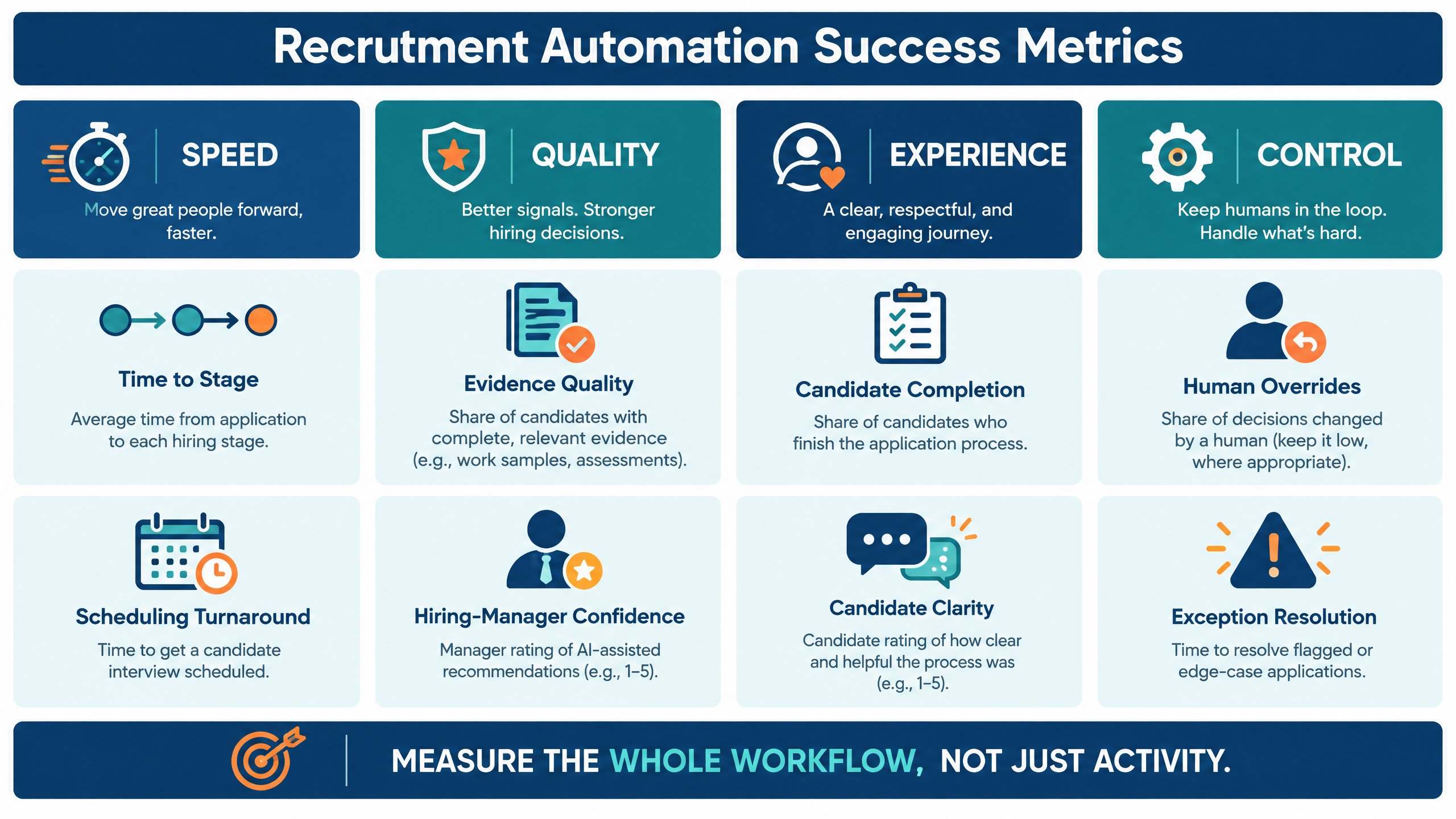
Recruitment automation success metrics grouped by speed, quality, experience, and control

How futuremug supports automated hiring workflows

futuremug’s published platform combines AI-powered interviews, assessments, expert-led evaluation, scheduling, candidate management, and structured reporting. Its describes automated scheduling, video interviews, a real-time coding environment, question libraries, interviewer dashboards, AI-generated transcripts and summaries, notifications, and personalized reports.
The page describes 24/7 auto-scheduling, customizable interviews, expert panels, resume-to-job-description matching, communication updates, structured reports, and AI-powered insights. This is relevant when an organization needs both workflow automation and additional interviewer capacity.
For teams that want a broader AI-enabled workflow, the describes automated interviews, job-description and candidate-profile analysis, voice capabilities, transcripts, evaluations, red-flag detection, and next-step triggers. Product pages describe intended capabilities, so enterprise buyers should verify current functionality, pricing, integrations, security terms, and governance controls in a live evaluation.
A useful futuremug demo should use your own role, hiring volume, candidate stages, communication requirements, assessment method, interview structure, and approval policy. Ask to see both the normal workflow and difficult cases such as rescheduling, incomplete information, manual overrides, and candidate support.

Request a recruitment workflow discussion

If your team is losing time to scheduling, reminders, fragmented assessment results, delayed interview feedback, or manual reporting, map the workflow before adding another point solution. Identify which steps are repetitive, which decisions require evidence, and where candidates or hiring managers are waiting.
Then bring that workflow to a . The discussion can cover automated scheduling, AI-powered interviews, assessments, expert interview support, candidate management, reporting, human review, integrations, and implementation fit.

Frequently Asked Questions

What is recruitment automation in simple terms?

Recruitment automation is the use of software and workflow rules to handle repetitive hiring tasks such as candidate communication, screening, assessments, scheduling, reminders, feedback collection, reporting, and next-step updates. People remain responsible for requirements, exceptions, evidence interpretation, and hiring decisions.

Is recruitment automation the same as AI recruitment?

No. Recruitment automation is the broader category. It can include simple rules, integrations, templates, calendar workflows, dashboards, and AI-assisted functions. AI recruitment refers specifically to the use of artificial intelligence for tasks such as matching, question generation, conversational screening, summarization, or prediction.

Which recruitment tasks should be automated first?

Start with high-volume, repetitive, measurable tasks that have clear rules. Scheduling, reminders, assessment invitations, status updates, feedback collection, and report consolidation are often strong starting points. Do not automate an unclear or unfair decision merely because the software can execute it.

Can recruitment automation replace recruiters?

It can reduce repetitive coordination, but it should not replace the strategic and accountable work of recruiters. Recruiters still define requirements, advise hiring managers, review evidence, support candidates, handle exceptions, and protect the quality of the hiring process.

How does automation affect candidate experience?

It can improve candidate experience by reducing waiting, providing timely updates, simplifying scheduling, and creating clearer next steps. It can harm experience when messages are irrelevant, technical failures are unsupported, AI involvement is unclear, or candidates cannot reach a person.

How should a company measure recruitment automation success?

Measure time-to-stage, scheduling turnaround, completion, candidate drop-off, feedback delays, evidence quality, interviewer workload, exception resolution, human overrides, candidate clarity, and downstream hiring quality. Review speed, quality, experience, and control together.

What should a recruitment automation demo include?

Ask the vendor to demonstrate a real workflow from role setup to candidate intake, qualification, assessment, scheduling, interview, feedback, report, human review, next-step trigger, integration, exception handling, and audit or governance controls.

Does futuremug support automated interview scheduling?

futuremug’s published AI interview and interview outsourcing pages describe automated scheduling, bulk interview setup, notifications, time-zone support, interviewer dashboards, and structured reporting. Confirm current capabilities and integration fit during a demo using your own hiring workflow.

Leave a Reply

Your email address will not be published.