
Technical Screening Tools: 10 Ways to Screen Developers Before the First Interview
What Technical Screening Tools Do
Technical screening tools sit between the application and your first engineering interview. Their job is to answer one question fast: can this person actually do the work?
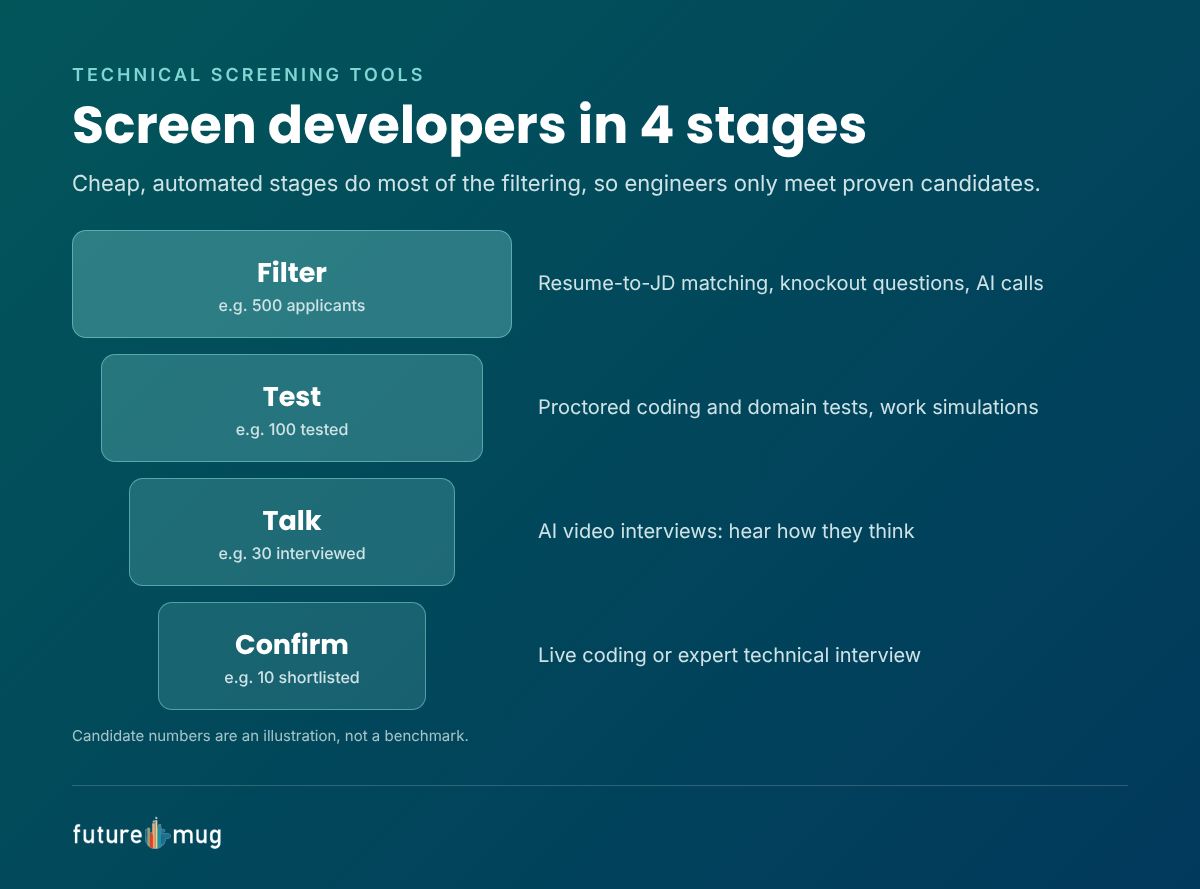
A good screening funnel narrows the pool in stages:
- Filter: remove applicants who don’t meet hard requirements.
- Test: check coding and technical knowledge objectively.
- Talk: hear how candidates explain their thinking, without booking an engineer.
- Confirm: a short live or expert interview for the final shortlist.
Each stage costs more time than the last, so the cheaper, automated stages should do most of the filtering. That way your engineers only interview candidates who have already shown they can code.
10 Ways to Screen Developers Before the First Interview
1. Resume-to-JD matching
AI resume screening ranks applicants by how closely their skills and experience match the job description. It is the fastest way to cut a pile of 500 applications down to the 100 worth testing.
- Tools: ATS resume parsing, AI matching tools, futuremug’s Job Push with resume-to-JD matching.
- Watch out: resumes are easy to inflate, so never hire on the match score alone.
2. Knockout questions and AI screening calls
Ask a few must-have questions upfront: notice period, location, required stack, expected salary. AI calling can collect the same answers by phone at scale.
- Tools: application forms in your ATS, AI calling tools.
3. Online coding tests
Timed coding problems with automated scoring show whether a candidate can write working code. They are the core of most technical screening.
- Tools: futuremug’s online assessment platform, HackerRank, Codility, HackerEarth.
- Tip: use problems close to your real work, not puzzle-style brain teasers.
4. Technical knowledge and domain tests
Multiple-choice and short-answer tests check knowledge of a language, framework, database, cloud platform or networking. These IT tech assessments are useful for roles where knowledge matters as much as coding, such as DevOps, QA or support engineering.
- Tools: futuremug, iMocha, TestGorilla.
5. Work simulations and take-home projects
Give candidates a small, realistic task: fix a bug, build an API endpoint, review a pull request. Simulations show how someone works, not just whether they know the answer.
- Tools: CodeSignal, Vervoe, or a take-home repo you design yourself.
- Tip: keep take-homes under 2 to 3 hours, or strong candidates will drop out.
6. GitHub and portfolio review
Open-source work and personal projects show coding style, consistency and real interest. They work best as a bonus signal, since many good engineers can’t share their work code.
7. AI video interviews
Candidates record answers to technical and behavioural questions at a time that suits them, and AI scores the responses. You hear how they explain their thinking without booking an engineer’s calendar.
- Tools: futuremug’s AI video interviews, HireVue.
8. Live coding interviews
A short pair-programming session in a shared editor shows how a candidate thinks, communicates and handles hints. It is costly in engineer time, so save it for the final shortlist.
- Tools: CoderPad, Codility, HackerRank interview tools.
9. Outsourced technical interviews
When your engineers can’t spare hours for screening, expert interviewers can run structured technical rounds and send detailed feedback.
- Tools: futuremug’s interview outsourcing, with 5,000+ expert interviewers across 250+ IT domains, so niche roles get a specialist interviewer.
10. Proctoring and identity verification
This is not a test on its own but a layer over all the others. AI proctoring flags tab switching, multiple faces and outside help, and ID checks confirm the person taking the test is the person you’ll hire. Learn how to detect cheating in video interviews.
Technical Screening Methods Compared
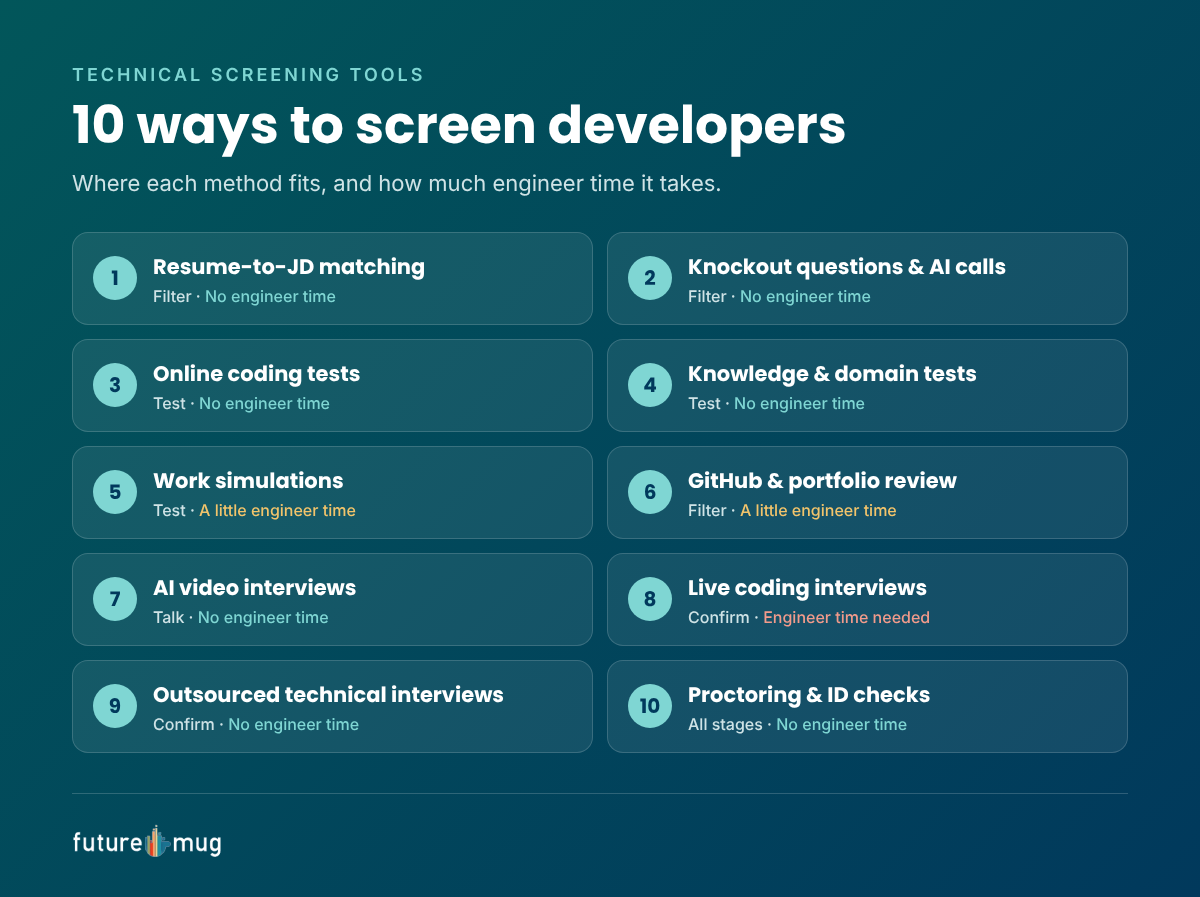
| Method | What it tells you | Engineer time | Candidate time | Best stage |
|---|---|---|---|---|
| Resume-to-JD matching | Relevant experience on paper | None | None | Filter |
| Knockout questions and AI calls | Basic fit: stack, location, notice | None | Minutes | Filter |
| Online coding tests | Can write working code | None | 45 to 90 min | Test |
| Knowledge and domain tests | Depth in a stack or tool | None | 20 to 45 min | Test |
| Work simulations and take-homes | How they work on real tasks | Review only | 1 to 3 hours | Test |
| GitHub and portfolio review | Coding style and initiative | 10 to 15 min | None | Filter |
| AI video interviews | How they explain their thinking | None | 20 to 30 min | Talk |
| Live coding interviews | Problem-solving and collaboration | 45 to 60 min | 45 to 60 min | Confirm |
| Outsourced technical interviews | Depth, judged by a domain expert | None | 45 to 60 min | Confirm |
| Proctoring and ID checks | The result is genuine | None | None extra | All stages |
Times are typical ranges, not fixed rules.
For a closer look at individual tools, see our list of the best technical assessment tools to hire IT professionals and the best skill assessment tools for 2026.
How to Build Your Technical Screening Stack
There is no single best tool. Match the stack to the role and how many candidates you see.
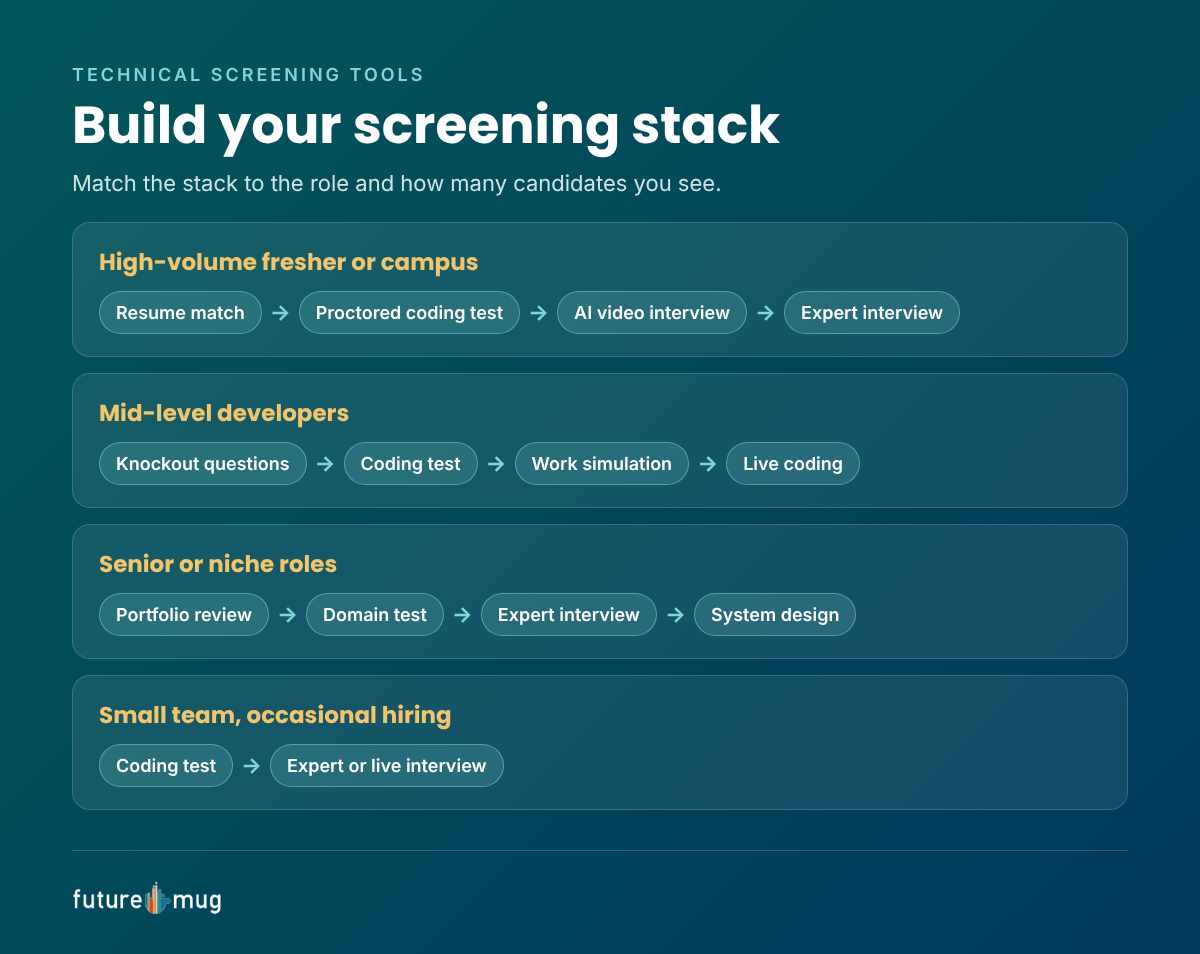
| Situation | Recommended stack |
|---|---|
| High-volume fresher or campus hiring | Resume matching → proctored coding test → AI video interview → expert interview for the top 10% |
| Mid-level developers, steady volume | Knockout questions → coding test → work simulation → live coding |
| Senior or niche roles | Portfolio review → short domain test → expert technical interview → system design round |
| Small team, occasional hiring | Coding test → one expert or live interview |
Three rules hold for every stack:
- Put the cheapest filters first, so engineers only meet candidates who have already shown they can code.
- Proctor every remote test, because a score you can’t trust is worse than no score.
- Confirm with a human, through a live or expert interview, before you make an offer.
Mistakes to Avoid
- Puzzle-heavy tests. Algorithm puzzles unrelated to the job screen out good engineers and reward memorisation.
- Very long take-homes. Senior candidates with options will skip a weekend-long assignment.
- Unproctored remote tests. With AI tools easy to use, unproctored scores are hard to trust.
- Too many stages. Each extra round loses candidates. Three or four steps before the offer is usually enough.
- No feedback. Candidates who invest an hour in a test expect at least a short result.
Conclusion
The best technical screening tools work as a funnel: automated filters and proctored tests first, AI interviews to hear how candidates think, and a live or expert interview to confirm the final shortlist. Your engineers spend time only on candidates who have already proved their skills.
futuremug brings proctored coding and domain tests, AI video interviews and technical rounds by 5,000+ expert interviewers across 250+ IT domains together on one platform. Start with futuremug’s free assessment platform and screen your next batch of developers before the first interview.



Frequently Asked Questions
Technical screening tools check a developer's skills before the first interview. They include resume matching, coding tests, technical knowledge tests, work simulations, AI video interviews, live coding tools and outsourced technical interviews.
The terms overlap. Technical assessment tools usually mean tests, such as coding or knowledge tests. Technical screening tools is the broader term for everything used to filter candidates before interviews, including tests.
Put automated steps first: resume matching, knockout questions, proctored coding tests and AI video interviews. Bring in engineers or expert interviewers only for the final shortlist.
Most coding tests run 45 to 90 minutes. Take-home projects should stay under 2 to 3 hours to avoid losing strong candidates.
Use AI proctoring and ID checks, design questions close to real work, and confirm results with a live or expert interview that probes the candidate's reasoning.
IT tech assessments are tests that check knowledge and skills in technical areas such as programming languages, databases, cloud, networking and testing.