
What Is Recruitment Automation? A Powerful Guide for High-Volume Recruitment
What is recruitment automation?
Why high-volume recruitment needs automation
|
Workflow symptom
|
Operational consequence
|
|
Candidate details are copied between systems
|
Errors, duplicate work, and incomplete reporting
|
|
Availability is collected by email or phone
|
Longer scheduling cycles and more rescheduling
|
|
Interview feedback arrives in different formats
|
Slow hiring-manager decisions and weak comparisons
|
|
Recruiters send reminders manually
|
Missed follow-ups and inconsistent candidate communication
|
|
Assessments and interviews are managed separately
|
Broken handoffs and unclear candidate status
|
|
Hiring data is spread across files and inboxes
|
Limited visibility into bottlenecks and workload
|
|
Candidates wait without updates
|
Drop-off and damage to the employer experience
|
What recruitment automation can include
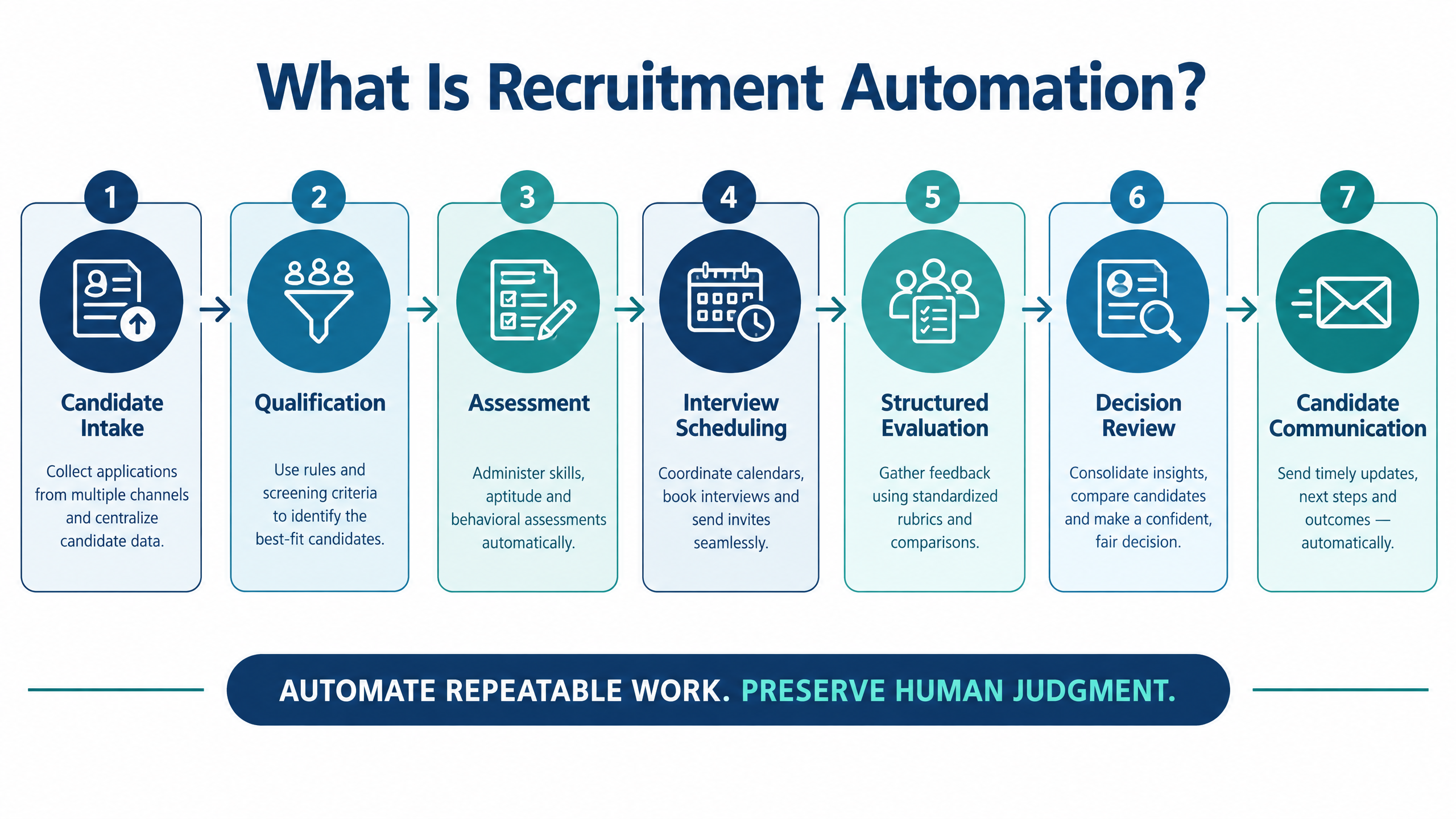
Candidate intake and data normalization
Resume and job-description matching
Candidate outreach and qualification
Assessments and skills validation
Interview scheduling and reminders
Structured interviews and evaluation
Reporting and next-step triggers
7 powerful ways recruitment automation improves hiring
1. It reduces repetitive coordination
2. It shortens time between hiring stages
3. It supports more consistent evaluation
4. It improves visibility for TA operations
5. It scales candidate communication
6. It connects assessments, interviews, and reports
7. It creates a foundation for continuous improvement
How to design the right automated hiring workflow
Stage 1: Define the hiring requirement
Stage 2: Capture and normalize candidates
Stage 3: Engage and qualify
Stage 4: Validate relevant skills
Stage 5: Schedule the next interaction
Stage 6: Collect and consolidate evidence
Stage 7: Review, decide, and learn
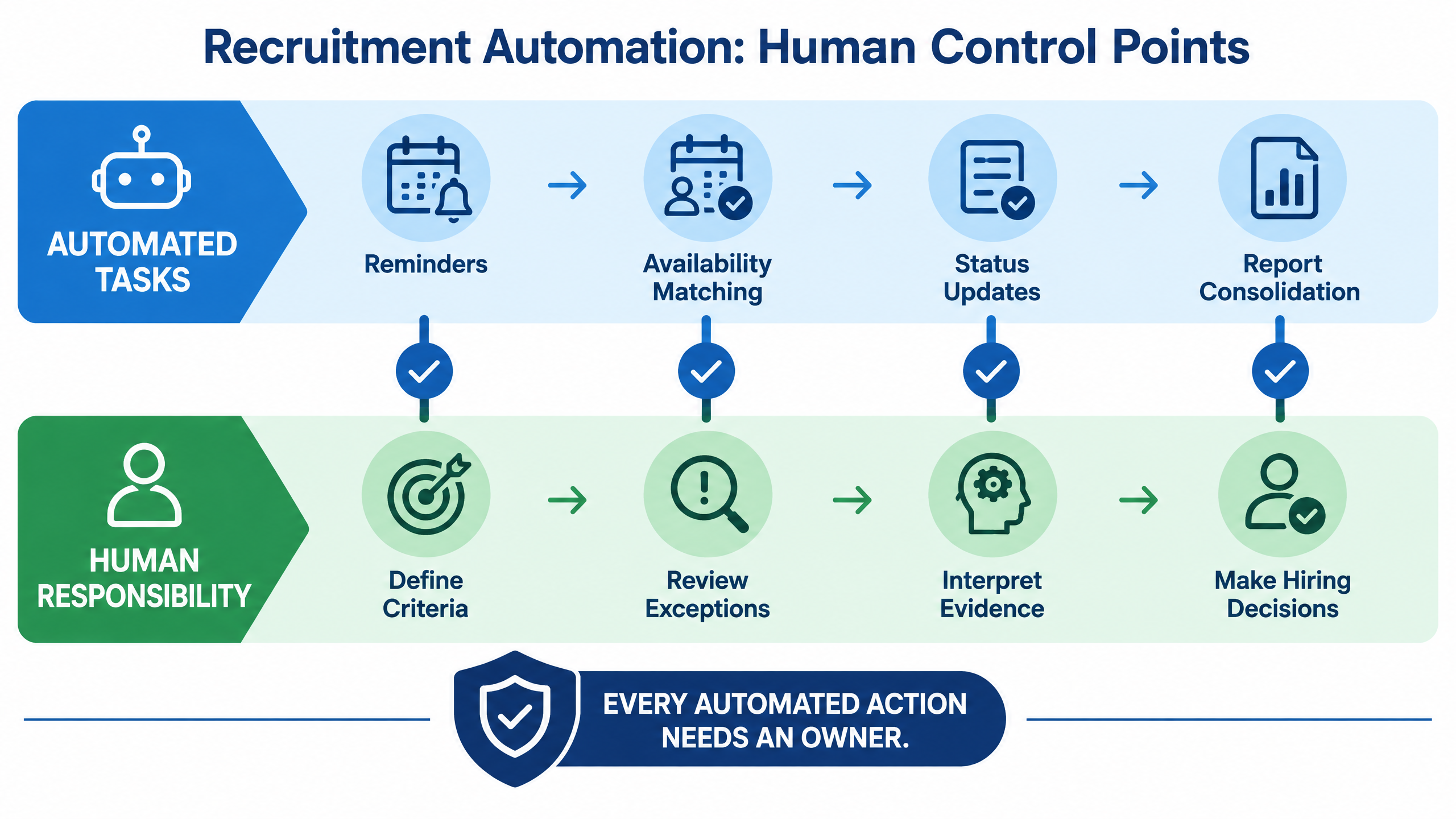
What should remain human-led?
|
Hiring responsibility
|
Suitable automation role
|
Human responsibility
|
|
Candidate invitations
|
Send approved messages and reminders.
|
Approve templates, consent language, and escalation.
|
|
Scheduling
|
Match availability and issue calendar updates.
|
Resolve exceptions and candidate needs.
|
|
Screening
|
Apply approved filters or surface relevant profiles.
|
Review borderline and nontraditional candidates.
|
|
Assessment
|
Deliver tests, track completion, and calculate defined scores.
|
Confirm job relevance and interpret results.
|
|
Interviews
|
Provide question structures, transcripts, and reports.
|
Evaluate context, depth, and evidence.
|
|
Candidate progression
|
Trigger a review or next-stage task.
|
Make consequential progression decisions.
|
|
Communication
|
Send routine status updates.
|
Handle sensitive outcomes and candidate concerns.
|
How to evaluate a recruitment automation platform
Check workflow flexibility
Check data flow and integrations
Check scheduling depth
Check evidence quality
Check candidate experience
Check enterprise support
How futuremug supports automated hiring workflows
Request a recruitment workflow discussion



Frequently Asked Questions
Recruitment automation is the use of software and workflow rules to handle repetitive hiring tasks such as candidate communication, screening, assessments, scheduling, reminders, feedback collection, reporting, and next-step updates. People remain responsible for requirements, exceptions, evidence interpretation, and hiring decisions.
No. Recruitment automation is the broader category. It can include simple rules, integrations, templates, calendar workflows, dashboards, and AI-assisted functions. AI recruitment refers specifically to the use of artificial intelligence for tasks such as matching, question generation, conversational screening, summarization, or prediction.
Start with high-volume, repetitive, measurable tasks that have clear rules. Scheduling, reminders, assessment invitations, status updates, feedback collection, and report consolidation are often strong starting points. Do not automate an unclear or unfair decision merely because the software can execute it.
It can reduce repetitive coordination, but it should not replace the strategic and accountable work of recruiters. Recruiters still define requirements, advise hiring managers, review evidence, support candidates, handle exceptions, and protect the quality of the hiring process.
It can improve candidate experience by reducing waiting, providing timely updates, simplifying scheduling, and creating clearer next steps. It can harm experience when messages are irrelevant, technical failures are unsupported, AI involvement is unclear, or candidates cannot reach a person.
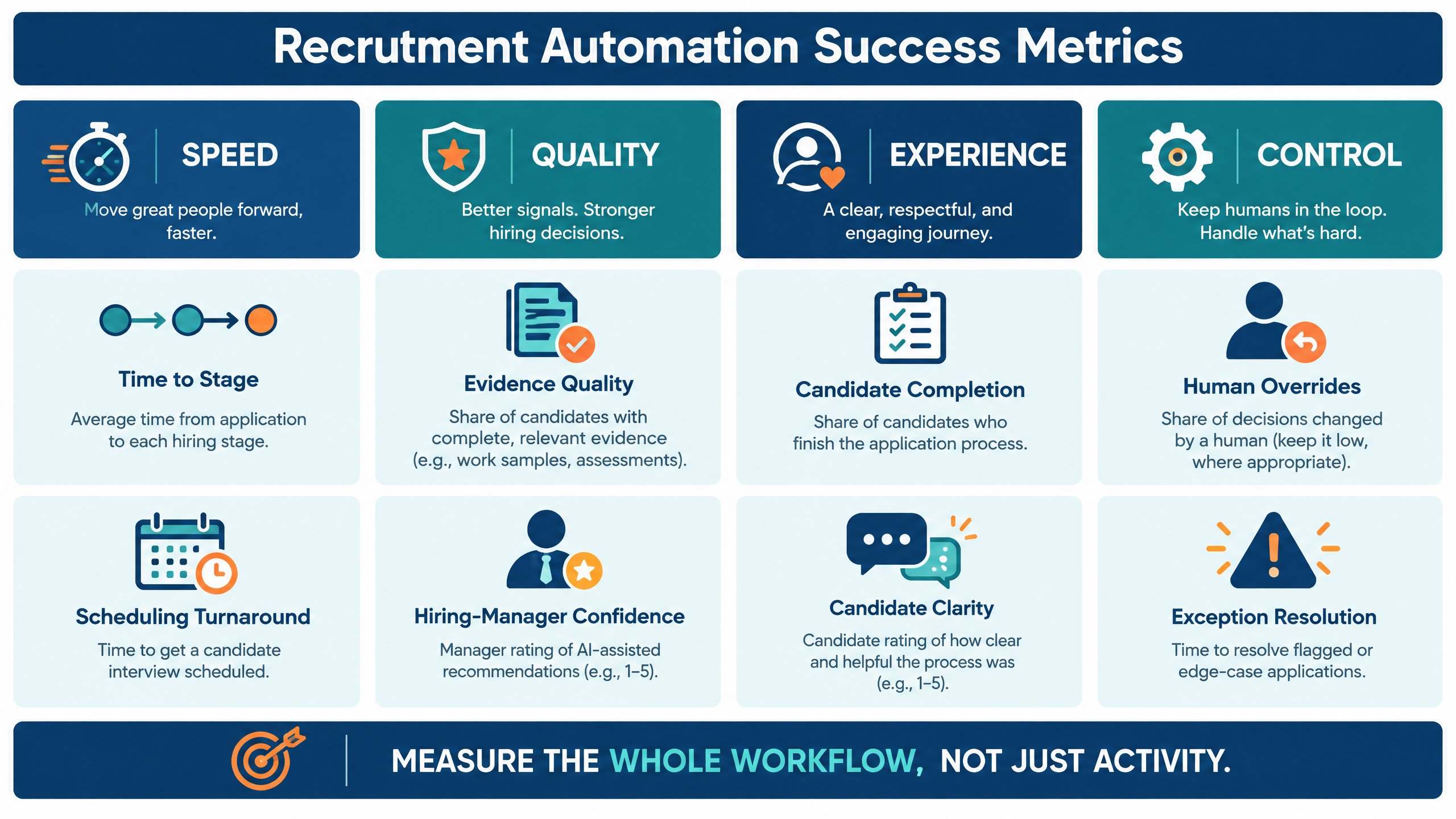
Measure time-to-stage, scheduling turnaround, completion, candidate drop-off, feedback delays, evidence quality, interviewer workload, exception resolution, human overrides, candidate clarity, and downstream hiring quality. Review speed, quality, experience, and control together.
Ask the vendor to demonstrate a real workflow from role setup to candidate intake, qualification, assessment, scheduling, interview, feedback, report, human review, next-step trigger, integration, exception handling, and audit or governance controls.
futuremug’s published AI interview and interview outsourcing pages describe automated scheduling, bulk interview setup, notifications, time-zone support, interviewer dashboards, and structured reporting. Confirm current capabilities and integration fit during a demo using your own hiring workflow.