
The Modern Playbook for Campus Recruitment Platform for a Scalable Placement Season
What is a campus recruitment platform?
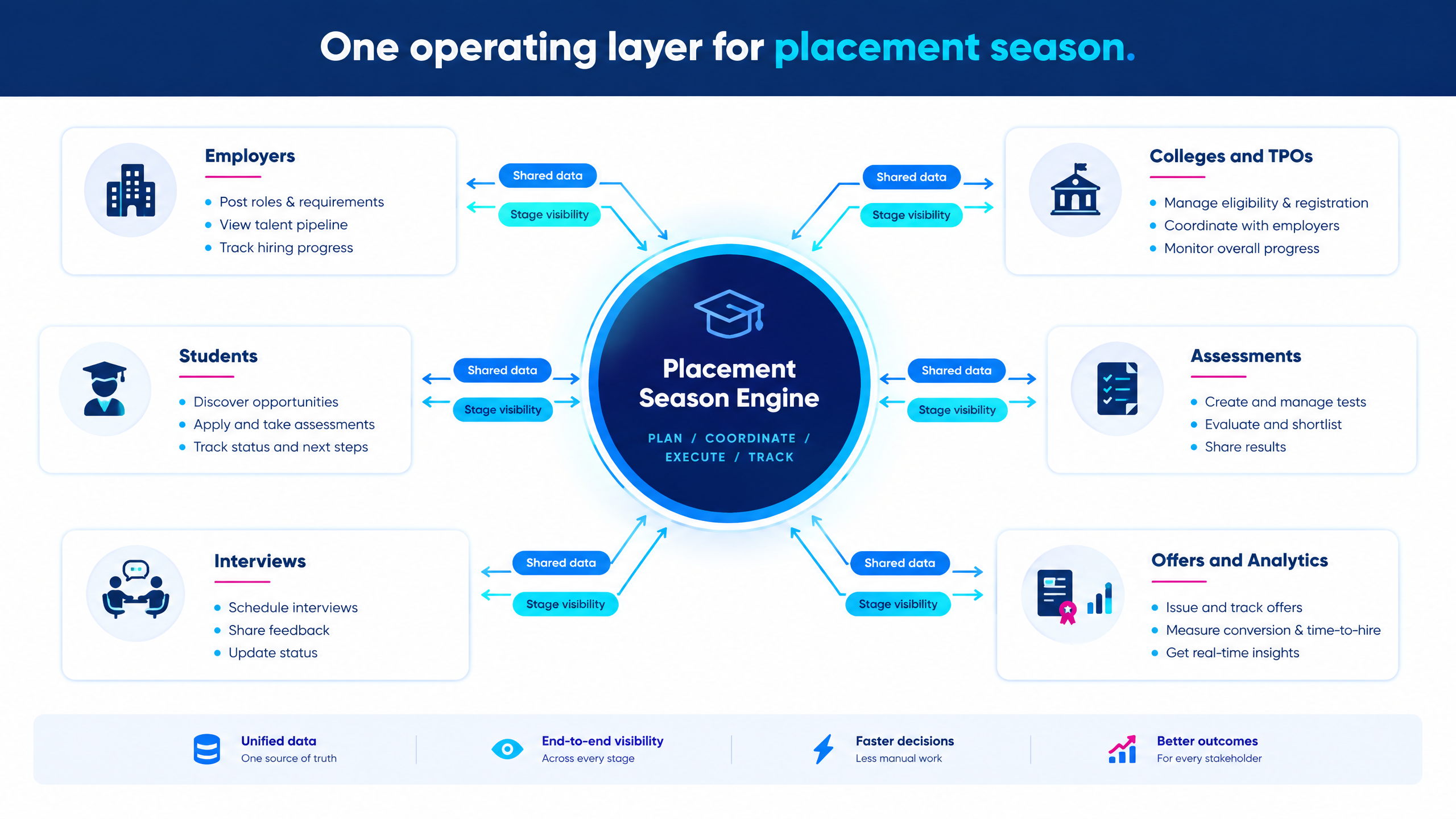
Why placement season needs a connected operating layer
|
Placement-season problem
|
Operational effect
|
Hiring or placement impact
|
|
Fragmented candidate data
|
Teams duplicate records across spreadsheets and forms.
|
Eligibility errors, repeated requests, and weak reporting.
|
|
Manual TPO coordination
|
Recruiters send repeated messages and chase confirmations.
|
Slower drive setup and unclear ownership.
|
|
High assessment volume
|
Teams upload lists, send links, monitor attendance, and consolidate scores manually.
|
Delayed shortlists and higher administration effort.
|
|
Interview scheduling gaps
|
Students, panels, and recruiters coordinate through separate channels.
|
No-shows, rescheduling, and candidate frustration.
|
|
Inconsistent evaluation
|
Interviewers use different questions or scoring standards.
|
Harder comparisons and weaker decision confidence.
|
|
Limited season visibility
|
Leaders cannot see stage-level progress in real time.
|
Late interventions and missed hiring targets.
|
|
Offer and joining delays
|
Selected students wait for updates or documentation.
|
Higher risk of drop-off and competing offers.
|
How the platform works from campaign to offer
|
Stage
|
Employer or placement-team activity
|
Platform outcome
|
|
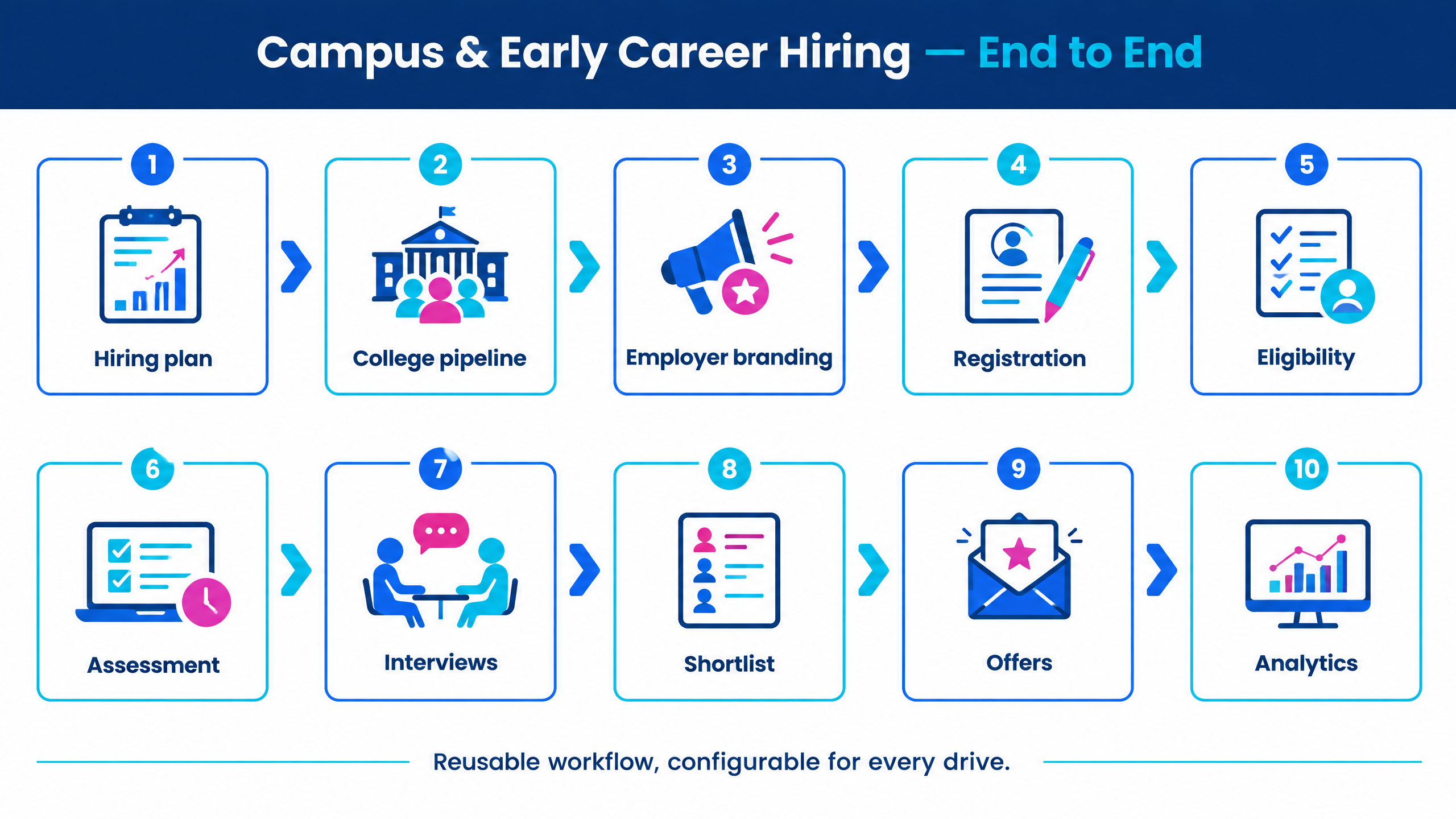
1. Hiring plan
|
Define roles, locations, eligibility, skills, compensation information, targets, and timelines.
|
A structured campaign brief and role configuration.
|
|
2. College pipeline
|
Identify institutions, engage TPOs, confirm participation, and manage drive slots.
|
Centralized college, TPO, and campaign records.
|
|
3. Employer branding
|
Present the company, culture, role, learning opportunities, and selection process.
|
A consistent employer and candidate experience.
|
|
4. Registration
|
Register students, import candidate lists, capture consent, and collect resumes.
|
Searchable candidate profiles with required information.
|
|
5. Eligibility and screening
|
Apply academic, branch, graduation-year, location, and skill rules.
|
Consistent eligibility decisions and shortlists.
|
|
6. Assessments
|
Conduct aptitude, technical, coding, domain, or role-specific evaluations.
|
Scores, reports, integrity signals, and stage status.
|
|
7. Interviews
|
Run group discussions, video interviews, technical rounds, or expert panels.
|
Coordinated slots and structured evaluations.
|
|
8. Shortlisting
|
Review evidence, approve candidates, and communicate next steps.
|
Clear decisions and candidate movement.
|
|
9. Offers and joining
|
Share offers, collect documents, track confirmations, and manage updates.
|
A visible post-selection workflow.
|
|
10. Analytics
|
Compare colleges, roles, stages, conversion, and outcomes.
|
Program-level dashboards for improvement.
|
10 capabilities to evaluate
1. Employer branding and campaign pages
2. College and TPO coordination
3. Candidate registration and data management
4. Eligibility filters and AI-assisted screening
5. Assessments and coding tests
6. Interviews and expert panels
7. Scheduling and candidate communication
8. Reports and decision dashboards
9. Integrations, access, and data governance
10. Support, implementation, and commercial fit
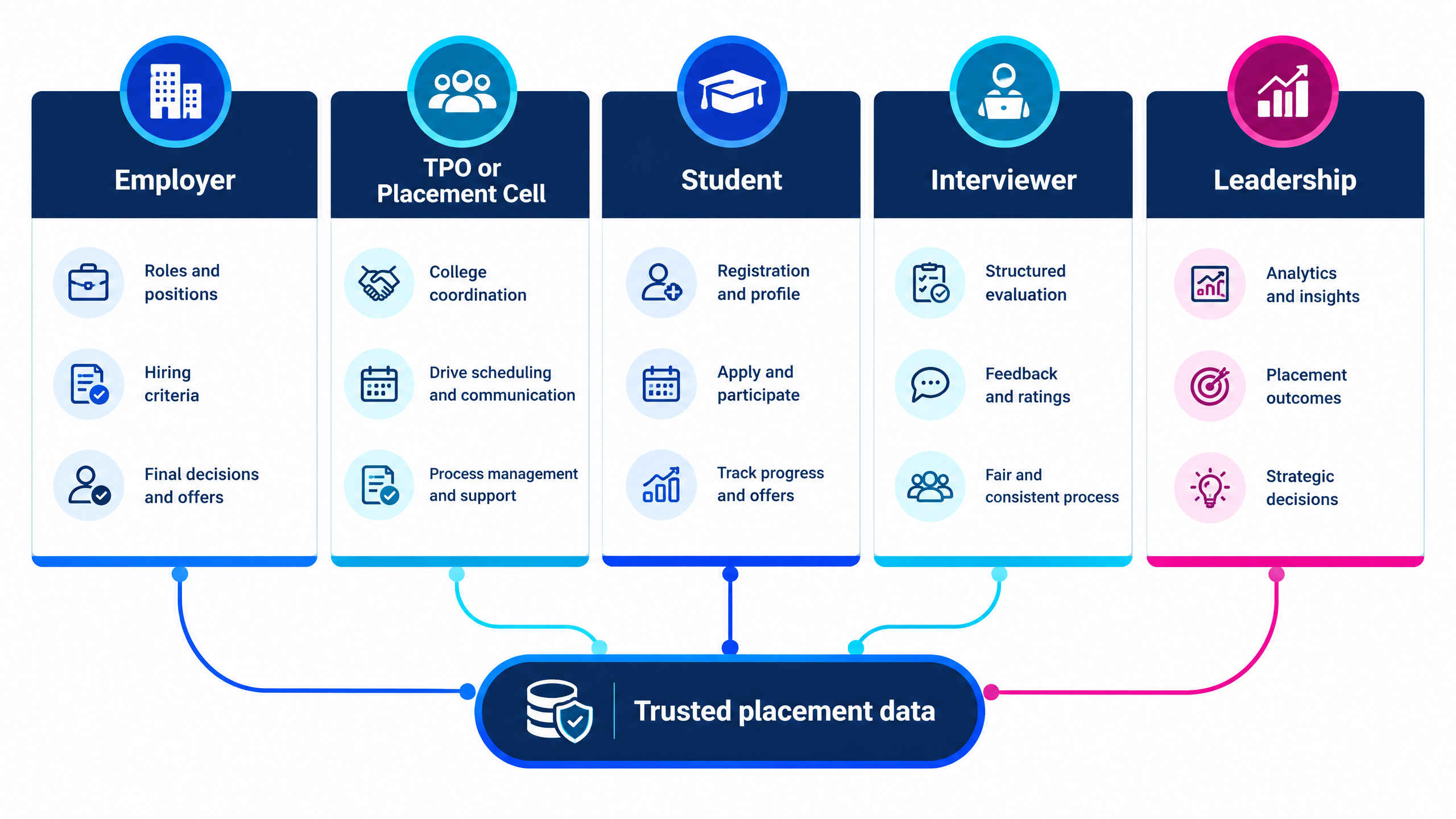
What employers should look for
What colleges and TPOs should look for
Campus recruitment platform versus spreadsheets and general ATS tools
|
Option
|
Strength
|
Limitation for campus recruitment
|
|
Spreadsheets and email
|
Low initial cost and familiar to teams.
|
Fragmented records, manual coordination, weak reporting, and high error risk at scale.
|
|
General ATS
|
Useful for requisitions, applications, and hiring workflow.
|
May not provide deep college, TPO, student, or drive coordination.
|
|
Assessment-only tool
|
Strong for test delivery and scoring.
|
Does not necessarily manage employer branding, colleges, interviews, offers, or joining.
|
|
Placement-management software
|
Useful for student, recruiter, and placement-office administration.
|
May require additional tools for employer-side assessment and interview execution.
|
|
Campus recruitment platform
|
Connects employers, colleges, students, assessments, interviews, communication, and analytics.
|
Requires proper configuration, adoption, governance, and process ownership.
|
|
Managed campus hiring service
|
Adds operational coordination and execution capacity.
|
Requires clear SLAs, data governance, quality controls, and commercial scope.
|
How to evaluate a platform before buying
|
Evaluation area
|
Questions to ask
|
Evidence to request
|
|
Scalability
|
How many candidates, colleges, and concurrent drives can it support?
|
Peak-volume workflow and service-level explanation.
|
|
Student experience
|
Can students use the platform easily on common devices?
|
Candidate journey walkthrough and support process.
|
|
TPO workflow
|
How are college users, lists, approvals, and updates managed?
|
TPO dashboard or role-based workflow demo.
|
|
Assessments
|
Can the system handle aptitude, coding, proctoring, and reports?
|
Sample assessment and score report.
|
|
Interviews
|
Does it support video, technical, group, expert, or AI interviews?
|
Live interview workflow and evaluation form.
|
|
Communication
|
Are reminders, status updates, and exceptions visible?
|
Message templates, logs, and escalation path.
|
|
Analytics
|
Can leaders compare stages, colleges, roles, and outcomes?
|
Sample dashboard and export.
|
|
Implementation
|
How long does setup, migration, training, and configuration take?
|
Implementation plan, owners, and support SLA.
|
|
Governance
|
Who can access, change, export, or delete candidate information?
|
Permission model, retention policy, and audit approach.
|
|
Commercial fit
|
What is included at normal and peak volumes?
|
Transparent proposal with assumptions and exclusions.
|
How to run a scalable placement-season pilot
Define a representative scope
Set a baseline
Configure the campaign
Test the candidate journey
Test exceptions
Compare outcomes with the baseline
Automation and human oversight
Explore futuremug’s campus hiring solution
- Review futuremug’s Campus Placement & Hiring Automation Platform India for assessments, interviews, TPO coordination, employer branding, candidate management, and hiring operations.
- Read A Practical Guide to Campus Hiring Platform for Indian Campus Recruitment Teams for the core platform workflow and feature model.
- Explore Campus Hiring Solutions for high-volume early-talent hiring for college coordination, assessments, interviews, and placement-season execution.
- Review the campus recruitment automation guide for what to automate and what should remain human.
- Use the placement-software evaluation guide to prepare for a trial or product demo.
- Explore the free online assessment platform and interview outsourcing services for connected evaluation workflows.
Request a campus hiring platform demo



Frequently Asked Questions
A campus recruitment platform is software that connects employer, college, TPO, student, assessment, interview, communication, offer, and placement-analytics workflows. It helps teams manage recruitment from campaign setup to hiring and joining outcomes.
Employers, recruiters, TA operations, hiring managers, college placement cells, TPOs, placement coordinators, interviewers, and students may use different parts of the same platform. Role-based access should ensure each stakeholder sees relevant information.
It centralizes campaign data, automates repetitive steps, supports bulk registration and assessment, coordinates interviews, improves status visibility, and provides dashboards for intervention. It helps teams scale a repeatable workflow without relying on disconnected spreadsheets and messages.
Yes. Many platforms connect aptitude, technical, coding, psychometric, group discussion, video, AI, and expert-led interview stages. During evaluation, confirm which stages are supported natively, which require integrations, and which are delivered as managed services.
It can help TPOs manage employer opportunities, eligible student lists, deadlines, drive participation, communications, interview schedules, status updates, and placement records. The exact workflow should be tested with a real college process before purchase.
Placement software often focuses on college operations such as student records, recruiter engagement, placement events, and analytics. A campus recruitment platform may extend further into employer campaigns, assessments, interviews, candidate evaluation, and hiring decisions. Some products combine both capabilities.
Often, yes. The same workflow can support early-talent campaigns, graduate programs, internships, apprenticeships, job fairs, referrals, and off-campus recruitment. Confirm whether the platform supports multiple campaign types and candidate sources.
Ask the provider to demonstrate a real role from campaign setup through registration, eligibility, assessment, interview scheduling, evaluation, shortlisting, offer communication, and analytics. Also ask about peak volume, exceptions, integrations, permissions, support, implementation, and pricing.
Colleges should test student management, recruiter management, candidate dashboards, assessment integration, interview scheduling, placement analytics, mobile usability, security, scalability, training, and support against actual placement workflows. A guided demo is useful for integrations and complex requirements, while a trial helps test everyday usability.
It should not. Automation can handle repetitive, rule-based activity, while humans should oversee exceptions, accommodations, integrity concerns, final decisions, college relationships, offer conversations, and sensitive candidate interactions.