
Online Assessment Platform for Recruitment: A Buyer’s Evaluation Checklist
Online assessment platform for recruitment: the short answer
- Relevant evidence: the assessment measures skills or knowledge related to the role.
- Candidate completion: candidates can understand, access, and finish the experience.
- Operational control: recruiters and hiring managers can manage invitations, status, scoring, and next steps.
- Governance: the organization can control permissions, data, integrity signals, review, and retention.
- Economic value: the platform reduces enough manual work or improves enough decision quality to justify its total cost.
What this buyer checklist adds
- A 10-point product and workflow checklist.
- Questions for recruiters, hiring managers, operations, L&D, IT, privacy, and finance.
- A realistic demo test that follows a candidate from invitation to shortlist.
- A vendor scorecard that separates evidence quality from feature volume.
- Schema-ready FAQ topics for a recruitment assessment platform page.
- A product-context section linking to futuremug’s assessment landing page.
The 10-point online assessment platform for recruitment checklist
1. Role relevance and evidence quality
- Can the assessment map sections to competencies?
- Can internal subject-matter experts review and approve content?
- Can difficulty vary by role level?
- Can the team define cut-offs by job family or stage?
- Can a reviewer inspect the response behind a score?
- Can the platform distinguish knowledge, applied skill, and work-sample evidence?
2. Assessment content and question management
- Question formats.
- Domain coverage.
- Difficulty labeling.
- Skill tagging
- Version control.
- Question approval.
- Duplicate detection.
- Leakage or exposure controls.
- Randomization.
- Assessment variation.
- Proprietary-question upload.
- AI-generated-question review.
- Expiry and refresh process.
3. Candidate experience and accessibility
- Invitation and registration.
- Device and browser requirements.
- Instructions and examples.
- Practice or preview questions.
- Timer and navigation.
- Autosave and session recovery.
- Mobile or responsive behavior.
- Submission confirmation.
- Candidate support.
- Status and next-step communication.
4. Integrity and proportional proctoring
- What does each control detect?
- What does it not detect?
- How are false positives reviewed?
- Can an authorized human inspect the underlying signal?
- Are candidates informed about monitoring before the test?
- Can candidates report a technical issue or request support?
- Are integrity events stored with the candidate record?
- Can the buyer configure different controls by assessment?
5. Scoring, AI evaluation, and human review
- Section-level scores.
- Skill-level scores.
- Custom cut-offs.
- Negative marking where appropriate.
- Partial credit.
- Manual review.
- AI-assisted evaluation.
- Evaluator notes.
- Reviewer overrides.
- Confidence or exception signals.
- Candidate comparisons.
- Report exports.
- A clearly strong response.
- A clearly weak response.
- A borderline or unusual response.
6. Recruitment workflow and integrations
- Candidate import.
- Bulk invitations.
- Custom invitation messages.
- Reminders.
- Open or shareable links.
- Applicant tracking system integration.
- HRIS or CRM integration.
- API or webhook triggers.
- Calendar connection.
- Candidate status synchronization.
- Shortlist export.
- Duplicate handling.
- Consent and data mapping.
7. Operations, permissions, and reporting
- Who can create or edit assessments?
- Who can change questions after approval?
- Who can invite candidates?
- Who can see scores and answers?
- Who can export reports?
- Who can manage user roles?
- Is there an audit history for important changes?
- Can different business units use separate workspaces?
- Can reports be customized by audience?
- Can hiring managers see evidence without receiving unnecessary personal data?
8. L&D and internal mobility use cases
- Pre-training diagnostics.
- Post-training assessments.
- Skill-gap reports.
- Internal candidate cohorts.
- Certification or recertification.
- Learning-path triggers.
- Repeat assessments.
- Individual feedback.
- Manager visibility.
- Separate data access for employees and applicants.
9. Governance, privacy, and auditability
- Data location and processing.
- Retention and deletion.
- Access permissions.
- Audit logs.
- Export and portability.
- Encryption and secure transport.
- Subprocessors.
- Incident response.
- Backup and recovery.
- Candidate notices and consent.
- Data separation between customers.
- AI evaluation data use.
- Human-review and override records.
10. Commercial model and total cost
- Users or seats.
- Assessments created.
- Candidate attempts.
- Credits.
- Assessment volume.
- Managed-service fees.
- Premium modules.
- Integrations.
- Implementation or configuration.
- Support tier.
- White-label or deployment requirements.
- Content creation.
- Question review.
- Candidate support.
- Report interpretation.
- Manual scoring.
- Data export.
- Integration maintenance.
- User administration.
- Governance review.
How to run a realistic vendor evaluation
Stage 1: Define the decision
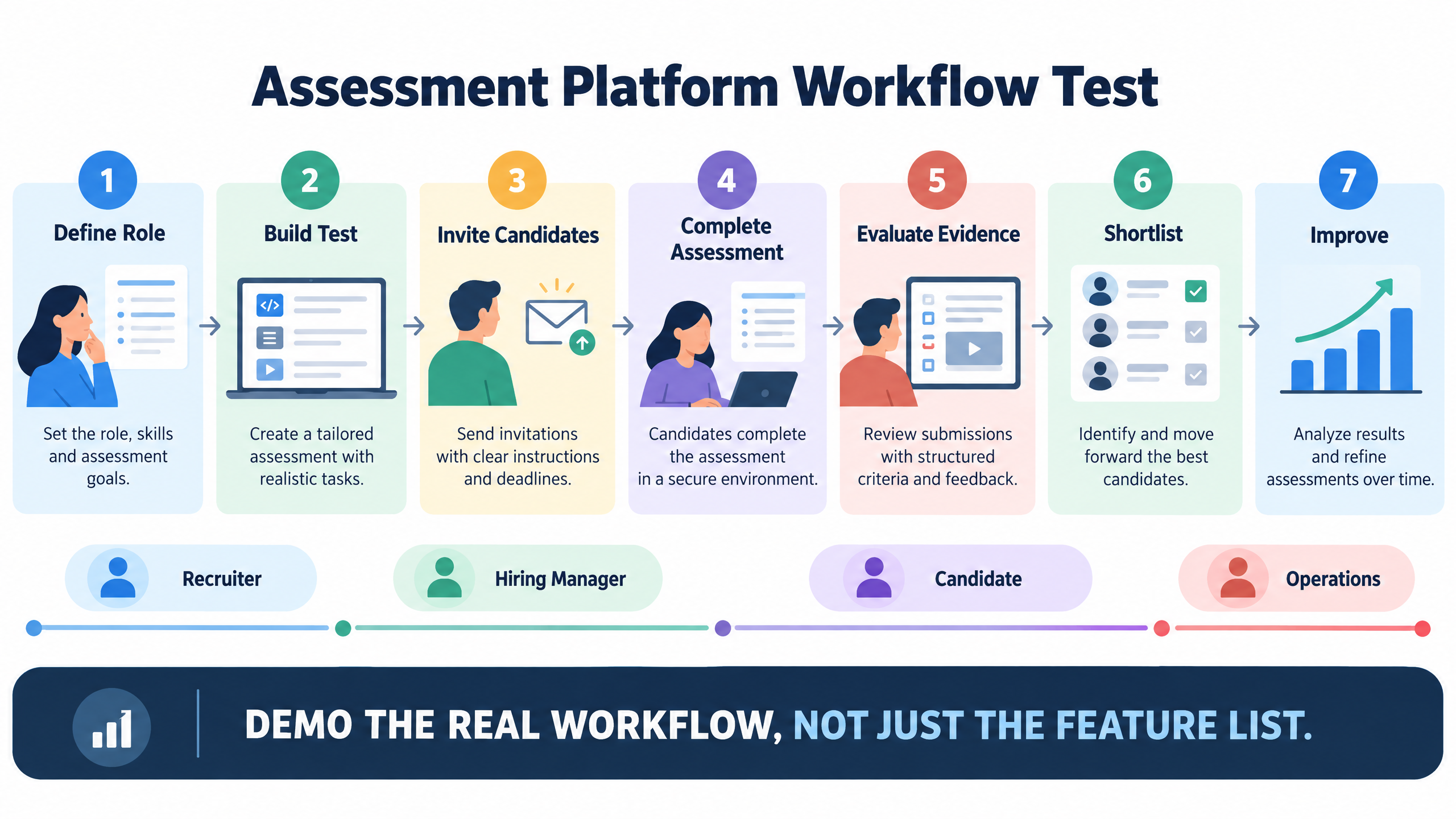
Stage 2: Build the evaluation script
- Create or import the role requirement.
- Map competencies.
- Select or create questions.
- Configure time and integrity rules.
- Invite a test candidate.
- Complete the assessment.
- Trigger a technical exception.
- Review scoring.
- Inspect AI or automated evaluation.
- Apply a human override.
- Export or share a report.
- Shortlist or assign the next step.
Stage 3: Test the candidate experience
Stage 4: Test the exception path
- Candidate loses connectivity.
- Candidate refreshes the browser.
- Candidate submits late.
- Candidate receives an integrity flag.
- Reviewer disagrees with an automated score.
- Hiring manager needs a report without unnecessary personal data.
- An assessment version needs to be retired.
Stage 5: Review implementation effort
Stage 6: Score the evidence
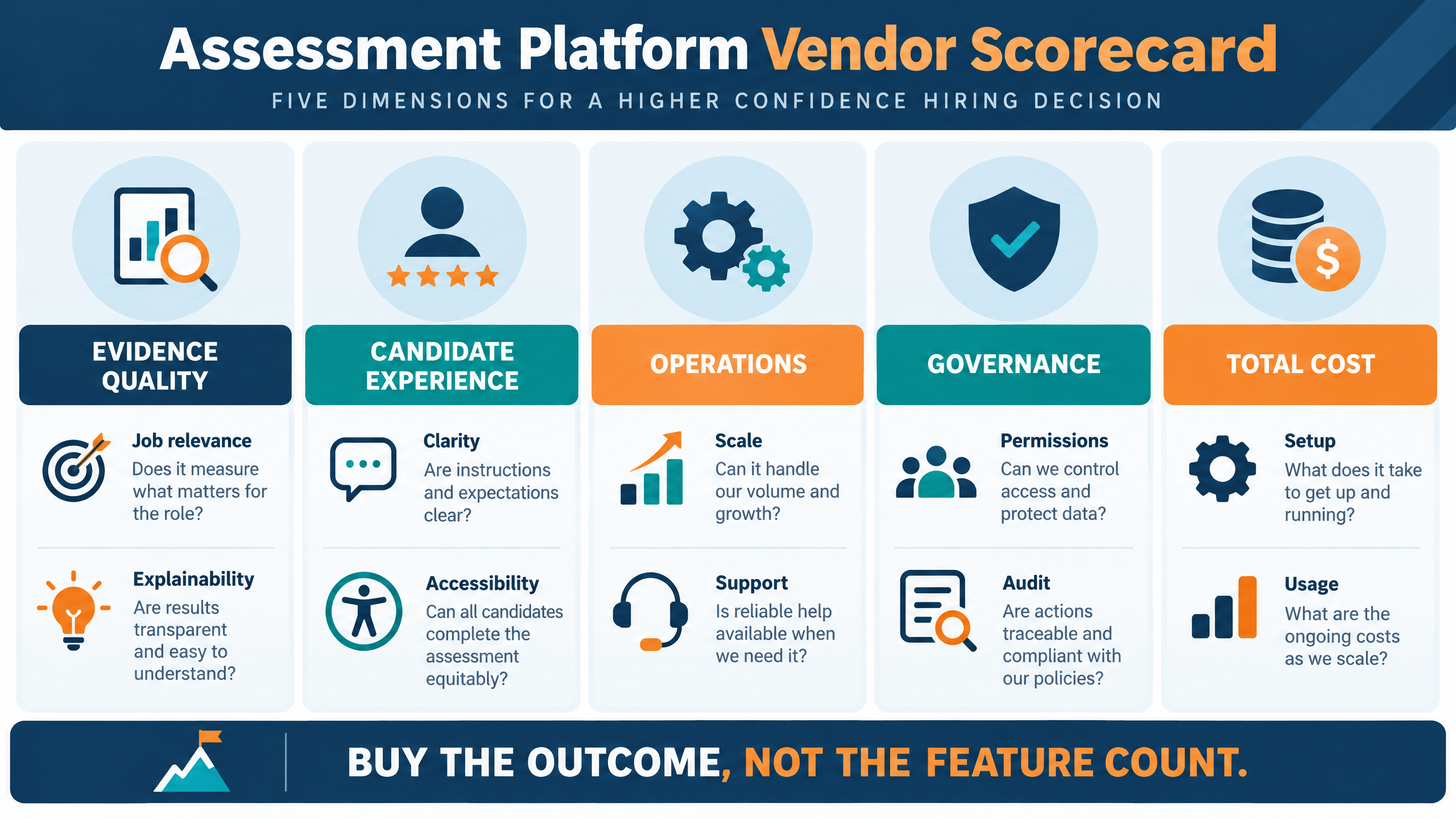
Online assessment platform vendor scorecard
|
Evaluation dimension
|
Suggested questions
|
Evidence to request
|
|
Evidence quality
|
Does the platform measure the required role skill?
|
Role-based assessment, rubric, sample report.
|
|
Content management
|
Can experts approve, version, reuse, and retire content?
|
Question workflow and change history.
|
|
Candidate experience
|
Can candidates understand and complete the test reliably?
|
Candidate test, support process, recovery demonstration.
|
|
Accessibility
|
Can candidates use the workflow with supported accessibility needs?
|
Accessibility review, keyboard test, accommodation process.
|
|
Integrity
|
Are monitoring controls proportionate and reviewable?
|
Flag example, human-review path, candidate notice.
|
|
Scoring
|
Are automated, AI-assisted, and human evaluations distinguishable?
|
Strong, weak, and borderline response review.
|
|
Workflow
|
Does the platform connect invitation, completion, result, and next step?
|
End-to-end scenario demonstration.
|
|
Operations
|
Can teams manage users, campaigns, permissions, and reports?
|
Admin console and role matrix.
|
|
Governance
|
Can the organization control data, access, retention, and audit?
|
Security, privacy, retention, and audit documentation.
|
|
Commercials
|
Is total cost clear across volume and implementation scenarios?
|
Proposal with assumptions and exclusions.
|
How futuremug fits the checklist
- One current recruitment role.
- One high-volume or campus scenario if relevant.
- One L&D or internal-mobility scenario if relevant.
- Candidate completion and recovery.
- Automated and human review.
- Reports and shortlisting.
- Permissions and governance.
- Integration and implementation effort.
- Current pricing and usage limits.



Frequently Asked Questions
It is software that helps employers create, deliver, monitor, evaluate, and report candidate assessments through a digital workflow. A recruitment-focused platform should connect job requirements, assessment content, candidate delivery, scoring, review, reporting, and the next hiring decision.
Evaluate role relevance, question quality, coding or practical-task support, candidate experience, accessibility, integrity controls, scoring, human review, integrations, permissions, reporting, governance, support, implementation effort, and total cost.
A basic quiz tool may deliver questions and collect answers. A recruitment assessment platform usually adds candidate management, role-based assessment design, scoring, proctoring or integrity controls, reporting, permissions, workflows, and decision support. Verify the actual capabilities rather than relying on category labels.
It should if the hiring roles require coding or technical problem-solving. Evaluate language support, compiler or execution environment, test cases, partial scoring, code evidence, plagiarism or similarity controls, and reviewer workflow. Do not require coding support for roles that do not need it.
AI-assisted evaluation can reduce repetitive work, but it is not a substitute for role relevance, scoring design, or human accountability. Ask how the result is produced, calibrated, reviewed, overridden, and recorded. Use human review for ambiguous or high-consequence decisions.
Proctoring should be proportionate to the assessment risk and the decision that follows. Ask what signals are collected, how candidates are informed, how false positives are reviewed, and whether a human can inspect the underlying evidence.
Use internal testers and a realistic assessment. Check invitation clarity, registration, instructions, device support, timer behavior, navigation, connectivity recovery, submission confirmation, accessibility, support, and next-step communication.
Some platforms can support both, but the workflows and reports may differ. Recruitment needs progression and hiring evidence. L&D may need diagnostics, feedback, development paths, certification, and repeat assessment. Test each use case separately.
Compare total cost across the expected candidate volume, usage basis, user access, implementation, support, integrations, content work, candidate support, manual review, and reporting. Ask for low, expected, and peak-volume scenarios.
The demo should start with a role or learning objective and finish with a candidate result, human review, report, shortlist or development action, and audit trail. It should also show an exception such as a lost connection, an integrity flag, or a score override.
futuremug’s product page presents a free entry path and a freemium plan. Current limits, validity, formats, credits, and enterprise features should be verified on the live product page or through a current sales conversation.