A Complete Guide to Campus Recruitment Automation to Improve Shortlisting Quality

What is campus recruitment automation?
Campus recruitment automation is the use of software, workflow rules, assessments, interview tools, communication, and reporting to coordinate high-volume graduate hiring from candidate registration through shortlisting, interviews, offers, and placement tracking.
A campus recruitment automation platform can help employers and college placement teams manage eligibility rules, candidate data, assessments, coding tests, interview scheduling, status updates, document collection, recruiter review, TPO coordination, and candidate communication in one connected workflow.
The purpose is not to remove people from campus hiring. Employers still define the role requirements and hiring bar. TPOs and placement teams still support students and coordinate drives. Recruiters and hiring managers still review evidence and make decisions. Automation organizes repeatable work so that people can focus on judgment, communication, and candidate support.
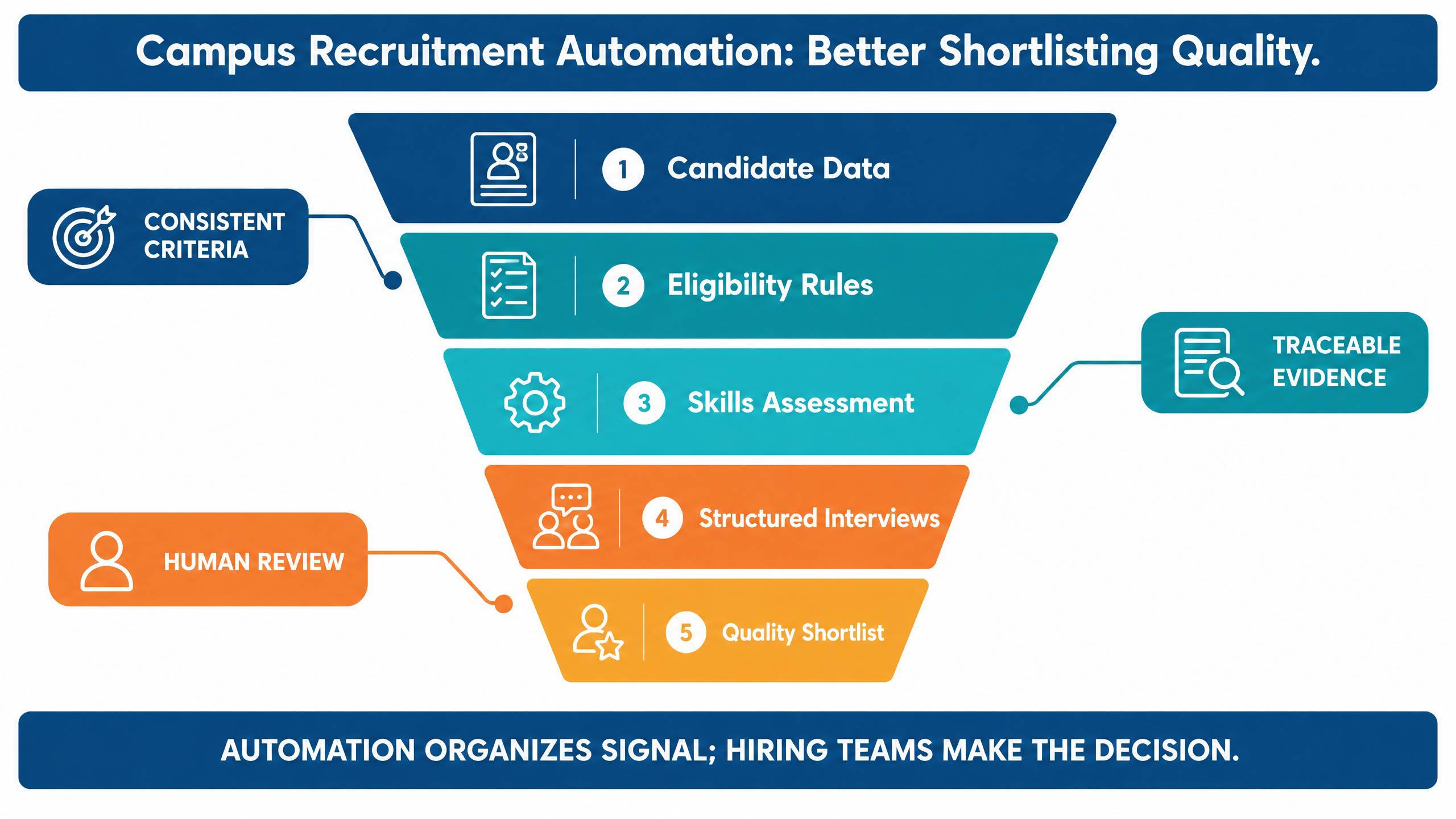
A useful campus recruitment automation system connects five layers:
1.Candidate data: registration, resumes, academic information, skills, eligibility, and preferences.
2.Evaluation: aptitude, domain, coding, communication, behavioral, and role-based assessments.
3.Coordination: drive schedules, invitations, reminders, time zones, interview slots, and status updates.
4.Decision support: scorecards, evidence, shortlists, reports, and recruiter review.
5.Governance: permissions, auditability, privacy, accessibility, escalation, and human oversight.
When these layers are disconnected, shortlisting can become a spreadsheet exercise. When they work together, campus teams can make faster decisions with clearer evidence.
For a broader platform overview, explore futuremug’s .
Campus recruitment automation funnel showing candidate data, eligibility rules, skills assessments, structured interviews, and a quality shortlist

Why shortlisting quality matters in campus hiring

Campus hiring creates a distinctive shortlisting problem. A single drive may involve many colleges, large candidate cohorts, different academic backgrounds, varied resumes, eligibility rules, assessments, interviews, and strict placement timelines.
A shortlist that is too broad overloads recruiters and interviewers. A shortlist that is too narrow may exclude capable candidates because of inconsistent rules, incomplete data, weak resume matching, or an assessment that measures the wrong skills.
Shortlisting quality means that the candidates who progress are relevant to the role, evaluated against clear criteria, and supported by enough evidence for the next decision. It does not mean predicting a candidate’s entire career from one score.
Shortlisting problem
What it can cause
Better automation objective
Inconsistent eligibility checks
Eligible candidates are missed or ineligible candidates progress.
Apply visible, configurable rules with an exception path.
Resume-only filtering
Potential is overlooked because resumes use different formats or language.
Combine resume signals with role-relevant assessments.
Generic assessments
Scores do not reflect the actual role.
Use custom, skill-based evaluation aligned to the job.
Disconnected data
Recruiters cannot see the full candidate picture.
Connect registration, assessment, interview, and status data.
Manual spreadsheet updates
Duplicate work, stale status, and avoidable errors.
Use a shared source of truth with permissions and history.
Unclear communication
Student confusion, missed slots, and lower completion.
Send timely instructions, reminders, and next-step updates.
No evidence trail
Hiring decisions are difficult to explain or review.
Preserve criteria, scores, notes, reports, and reviewer actions.
Quality should therefore be measured across the full campus hiring journey. A platform that filters candidates quickly but creates poor candidate experience or weak evidence is not solving the complete problem.

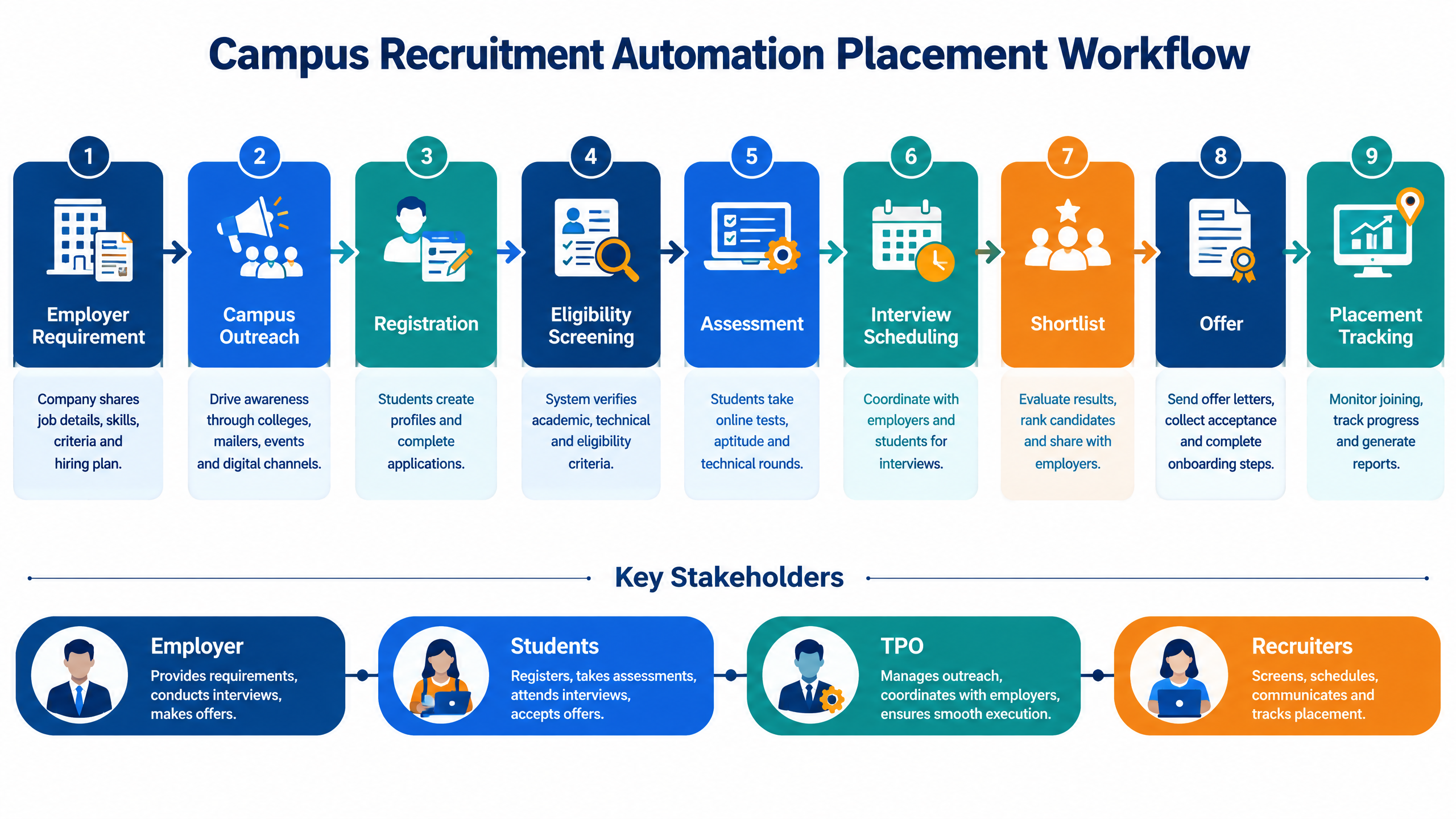
What a campus recruitment automation workflow includes

A complete workflow should support both the employer’s hiring process and the college’s placement process. It should make responsibilities visible without forcing every stakeholder into the same view.

Employer requirement and campaign setup

The employer defines the job family, role level, location, compensation range where applicable, graduation criteria, eligible disciplines, required skills, preferred skills, hiring volume, assessment stages, interview stages, and timeline.
The platform should turn this information into a campaign configuration rather than leaving the requirements in email threads. A clear configuration reduces ambiguity before candidate registration begins.

College and TPO coordination

The employer or hiring partner works with colleges and Training and Placement Officers, commonly called TPOs, to confirm drive dates, student eligibility, communication responsibilities, venue or remote requirements, and escalation contacts.
TPOs need visibility into relevant student actions and deadlines. They should not need access to sensitive recruiter notes or internal hiring decisions that are outside their responsibility.

Candidate registration and data capture

Students register through a defined flow and provide the information required for eligibility and evaluation. The platform can collect resumes, academic details, skills, preferred locations, consent, contact information, and relevant documents.
Data capture should be proportionate. Collecting more information does not automatically improve shortlisting. Each field should have a clear purpose and a defined owner.

Eligibility screening

Eligibility rules may include graduation year, degree, discipline, academic thresholds, backlog criteria, location, work authorization, notice period, or other role-specific requirements. The rules should be visible to the relevant stakeholders and should include a route for exception review.

Skill assessment

Assessments can measure aptitude, domain knowledge, coding, communication, problem-solving, or job-specific skills. The assessment should reflect the role and the stage of the process. A short first screen and a deeper technical evaluation do not need to measure the same competencies.

Shortlisting and review

The platform combines configured eligibility, assessment results, resume or job-description matching, and other approved signals. Recruiters review the recommended shortlist and investigate edge cases before advancing candidates.
Automation should support a decision, not hide the basis for one. A recruiter should be able to understand why a candidate was included, excluded, or flagged for review.

Interview scheduling and coordination

Candidates who progress receive interview invitations, instructions, reminders, and joining details. The system manages available slots, interviewer calendars, rescheduling, and status changes.
For high-volume drives, scheduling is often one of the largest sources of manual effort. Automation can reduce repetitive coordination while preserving a human support path for students who encounter unusual circumstances.

Reports, offers, and placement tracking
Recruiters and placement teams need clear reports on progress, assessment completion, interview outcomes, offers, acceptances, and joining status. A shared workflow can reduce duplicate updates and create a more reliable record of the campaign.
Campus recruitment automation placement workflow connecting employer requirements, campus outreach, registration, screening, assessment, interviews, shortlisting, and placement tracking

10 ways automation improves shortlisting quality

1. It converts role requirements into visible criteria

Shortlisting quality begins before the first student registers. The employer should define the competencies and eligibility conditions that matter for the role.
A configurable platform makes these criteria explicit. Recruiters can review the configuration, TPOs can communicate relevant requirements, and students can decide whether the opportunity fits before investing time in the process.

2. It separates eligibility from capability

Eligibility and capability are related but not identical. A candidate may meet academic and graduation rules but still need to demonstrate coding, communication, domain knowledge, or problem-solving. Another candidate may have a nontraditional academic profile but show strong role-relevant capability.
Automation can keep these signals separate in the workflow. This allows the employer to apply mandatory conditions while using assessments and human review to understand capability.

3. It reduces inconsistent manual filtering

Manual spreadsheets and repeated copy-paste can produce different interpretations of the same rule. They can also make it difficult to know which version of the candidate data was used.
A platform can apply configured rules consistently and record when an authorized reviewer changes or overrides a result. This improves repeatability without assuming that every edge case should be resolved automatically.

4. It adds role-relevant skills evidence

A resume can show education, projects, internships, and keywords, but it may not show how a student solves a problem or communicates technical reasoning. A role-based assessment adds another evidence layer.
Use assessments that match the role and stage. For a software role, that may include coding or debugging. For a customer-facing role, it may include communication and scenario judgment. For an analyst role, it may include data interpretation and structured reasoning.

5. It supports resume-to-job matching without making it the final decision

Resume-to-job matching can help identify relevant experience and skills across large candidate cohorts. It is most useful when treated as a screening signal that supports recruiter review.
Recruiters should be able to inspect the match rationale and check for missing context. Keyword absence should not automatically mean skill absence, especially when students describe projects and learning experiences in different ways.

6. It creates a consistent assessment experience

Students should receive comparable instructions, time limits, evaluation criteria, and support information. Consistency helps the employer compare results and helps candidates understand what is expected.
The platform should also accommodate approved accessibility needs, technical issues, and exceptional circumstances. A standardized process is not fair if it cannot support the people expected to use it.

7. It connects assessment results to interview planning

A quality workflow does not stop at a score. It carries relevant evidence into the next stage so that interviewers can validate strengths, investigate gaps, and avoid repeating assessments unnecessarily.
Interviewers should receive the context they need without being biased by irrelevant or premature conclusions. Define which information is shared, when it is shared, and how interviewers record new evidence.

8. It makes shortlist decisions traceable

A recruiter or hiring manager should be able to answer: What criteria did this candidate meet? Which assessment or interview evidence supported progression? Who reviewed the result? Was an exception applied? What happens next?
Traceability is valuable for quality review, stakeholder communication, candidate support, and process improvement. It also helps teams identify whether a rule is excluding too many potentially qualified candidates.

9. It improves TPO and student communication

Candidates are more likely to complete a process when they understand the deadline, duration, technology requirements, next step, and support route. TPOs can coordinate more effectively when they have accurate campaign status instead of relying on multiple spreadsheets and message groups.
Automated email, SMS, WhatsApp, or portal notifications can support communication where appropriate. The message should be clear, timely, and consistent with the employer’s brand.

10. It provides feedback for continuous improvement

After a drive, review progression rates, assessment completion, interview conversion, offer acceptance, candidate feedback, college participation, and early joining or retention signals where available.
The goal is not to optimize a single filter. It is to learn whether the process identified relevant candidates, communicated clearly, used stakeholder time well, and supported better hiring decisions.

Campus recruitment automation for employers and TPOs

The same platform can support different responsibilities without giving every stakeholder the same permissions.

Employer workflow

Employers need to define the role, configure the hiring stages, review candidate evidence, schedule interviews, compare shortlists, manage hiring-manager approvals, and track offers. They may also need employer-brand content, campaign analytics, and integrations with existing recruiting systems.
The employer should own the hiring bar and final decision. Automation can recommend or organize candidates, but the employer remains accountable for the process and outcome.

TPO workflow

TPOs and placement teams coordinate students, communicate eligibility and deadlines, confirm drive logistics, answer questions, support attendance, and share relevant updates with the college.
TPO visibility should focus on student progress, completion, schedules, notices, and support requirements. Sensitive interviewer notes, internal calibration discussions, and confidential hiring decisions should be restricted.

Student workflow

Students need a clear registration process, transparent eligibility information, assessment instructions, interview details, status updates, and a support route. They should understand how their information is used and what happens after each stage.
A good student experience is part of the employer’s campus reputation. Confusing communication can reduce participation and create friction for both the employer and the college.

Shared platform layer

The shared layer should connect candidate records, campaign rules, assessment outcomes, interview schedules, communications, reports, and placement status. Access controls should ensure that each stakeholder sees the information needed for their responsibility.

How to evaluate a campus recruitment automation platform

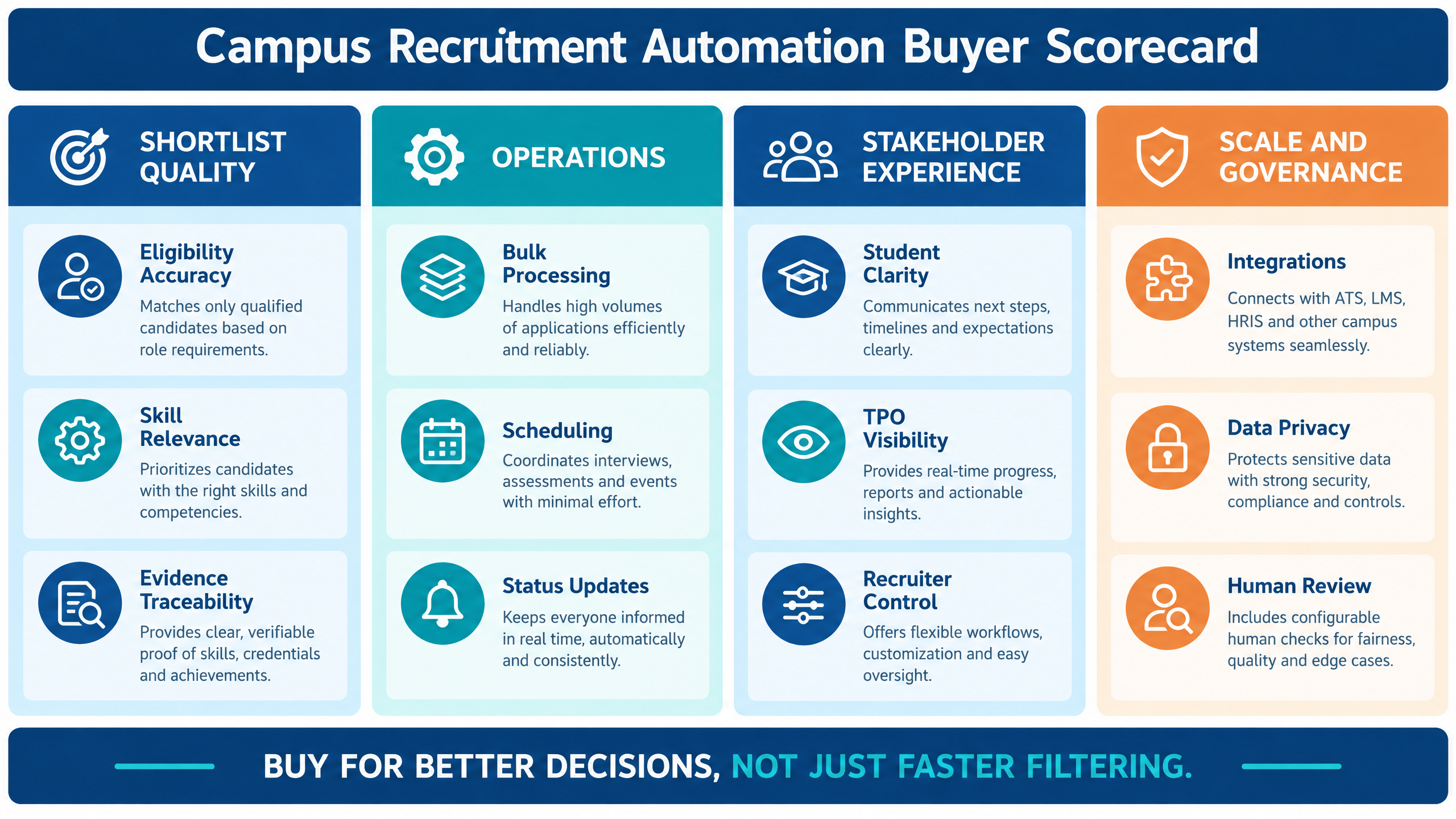
A buyer should evaluate the operating model, not only the dashboard. Ask how the platform handles normal flow, exceptions, volume, support, integrations, privacy, and human review.

Shortlisting quality

Check whether the platform supports configurable eligibility, role-based assessments, resume-to-job matching, evidence-linked recommendations, exception review, and clear recruiter override. Ask to see how a candidate moves from registration to shortlist.

Bulk processing and scale

Campus drives may include thousands of candidates, multiple colleges, parallel assessments, and compressed timelines. Review the platform’s handling of registration peaks, assessment concurrency, interview scheduling, reporting, and status updates.

Assessment and interview coverage

Confirm whether the platform supports aptitude, coding, domain, communication, behavioral, group discussion, one-way video, live interviews, expert panels, or AI interviews where relevant to your program.

TPO and stakeholder visibility

Ask what TPOs can see, what recruiters can control, how colleges are onboarded, how notices are distributed, and how student support issues are escalated. Permission design is as important as feature count.

Candidate communication

Review invitations, reminders, notifications, rescheduling, consent, accessibility, technical support, and post-stage updates. Ask whether communication can be customized by employer, college, drive, and stage.

Evidence and reporting

Reports should show the source of a recommendation and support review by recruiters and hiring managers. Look for assessment scores, skill summaries, interview notes, transcripts where applicable, status history, and campaign-level analytics.

Data privacy and governance

Review consent, retention, access, data export, deletion requests, audit history, recording and transcript handling, vendor access, incident response, and AI oversight. The can support governance conversations where AI-assisted screening or interviewing is involved .

Integration and implementation

Ask whether the platform integrates with the ATS, calendar, communication tools, assessment systems, identity providers, and reporting workflows already used by the organization. Also ask how data is migrated, how users are trained, and who supports the first campus drive.

Commercial flexibility

Understand pricing by candidate, assessment, interview, batch, college, drive, project, or annual program. Ask about peak-season support, minimum commitments, pilot scope, reattempts, rescheduling, report access, and the ability to pause between placement seasons.
Campus recruitment automation buyer scorecard covering shortlist quality, operations, stakeholder experience, scale, governance, and human review

How to implement automation without losing human oversight

Automation should reduce repetitive work while preserving human judgment where context, fairness, and candidate support matter.

Define decision ownership

Write down who owns eligibility rules, exception approval, assessment design, shortlist review, interview decisions, offer approval, student support, and data access. Ambiguous ownership creates delays and makes it difficult to correct errors.

Make the criteria visible

Candidates and TPOs need an understandable explanation of eligibility and process stages. Recruiters and hiring managers need the detailed rubric and evidence requirements. Visibility should be appropriate to the audience, but the process should not be a black box.

Create an exception path

Not every candidate record is complete or typical. Build a route for document issues, accessibility needs, technical interruptions, unusual academic paths, duplicate records, and disputed eligibility. Human review should be deliberate rather than an informal workaround.

Use automation for repeatable tasks

Scheduling, reminders, status updates, duplicate checks, document collection, report consolidation, and rule-based eligibility checks are often suitable for automation. They are repeatable and can be monitored.

Keep judgment-heavy decisions reviewable

Assessment interpretation, borderline shortlists, accommodation requests, integrity concerns, and final hiring decisions may require human review. The platform should show the evidence and the basis for any recommendation.

Audit outcomes after the drive

Compare the configured criteria with actual progression, interview feedback, offer acceptance, joining, and early performance where available. If a rule removes too many candidates from a particular group or produces weak downstream outcomes, review the rule and the evidence.

Pilot before scaling

Start with one employer, role family, college group, or hiring cohort. Define success metrics such as shortlist relevance, assessment completion, candidate experience, TPO effort, scheduling turnaround, report quality, and recruiter confidence.
Scale only after the workflow handles edge cases as well as the normal path.

How futuremug supports campus hiring workflows

futuremug’s published campus hiring positioning describes an AI and human-powered workflow covering employer branding, college and TPO engagement, candidate management, assessments, interviews, coordination, and candidate insights. The workflow includes resume pre-screening, MCQ and coding tests, group discussions, one-way video interviews, expert verification, and support.
Explore the to review the campus-specific operating model, employer and college workflows, and demo path.
futuremug also describes , assessment outsourcing, expert-led interviews, automated scheduling, candidate dashboards, structured feedback, and reporting. These capabilities can support employers that need to process a large candidate cohort while giving recruiters more decision-ready evidence.
The is relevant when the hiring team needs support with assessment setup, delivery, monitoring, scoring, and candidate coordination. The is relevant when internal panels need additional capacity for technical, functional, behavioral, or volume interviews.
A live evaluation should verify current assessment types, interview coverage, data handling, integrations, TPO permissions, support processes, service levels, pricing, and how human reviewers can inspect or override automated recommendations.

Request a campus hiring platform demo

If campus hiring teams are spending too much time on spreadsheets, manual shortlisting, repeated messages, assessment coordination, interview scheduling, or status updates, campus recruitment automation can provide a more connected operating model.
Bring one upcoming drive, the role requirements, eligible student criteria, expected candidate volume, college and TPO structure, assessment stages, interview plan, reporting needs, and privacy requirements to the discussion.
to review campus hiring workflows, candidate shortlisting, assessments, interviews, TPO coordination, automation, reporting, and a practical implementation plan.

Frequently Asked Questions

What is campus recruitment automation?

Campus recruitment automation uses software and workflow rules to coordinate graduate hiring from registration and eligibility screening through assessments, interviews, shortlisting, offers, and placement tracking. It supports employers, recruiters, students, TPOs, and placement teams with role-appropriate visibility.

How does campus recruitment automation improve shortlisting quality?

It can apply consistent eligibility rules, combine resumes with role-based assessments, connect evidence across stages, flag exceptions for human review, and create a traceable record of shortlist decisions. It improves quality when the criteria are relevant and the hiring team reviews important edge cases.

Can automation replace TPOs or college placement teams?

No. Automation can reduce repetitive coordination, but TPOs and placement teams remain important for student communication, drive logistics, support, and escalation. A good platform gives TPOs better visibility without removing the human relationship.

Can employers use campus recruitment automation for off-campus hiring?

Many campus hiring platforms also support off-campus, graduate, fresher, walk-in, and volume hiring workflows. Confirm the provider’s campaign, sourcing, assessment, interview, and communication capabilities for the specific program.

Which assessments are useful for campus hiring?

The right assessment depends on the role. Options may include aptitude, coding, domain knowledge, communication, behavioral, problem-solving, data interpretation, or job simulations. The assessment should measure a capability that matters at the next stage.

How should employers handle borderline candidates?

Borderline candidates should be routed to a defined exception or human-review process. Recruiters and hiring managers can examine the evidence, check whether the assessment reflects the role, and decide whether a second assessment or interview is appropriate.

What should TPOs see in a campus recruitment platform?

TPOs commonly need student registration status, eligibility communication, deadlines, assessment completion, interview schedules, attendance, notices, and support escalation. They should not automatically see confidential recruiter notes or internal hiring decisions.

How can a campus hiring team measure automation success?

Measure shortlist relevance, assessment completion, interview conversion, candidate experience, scheduling turnaround, TPO coordination effort, recruiter review time, offer acceptance, joining, data quality, and exception resolution. Review downstream outcomes instead of optimizing only the number of candidates filtered.

Is human oversight necessary in AI-assisted shortlisting?

Yes. Human oversight is important for exceptions, accessibility, ambiguous data, borderline results, integrity concerns, candidate questions, and final hiring decisions. AI-assisted recommendations should be explainable enough for an authorized reviewer to inspect and challenge them.

What should be included in a campus recruitment automation demo?

Ask the provider to demonstrate campaign setup, eligibility rules, candidate registration, assessment configuration, shortlist review, exception handling, TPO permissions, candidate notifications, interview scheduling, reports, integrations, audit history, and support during a live drive.

Leave a Reply

Your email address will not be published.