A Practical Guide to Online Assessment Platform for Recruitment for a Modern Talent Acquisition Stack

What is an online assessment platform for recruitment?

An online assessment platform for recruitment is software that helps employers create, deliver, monitor, evaluate, and report candidate assessments through a digital workflow. It can support aptitude, coding, domain, behavioral, psychometric, communication, descriptive, video, case, or job-simulation assessments.
For a talent acquisition team, the value is not simply moving a test online. A useful platform should help the employer measure job-relevant skills consistently, support candidates across locations and devices, protect assessment integrity, reduce manual evaluation, and provide evidence that recruiters and hiring managers can use.
A recruitment assessment platform can also connect the assessment stage to the wider hiring workflow. Candidates may enter from an applicant tracking system, a campus drive, a recruitment campaign, a staffing partner, or an open assessment link. The platform can then send invitations, provide reminders, track completion, score responses, generate reports, and return shortlisted candidates to the next stage.
The employer still owns the hiring standard and final decision. Automation should organize evidence and repeatable work. It should not make a high-stakes decision impossible to inspect or challenge.
A practical platform connects six layers:
  1. Role requirements: the competencies and outcomes the job needs.
  2. Assessment design: questions, tasks, time limits, rules, and scoring.
  3. Candidate delivery: invitations, instructions, access, support, and completion.
  4. Integrity controls: identity, proctoring, randomization, monitoring, and review.
  5. Evaluation: automated, AI-assisted, manual, or hybrid scoring.
  6. Decision support: reports, rankings, shortlists, integrations, and audit history.
The buyer’s job is to confirm that these layers work together in the organization’s real hiring process.
Explore futuremug’s to review assessment creation, question banks, coding, proctoring, scoring, reports, candidate management, and recruitment use cases.
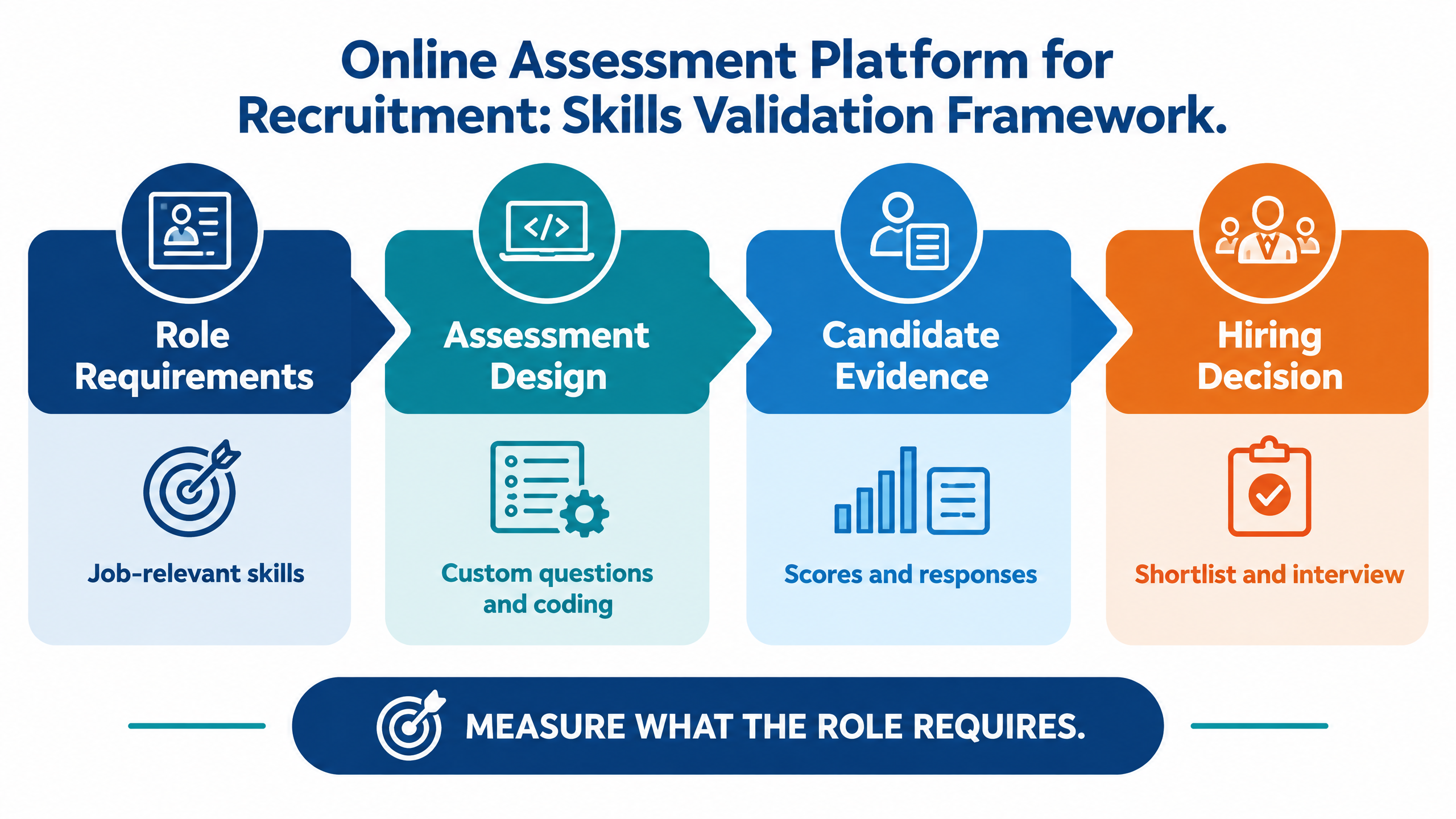
Online assessment platform for recruitment skills-validation framework connecting role requirements, assessment design, candidate evidence, and hiring decisions

Why assessment platforms matter in a modern talent acquisition stack

Recruitment teams are expected to screen more candidates, support more hiring managers, and make decisions faster without reducing quality. A spreadsheet or basic quiz tool may work for a small internal exercise. It becomes difficult to govern when an assessment determines who receives an interview, joins a campus shortlist, enters a staffing pipeline, or progresses toward a high-value technical role.
The assessment stage also sits between employer promise and hiring decision. A confusing or unreliable test can damage candidate experience. An irrelevant test can reduce trust in the process. A score without context can create additional work for hiring managers instead of reducing it.
Recruitment challenge
What the right platform should provide
High candidate volume
Bulk candidate upload, scalable delivery, live tracking, and automated reports.
Different role requirements
Configurable tests, question banks, coding, domain, descriptive, behavioral, and video formats.
Remote or distributed hiring
Browser and mobile support, reminders, clear instructions, and candidate assistance.
Integrity concerns
Proctoring, identity checks, randomization, tab monitoring, suspicious-activity review, and audit trails.
Slow evaluation
Automated scoring, AI-assisted evaluation where appropriate, section-level reports, and exports.
Distributed hiring teams
Role-based access, permissions, shared records, and reviewer collaboration.
Campus and staffing use cases
Bulk invites, cutoffs, rankings, candidate shortlisting, TPO or recruiter access, and campaign reports.
Hiring-manager scrutiny
Explainable scorecards tied to competencies and role expectations.
A platform should reduce friction without weakening judgment. Automation is valuable when it gives recruiters more time to review meaningful evidence. It is harmful when it hides how a score was produced, creates false certainty, or makes candidate support difficult.

10 smart buying criteria

1. Role relevance and skills validity

Start with the role, not the vendor’s feature list. Ask what the assessment is intended to measure and whether those skills matter for successful performance in the job.
For software engineering, the assessment may need coding, debugging, data structures, SQL, language knowledge, or a practical development task. For customer-facing roles, it may need communication, situational judgment, writing, and problem-solving. For operations or analyst roles, it may need data interpretation, accuracy, prioritization, and structured reasoning.
The assessment should be connected to a current job analysis or competency model. The states that employment tests and selection procedures should be properly validated for the positions and purposes for which they are used . Local legal and HR requirements may differ, so organizations should obtain appropriate professional advice for their jurisdictions.
A buyer should ask:
  • Which competencies does the assessment measure?
  • Why are those competencies important for the role?
  • How is difficulty calibrated by level?
  • Can the hiring team map sections to role requirements?
  • Can internal experts review and approve the assessment before launch?
A large question library does not prove validity. Role relevance is more important than the number of questions available.

2. Question-bank quality and customization

Treat the question bank as a content system. Evaluate the source, validation process, difficulty labeling, domain coverage, refresh cycle, leakage controls, and ability to upload proprietary questions.
A flexible platform may support multiple-choice, image-based, descriptive, fill-in-the-blank, framework, video, and coding questions. The assessment owner should be able to create variations, randomize sections, set question pools, define time limits, manage versions, and maintain different templates for different jobs.
Ask the provider to configure an assessment using one of your current job descriptions. Review how the role requirements become sections, questions, tasks, cutoffs, and scoring rules. This demonstration reveals more than a generic feature tour.

3. Coding and technical assessment depth

Technical screening requires more than a text box. Compare the coding environment, language support, compilation, test cases, runtime feedback, partial scoring, plagiarism or similarity controls, candidate instructions, and evaluator workflow.
For software roles, ask whether candidates can demonstrate real problem-solving rather than memorized answers. Consider whether the platform preserves code evidence, supports realistic tasks, and helps technical reviewers inspect borderline performance.
For non-engineering roles, confirm that the platform supports role-relevant simulations rather than forcing every candidate into coding or generic aptitude. The assessment format should follow the capability being measured.

4. Proctoring and assessment integrity

Integrity controls should be proportionate to the risk of the role and transparent to candidates. Possible controls include identity or OTP verification, browser restrictions, tab-switch monitoring, copy-paste controls, webcam or video proctoring, question randomization, suspicious-activity review, and automated disqualification rules.
No control eliminates every form of assistance. The buyer should ask how signals are surfaced, how false positives are handled, whether a human can review a case, and whether candidates can request help or an accommodation.
A defensible process does not treat an automated flag as automatic proof of misconduct. It creates an evidence trail for an authorized reviewer to consider alongside the candidate’s performance.

5. Scoring and AI-assisted evaluation

Automated scoring can accelerate objective sections. AI-assisted evaluation may help with descriptive responses, communication, or structured criteria, but the buyer should understand the scoring logic, review controls, calibration process, and limits.
Ask whether scores are reproducible, whether evaluators can override them with a reason, whether the original response is preserved, and whether reports distinguish raw scores from AI-generated summaries. Human review remains important for nuanced, high-stakes, or borderline decisions.
The platform should also make it clear when an evaluation is automated, AI-assisted, or manual. This distinction supports internal governance and better communication with candidates and hiring managers.

6. Candidate experience and accessibility

The best assessment is not useful if qualified candidates cannot complete it. Evaluate mobile responsiveness, browser support, load time, instructions, practice access, language clarity, time-zone handling, accommodation workflows, resume or profile reuse, and support channels.
Candidates should know the duration, format, required equipment, permitted resources, data use, and next step. They should receive confirmation, reminders, and a clear route to support when a connectivity or access issue occurs.
A smooth candidate experience also protects employer brand. An assessment that feels confusing, intrusive, or unreliable can reduce completion and discourage future applicants. Candidate experience should therefore be measured alongside score quality and completion rate.

7. Reporting and decision support

Reports should help recruiters answer a decision question. They should not merely display a total score.
Look for section-wise performance, competency mapping, question-level evidence where appropriate, candidate comparisons, rank lists, cutoffs, flags, reviewer notes, downloadable reports, custom branding, and dashboards for different stakeholders.
A hiring manager may need a concise scorecard. A recruiter may need funnel status and completion. An assessment owner may need item-level analysis. A leadership team may need pass rates, time to decision, cost, and quality trends.
Ask whether the report communicates uncertainty. A borderline result should not look identical to a strong pass. A suspicious-activity flag should be distinguishable from a performance score. Clear reporting helps prevent false precision.

8. Workflow and integration fit

An online assessment platform for recruitment should fit how the team already hires. Ask how candidates enter the system, how invitations are triggered, how results return to the ATS, how interview stages are updated, and how calendars, email, SMS, WhatsApp, or APIs are supported.
Integration is not only technical. Define who owns candidate records, consent, status changes, report access, rescheduling, exceptions, and retention. A platform that requires recruiters to retype results into several systems will create a new operational bottleneck.
Review the handoffs between the assessment platform and the rest of the TA stack:
Handoff
Buyer question
ATS to assessment
Can the team trigger the right assessment from the correct stage?
Candidate to invitation
Are instructions, deadlines, reminders, and support clear?
Assessment to report
Are scores, responses, flags, and evidence consolidated automatically?
Report to recruiter
Can recruiters review, filter, compare, and shortlist efficiently?
Recruiter to interview
Can qualified candidates move to interview without duplicate data entry?
Assessment to analytics
Can leaders see completion, quality, funnel, and time-to-decision trends?

9. Security, privacy, and governance

Assessment data may include identity information, resumes, video, code, responses, scores, proctoring signals, and hiring decisions. Review hosting, encryption, role-based permissions, audit logs, retention, deletion, consent, exports, access controls, and incident response.
Ask whether the platform can support the organization’s privacy, security, procurement, and data-residency requirements. If AI is used, ask what data is processed, whether it is used for model training, who can access it, and how the organization can review or restrict the feature.
Governance should include more than a security questionnaire. Define who can create tests, change cutoffs, publish assessments, view candidate data, override results, clear integrity flags, and export reports.

10. Total cost and scalability

Compare more than the license price. Include candidate volume, assessment types, proctoring, AI evaluation, question creation, customization, integrations, support, implementation, managed operations, and reporting.
Model cost at three volumes: a small pilot, a normal hiring month, and a peak campaign. A platform that is inexpensive at 100 candidates may be expensive at 10,000.
Useful commercial metrics include cost per completed assessment, cost per qualified shortlist, cost per interview-ready candidate, cost per successful hire, and internal hours saved. Do not optimize cost per test if the test produces weak shortlists or poor candidate completion.
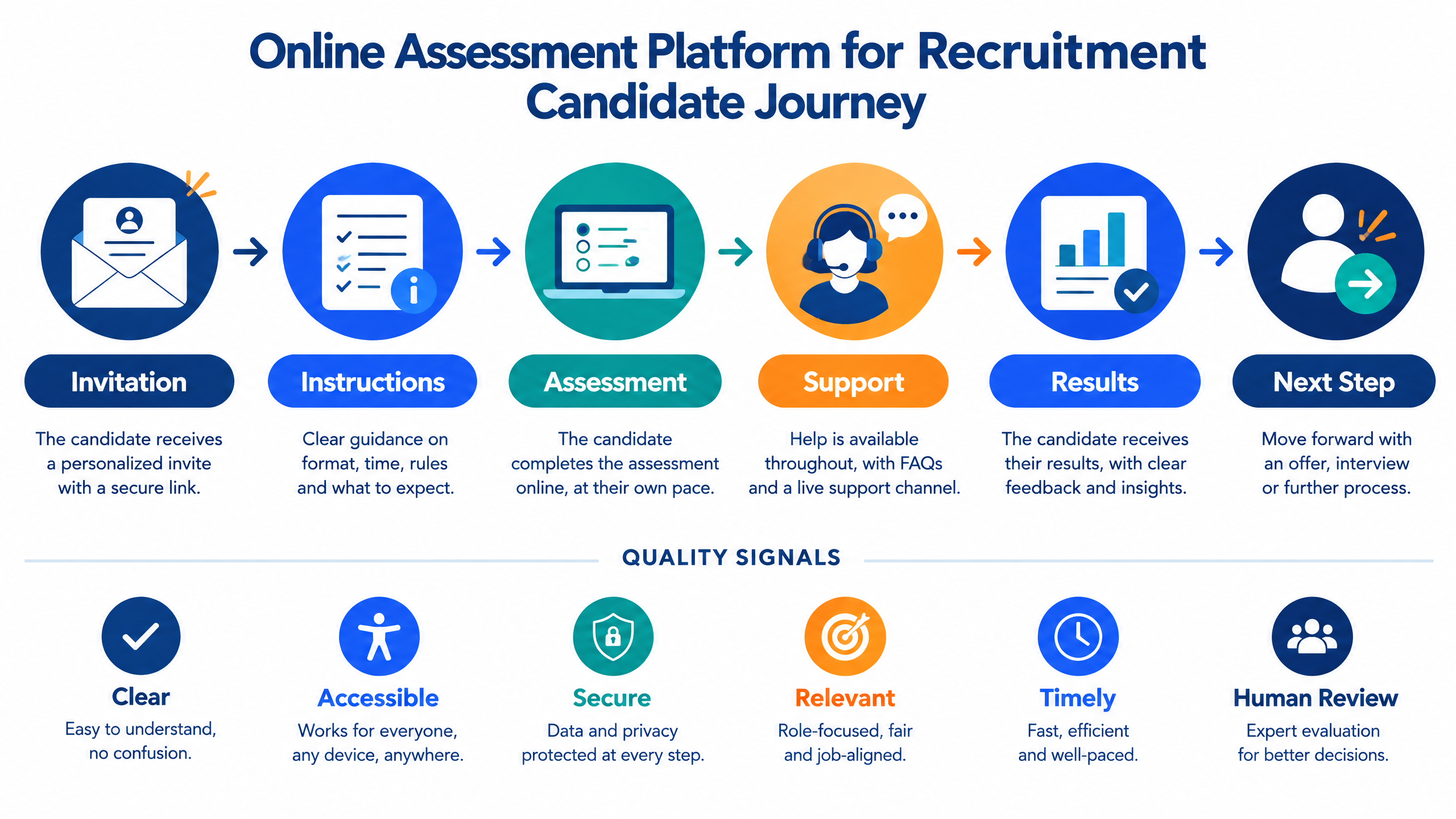
Online assessment platform for recruitment candidate journey showing invitation, instructions, assessment, support, results, and next step

Assessment types to compare

Different roles require different evidence. A platform should support a portfolio of formats rather than force every hiring problem into one test type.
Assessment type
Best used for
Buyer questions
Aptitude and reasoning
Graduate hiring, operations, support, sales, and general screening.
Are questions role-relevant, refreshed, and configurable by difficulty?
Coding assessment
Software engineering, data, QA automation, and technical roles.
Does the environment support languages, test cases, partial scoring, and evidence review?
Domain assessment
Finance, healthcare, engineering, customer operations, and specialist functions.
Can the employer use custom content and role-specific scoring?
Descriptive assessment
Writing, analysis, explanation, and structured thinking.
Is evaluation manual, automated, AI-assisted, or hybrid?
Psychometric or behavioral
Work preferences, traits, communication, and role fit.
Is the instrument appropriate, transparent, and interpreted responsibly?
Video or communication
Customer-facing roles, language, presentation, and soft skills.
Are instructions clear and scoring linked to a defined rubric?
Case or simulation
Consulting, product, operations, management, and real-work tasks.
Can the platform capture reasoning and output, not only a score?
Campus or cohort assessment
College hiring, training institutes, certifications, and placement programs.
Can the platform handle cohorts, rankings, TPOs, and reports?
The assessment type should also match the hiring stage. A short eligibility or aptitude screen may be appropriate early in the funnel. A deeper coding task, case, or simulation may be better after the candidate meets baseline requirements.

Assessment validity, integrity, and human oversight

A recruitment assessment must be both useful and governable. Validity asks whether the assessment measures something relevant to the job. Integrity asks whether the result reflects the candidate’s own work. Fairness asks whether candidates receive a consistent and relevant opportunity to demonstrate ability.
Use a governance checklist:
  • Define which skills the assessment measures and why they matter for the job.
  • Use the same core criteria for candidates applying to the same role.
  • Review whether questions depend on unnecessary cultural, linguistic, or technical assumptions.
  • Provide an accommodation route and a support channel.
  • Treat proctoring signals as evidence for review, not automatic proof of misconduct.
  • Monitor completion, scores, flags, and drop-off by cohort where lawful and appropriate.
  • Document who can change cutoffs, override a score, or clear an integrity flag.
  • Retain the information required for audit and delete what is no longer needed.
  • Validate AI-assisted evaluation against human review before using it for high-stakes decisions.
For AI-enabled assessment or screening, the offers a useful structure for discussing governance, risk, measurement, and management .
The hiring team should be able to explain how a candidate moves from response to score to shortlist. If no one can describe the path, the platform may be creating an appearance of objectivity rather than a defensible process.

Candidate experience and accessibility

Candidate experience is part of assessment quality. If candidates do not understand the instructions, cannot access the test, or cannot get support, the resulting score may reflect friction rather than ability.
Before choosing a platform, test the process from the candidate’s perspective. Check the invitation, sign-in, device compatibility, loading time, instructions, question navigation, timer, submission flow, confirmation, and post-assessment communication.
Ask how the platform supports:
  • Mobile and desktop candidates.
  • Different browsers and network conditions.
  • Screen readers or other accessibility needs.
  • Extra time or approved accommodations.
  • Candidates who lose connectivity.
  • Candidates who need to reschedule.
  • Candidates who dispute an integrity flag.
  • Candidates who need clarification about permitted resources.
Candidate communication should explain what is being assessed without revealing protected questions or compromising test integrity. It should also provide the expected duration, technical requirements, privacy information, and next step.
A candidate who does not progress should still receive a professional experience. The platform should help the employer communicate status and next steps consistently rather than leaving candidates without information.

Reporting, integrations, and workflow fit

The best assessment report is not the longest report. It is the report that helps the next decision-maker act.

Recruiter view

Recruiters need completion status, candidate filters, scores, flags, shortlisting controls, bulk actions, reminders, and communication history. They may also need to compare candidates by role, campaign, college, location, source, or assessment version.

Hiring-manager view

Hiring managers need a concise summary of relevant skills, evidence, strengths, gaps, and recommendation. They should be able to inspect the underlying response or code when a result is borderline or contested.

Assessment-owner view

Assessment owners need section performance, item difficulty, completion, drop-off, integrity signals, scoring distribution, and version history. These insights support question quality and process improvement.

Leadership view

TA leaders and HR leaders may need cost, time to decision, candidate volume, qualified-shortlist rate, interview conversion, offer acceptance, and downstream quality indicators. These metrics connect the assessment stage to business outcomes.
A platform should also support permission-aware collaboration. Not every user should see every candidate detail. Role-based access, candidate ownership, audit history, and report exports are part of the workflow design.

Build, buy, or outsource assessment operations

A self-service platform, a managed assessment service, and a hybrid model solve different problems.
Model
Best suited for
Strengths
Questions to ask
Build internally
Organizations with specialized requirements, engineering capacity, and long-term ownership needs.
Maximum customization and control.
Who maintains content, security, scoring, proctoring, support, and integrations?
Buy self-service software
Teams that want control over assessment creation and delivery.
Faster deployment, configurable workflows, and internal ownership.
Can the platform scale, integrate, and support governance?
Outsource assessment operations
Teams with high volume, limited administrators, tight timelines, or complex coordination.
Managed setup, candidate communication, monitoring, evaluation, and reporting.
What remains under employer control and how is quality reviewed?
Hybrid model
Organizations that need platform control plus operational capacity.
Internal standards with external execution support during peaks.
How are responsibilities divided and how is evidence transferred?
The correct choice depends on hiring volume, internal expertise, role complexity, candidate geography, assessment risk, and the amount of operational work the team wants to own.

How to evaluate a platform with a practical pilot

A pilot should prove more than whether a vendor can create a test. It should show whether the platform supports a valid, usable, and decision-ready process.
Choose one role family or hiring campaign with a clear job description, defined competencies, realistic candidate volume, and an internal comparison group where possible. Agree on success criteria before the pilot starts.
Pilot dimension
What to measure
Role fit
Whether questions and tasks reflect the actual role and level.
Assessment quality
Whether results provide relevant and interpretable evidence.
Candidate completion
Completion rate, time, technical issues, and support requests.
Integrity workflow
Quality of flags, false-positive handling, and reviewer control.
Reporting
Whether recruiters and hiring managers can act on the output.
Integration
Data handoffs, permissions, status updates, exports, and duplicate effort.
Operational effort
Internal time required to configure, launch, monitor, and review.
Commercial fit
Cost under pilot, normal, and peak-volume scenarios.
Downstream value
Qualified-shortlist rate, interview conversion, and hiring-manager confidence.
Include edge cases such as incomplete responses, rescheduling, connectivity loss, unusual backgrounds, accessibility requests, suspicious-activity flags, borderline scores, and manual overrides.
At the end of the pilot, document what should be automated, what requires human review, which controls are mandatory, and whether the platform should be expanded to other roles.

How futuremug supports recruitment assessment workflows
futuremug’s published supports assessment dashboards, question banks, MCQ, image-based MCQ, descriptive and coding formats, timers, proctoring, scoring rules, bulk candidate invites, live tracking, auto-disqualification rules, candidate roles, and real-time reports.
The platform page also describes AI-assisted evaluation, customizable assessments, detailed reports, question management, and role-based user access. Enterprise buyers should verify current features, integrations, data handling, security terms, pricing, and governance requirements during a live evaluation.
For teams that need operational support, futuremug’s describe custom question libraries, AI-generated questions, coding environments, automated scheduling, real-time results, centralized evaluation, proctoring, candidate tracking, and reporting.
The assessment outsourcing page also presents use cases for virtual campus hiring, technical screening, staffing and recruitment, pre-employment testing, and learning and development. These use cases can be relevant when the hiring team needs more than software configuration and requires support with candidate coordination, delivery, monitoring, evaluation, or shortlisting.
For technical hiring, connect the assessment workflow to or the when candidates need structured interviews after assessment.
A useful futuremug demo should use one of your own roles. Ask the team to show assessment design, question selection, coding or descriptive evaluation, proctoring settings, candidate invitations, live tracking, report generation, shortlist review, permissions, integrations, and exception handling.
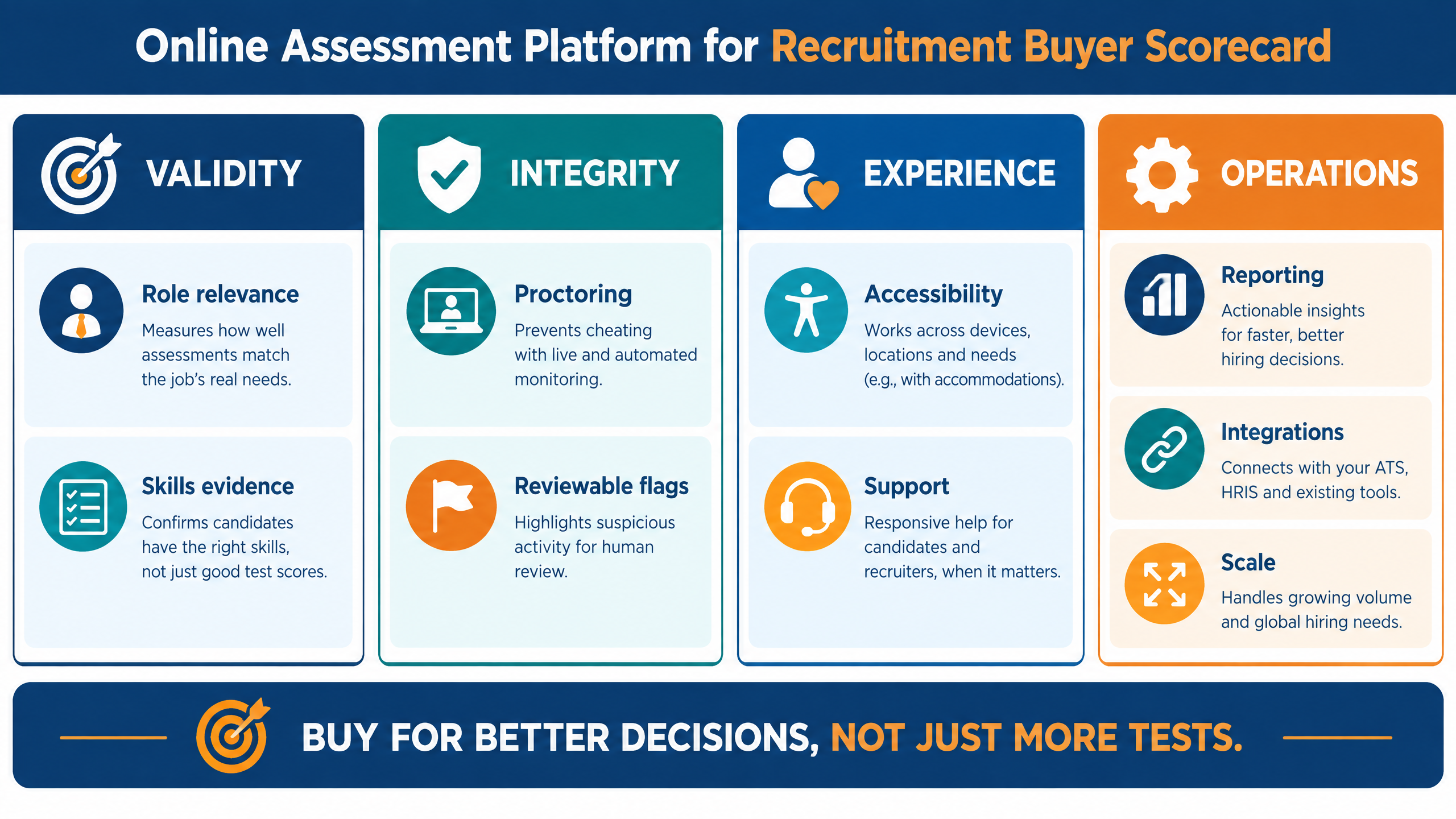
Online assessment platform for recruitment buyer scorecard covering validity, integrity, candidate experience, operations, reporting, integrations, and scale


Request an assessment-platform demo

If your talent acquisition team is spending too much time creating tests, coordinating candidates, reviewing incomplete evidence, chasing results, or moving data between systems, an online assessment platform for recruitment can provide a more connected evaluation workflow.
Bring one live job description, the skills you need to measure, candidate volume, assessment stages, integrity requirements, current systems, reporting needs, and candidate-experience standards to the discussion.
to review skills validation, coding and role-based assessments, proctoring, AI-assisted evaluation, candidate workflows, reports, integrations, and a practical pilot plan.

Frequently Asked Questions

What is an online assessment platform for recruitment? ▼

It is software that helps employers design, deliver, monitor, score, and report candidate assessments. It can support coding, aptitude, domain, behavioral, descriptive, communication, video, case, and other role-based formats.

How does an online assessment platform improve hiring? ▼

It can standardize assessment delivery, reduce manual scoring, support candidate communication, protect integrity, create structured reports, and connect results to shortlisting and interviews. Its value depends on whether the assessment measures relevant skills and whether people can review the evidence.

What should an online assessment platform measure? ▼

It should measure capabilities that matter for the role and hiring stage. The answer may include coding, reasoning, communication, domain knowledge, data interpretation, writing, behavioral judgment, or a realistic job simulation.

Are AI-scored assessments reliable? ▼

AI-assisted scoring can accelerate evaluation, but buyers should understand what is scored, how the model is calibrated, how performance is monitored, and when human review is required. High-stakes or borderline results should remain reviewable by an authorized person.

Does proctoring guarantee assessment integrity? ▼

No. Proctoring creates signals and controls, but it can produce false positives and does not eliminate every form of assistance. A defensible workflow combines proportionate controls, transparent candidate communication, human review, and an appeal or support route.

How can an assessment platform support candidate experience? ▼

It can provide clear invitations, simple instructions, reliable access, reminders, accessible design, technical support, rescheduling, status updates, and transparent next steps. Candidate experience should be measured alongside completion and score quality.

What reports should a recruitment assessment platform provide? ▼

Useful reports may include section scores, competency mapping, responses, coding results, integrity signals, reviewer notes, comparisons, rankings, cutoffs, completion, and recommendations. Different stakeholders need different views with appropriate permissions.

Should an assessment platform integrate with an ATS? ▼

Usually, yes. Integration can reduce duplicate data entry and connect assessment results to the candidate’s hiring stage. Confirm how invitations, scores, reports, status changes, consent, permissions, and audit history move between systems.

When should a company outsource assessment operations? ▼

Outsourcing may help when candidate volume is high, internal administrators are limited, timelines are compressed, proctoring and coordination are complex, or the team needs managed setup and reporting. A hybrid model can keep assessment standards internal while adding operational capacity.

What should be shown in an assessment-platform demo? ▼

Ask the provider to demonstrate a real job description becoming an assessment, candidate invitation, bulk upload, coding or descriptive evaluation, proctoring, live tracking, reports, shortlist review, permissions, integrations, exception handling, and support.

Leave a Reply

Your email address will not be published.