
A Practical Guide to Automation in Recruitment Without Hurting Candidate Experience

What is automation in recruitment?

Automation in recruitment is the use of software to trigger, route, coordinate, record, evaluate, or report on repeatable hiring activities. It can support job distribution, application intake, resume screening, candidate communication, assessment invitations, interview scheduling, reminders, status updates, feedback collection, reporting, and next-step workflows.
Recruitment automation does not have to mean fully automated hiring. In a well-designed process, automation handles predictable administrative work while recruiters, hiring managers, and interviewers retain responsibility for context, judgment, exceptions, and final decisions.
The distinction matters because candidates experience the hiring process as one connected journey. They do not separate the scheduling system from the employer, the assessment platform from the recruiter, or the automated message from the hiring team. If a workflow is confusing, silent, inaccessible, or impossible to correct, the employer experience suffers even when the underlying software is technically efficient.
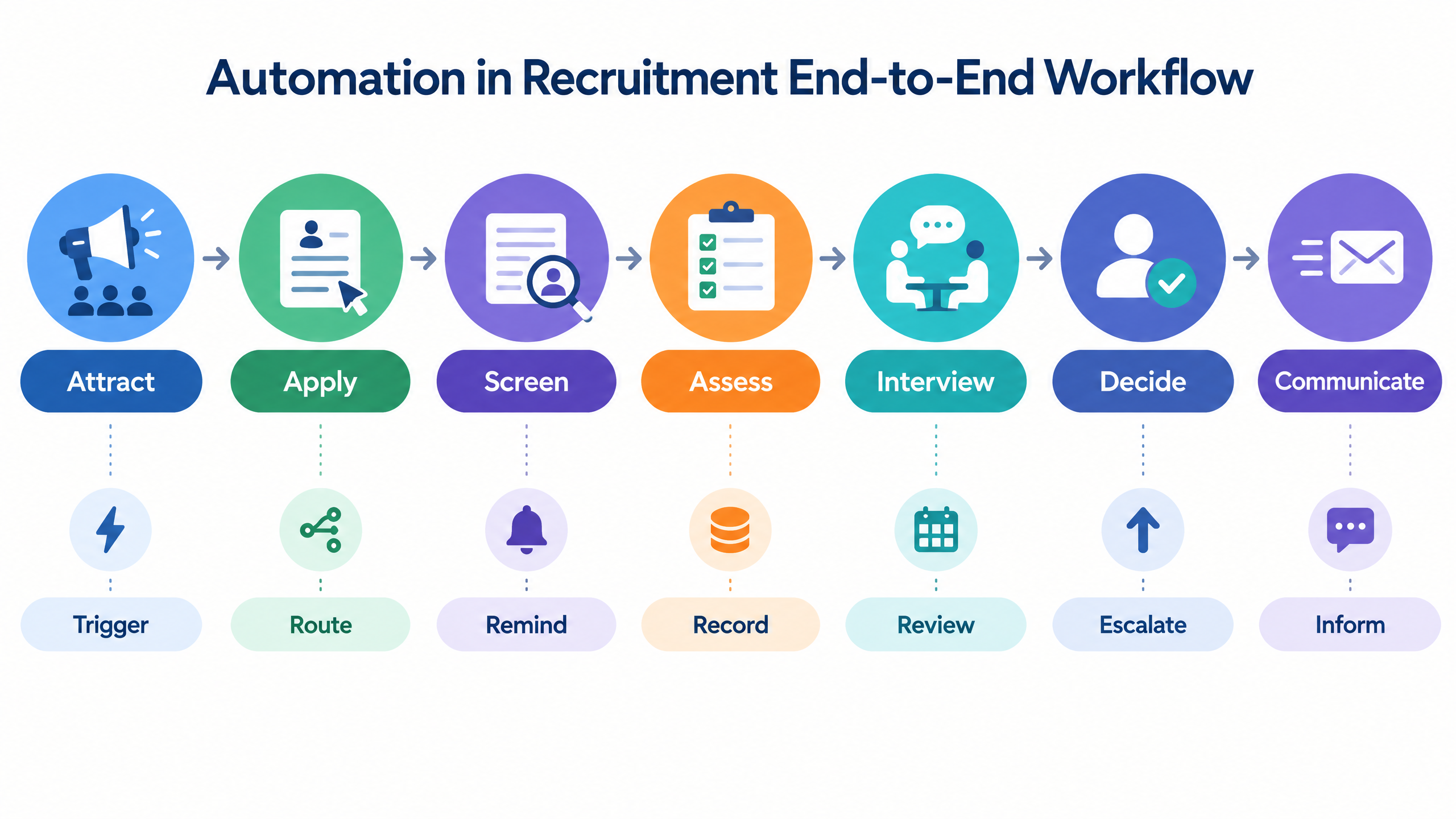
A practical recruitment automation workflow connects six layers:
  1. Candidate entry: application, referral, campaign, campus drive, or staffing intake.
  2. Qualification: resume review, eligibility rules, assessment, or recruiter screen.
  3. Coordination: invitations, reminders, calendars, rescheduling, and status updates.
  4. Evaluation: interviews, coding, assessments, scorecards, and reviewer feedback.
  5. Decision: shortlist, rejection, offer, hold, or next-round routing.
  6. Learning: funnel analytics, candidate feedback, quality measures, and process improvement.
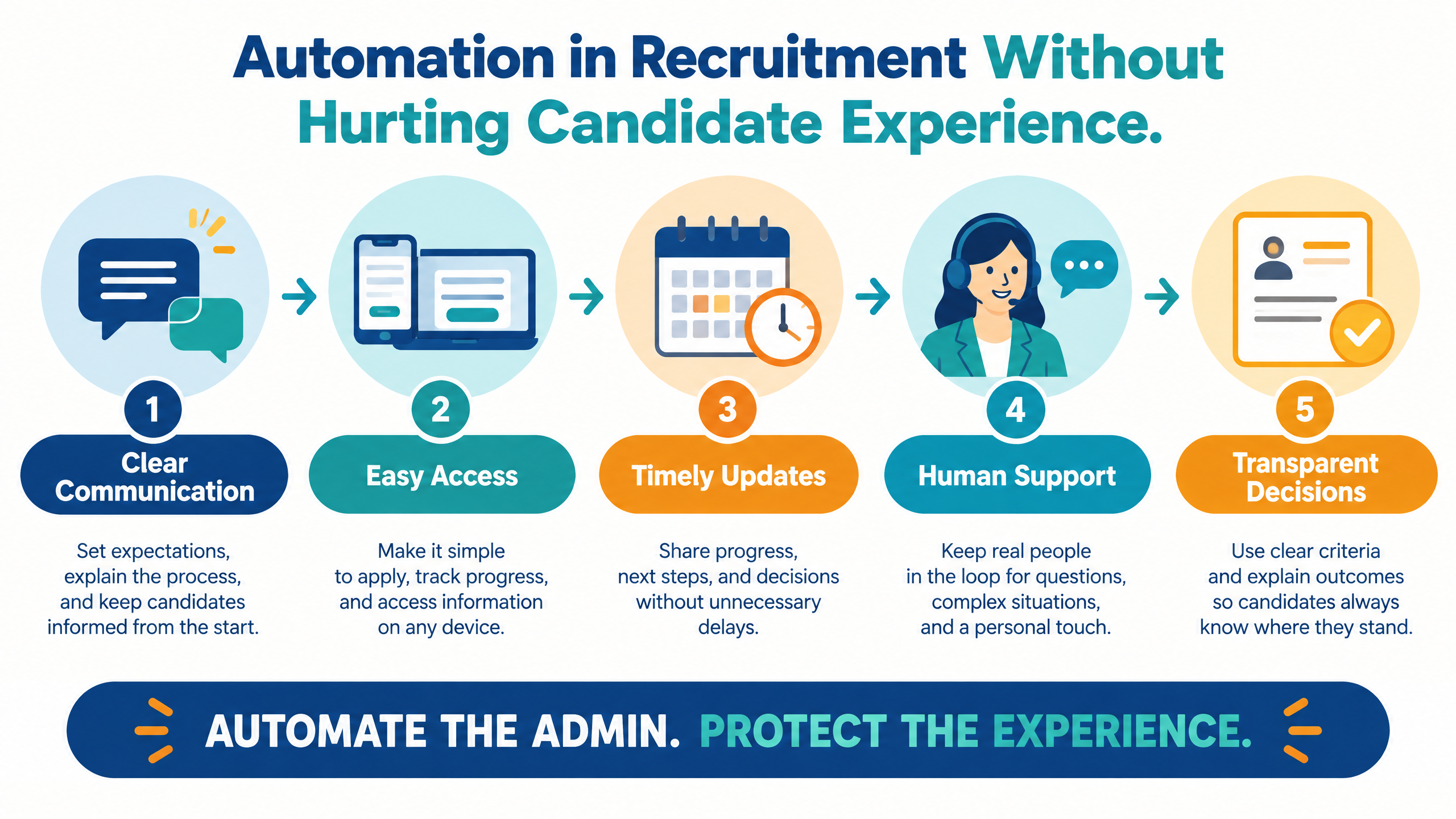
The right automation platform makes these handoffs visible. It also defines where a human can intervene when a candidate’s situation does not fit the normal path.
Explore futuremug’s to review automated scheduling, candidate workflows, AI assessments, expert-led interviews, reporting, and hiring operations.
Automation in recruitment candidate experience framework showing clear communication, easy access, timely updates, human support, and transparent decisions

Why candidate experience should shape automation

Recruitment teams automate because they need speed, consistency, scale, and better use of internal time. Candidates value those outcomes too, but only when the process remains understandable and respectful.
Automation can improve candidate experience by sending timely confirmations, reducing scheduling delays, making instructions consistent, offering self-service options, and keeping candidates informed. It can also damage the experience by sending irrelevant messages, creating duplicate requests, hiding a support route, triggering unexplained decisions, or making candidates repeat information across disconnected systems.
A useful design question is not “What can we automate?” It is “Which friction should automation remove, and which human responsibility must remain visible?”
Candidate need
Helpful automation
Experience risk to prevent
Clarity
Send clear instructions, timelines, requirements, and next steps.
Vague or contradictory messages.
Access
Provide mobile-friendly flows, reliable links, reminders, and rescheduling.
Broken links, inaccessible steps, or no recovery path.
Control
Let candidates choose available times or update information where appropriate.
Self-service that cannot handle exceptions.
Timeliness
Trigger confirmations, status updates, feedback requests, and reminders.
High-volume messages that feel irrelevant or excessive.
Support
Route technical or process issues to the right team.
Chatbots or forms that block human help.
Fairness
Apply consistent criteria and preserve review paths.
Automated rejection without explanation or escalation.
Trust
Explain data collection, assessments, AI use, and retention.
Hidden monitoring or unexpected data use.
Candidate experience is not a decorative layer added after the workflow is built. It is a quality constraint that should influence triggers, copy, permissions, exception handling, and metrics from the beginning.

Where automation helps and where it creates risk

Recruitment automation is strongest when the activity is repeatable, rules are clear, and the outcome can be reviewed. It is weaker when the activity depends on nuanced context, sensitive information, or a high-impact judgment that candidates may need to challenge.
Recruitment activity
Good automation opportunity
Keep visible human responsibility
Application acknowledgment
Immediate confirmation and expected timeline.
Review unusual submissions and accessibility requests.
Resume-to-job matching
Organize applications against defined requirements.
Validate criteria and inspect candidates who may not fit standard patterns.
Assessment invitation
Trigger the correct test with instructions and deadlines.
Handle accommodations, technical problems, and exceptions.
Interview scheduling
Match calendars, send reminders, and manage time zones.
Resolve conflicts and provide human coordination when needed.
Feedback collection
Prompt interviewers and consolidate scorecards.
Review conflicting or incomplete feedback.
Shortlisting
Filter by approved thresholds and present evidence.
Make progression decisions and review borderline cases.
Candidate communication
Send consistent updates and next-step instructions.
Manage sensitive rejections, disputes, and escalations.
Reporting
Track funnel, speed, completion, and quality indicators.
Interpret trends and change the workflow responsibly.
The most common failure is not automation itself. It is automation without ownership. When no one owns an exception, candidates experience a process that appears efficient but has no way to respond to real circumstances.

10 smart ways to automate without hurting candidates

1. Automate the first confirmation, not the entire relationship

The first message after an application should confirm receipt and set expectations. It should explain what happens next, which information may be required, and where a candidate can ask for help.
A useful confirmation is specific. It identifies the role, summarizes the current stage, gives an approximate timeline, and avoids promising a decision the team cannot guarantee.
Automation should not prevent a recruiter from contacting a candidate when the application needs clarification or when the process changes.

2. Use stage-based communication instead of generic message blasts

Candidates need different information at different stages. An assessment invitation should include duration, device requirements, deadline, permitted resources, privacy information, support, and next step. An interview invitation should include format, participants where appropriate, time zone, joining link, preparation guidance, and rescheduling instructions.
Build messages from the candidate’s actual stage. Avoid sending a candidate information about a step they have already completed or a process that does not apply to their role.
Before launching an automated campaign, test messages from the candidate’s perspective. Check the subject line, sender identity, links, formatting, reply route, and whether the message answers the next question a candidate is likely to have.

3. Automate scheduling while preserving choice and recovery

Scheduling is a strong automation use case because it involves calendars, availability, time zones, reminders, and repeated coordination. The candidate should be able to see the relevant time zone, select an available option, confirm the appointment, and request help when none of the options work.
The workflow should handle cancellations, interviewer changes, no-shows, connectivity issues, and rescheduling. A calendar link alone is not a complete candidate experience if the candidate cannot recover from a failed meeting.
For high-volume hiring, automation can manage bulk interview setup and notifications. It should still provide a visible support path for candidates and interviewers.

4. Explain assessments before asking candidates to begin

Before an automated assessment, state what will be measured, how long it will take, which device or browser is needed, what resources are allowed, whether monitoring is used, how support works, and what happens after completion.
Avoid presenting a long or high-stakes test as a casual step. Candidates make decisions about whether to invest time based on the information the employer provides.
For technical assessments, explain whether candidates will use coding, multiple-choice, descriptive, video, or other formats. For AI-assisted evaluation or proctoring, provide the relevant disclosure and support information required by the organization’s policy and applicable rules.
futuremug’s describes assessment creation, question banks, coding, proctoring, bulk invites, live tracking, automated scoring, and reports. Buyers should configure candidate instructions and support alongside the technical features.

5. Give candidates a recovery path

A good workflow assumes that something will occasionally go wrong. A candidate may lose connectivity, miss a reminder, open the wrong link, experience a browser issue, need an accommodation, or misunderstand an instruction.
Recovery can include a support email, phone number, help form, rescheduling policy, practice link, technical checklist, retry policy, or human escalation. The correct option depends on the stage and risk.
Do not make candidates prove that the system failed before they can receive help. Capture the issue, protect the assessment’s integrity, and route the case for appropriate review.

6. Use automation to collect feedback, not to hide it

Automated reminders can help interviewers submit structured feedback while the conversation is fresh. A scorecard should make the role criteria, evidence, recommendation, and confidence visible.
The workflow should detect missing or conflicting feedback rather than silently averaging it. A recruiter may need to request clarification, arrange another review, or involve a hiring manager.
Candidates do not need to see every internal note, but the organization should know how decisions are supported. Internal transparency improves consistency and makes candidate inquiries easier to handle.

7. Separate rule-based routing from human judgment

Rules are useful for clear administrative conditions. Examples include whether an assessment was completed, whether a required credential was supplied, whether a candidate selected an available slot, or whether a deadline has passed.
Human judgment is more appropriate when the evidence is ambiguous or context matters. Examples include nontraditional experience, accessibility-related interruption, conflicting feedback, unusual career history, or a borderline assessment.
When a workflow mixes the two, label the difference. A candidate should not be treated as automatically ineligible merely because an administrative rule fired without an opportunity for review.

8. Keep candidate records connected and permission-aware

Candidates should not have to repeat the same information because the ATS, assessment tool, interview system, and recruiter workspace are disconnected. Integration can reduce duplicate forms, inconsistent status, and repeated requests.
At the same time, more integration means more responsibility for access and data governance. Define which system owns the candidate record, which fields can be updated, who can view reports, how consent is recorded, and how retention and deletion work.
Role-based permissions help ensure that recruiters, interviewers, hiring managers, vendors, and administrators see only the information needed for their work.

9. Automate timely status updates

Silence is a form of friction. If the process takes longer than expected, candidates should receive an update that explains the new timeline without making unsupported promises.
Useful updates include application receipt, assessment completion, interview confirmation, reschedule confirmation, delay notice, progression, rejection, and next-step instructions. Each message should identify the role or stage and provide a route for questions where appropriate.
A status update should not be sent merely because the system has a trigger. Review whether it is accurate, useful, and appropriate for the candidate’s situation.

10. Measure experience together with efficiency
A workflow that reduces recruiter hours but increases candidate drop-off may not be improving recruitment. Pair operational metrics with candidate metrics.
Measure completion, support requests, technical failure, rescheduling, time between stages, candidate feedback, message engagement, and drop-off by stage. Review these alongside scheduling time, recruiter effort, time to decision, shortlist quality, and interview conversion.
When a metric changes, investigate the cause. A lower completion rate may indicate a technical problem, an overly long assessment, unclear instructions, an inconvenient deadline, or a change in candidate mix.
Automation in recruitment end-to-end workflow showing attract, apply, screen, assess, interview, decide, and communicate stages


Candidate experience metrics for an automated hiring process

Candidate experience metrics should help the team locate friction. Avoid treating one score as a complete description of the journey.
Metric
What it can reveal
Action to consider
Application completion
Whether the entry process is clear and proportionate.
Simplify fields, improve instructions, or remove unnecessary steps.
Assessment completion
Whether the test is accessible, relevant, and technically reliable.
Test devices, improve guidance, or review assessment length.
Interview scheduling time
Whether coordination is creating delay.
Improve availability, time-zone handling, or calendar integration.
Reschedule rate
Whether timing, links, or instructions are causing friction.
Add better options and clearer recovery.
Support request volume
Where candidates need help.
Classify issues and improve the workflow or support route.
Stage-to-stage silence
Whether candidates lack information during waiting periods.
Add accurate status updates and ownership.
Candidate drop-off
Where candidates stop progressing.
Investigate technical, communication, effort, or trust issues.
Candidate feedback
How people perceive clarity, respect, and fairness.
Review qualitative comments with operational data.
Qualified-shortlist rate
Whether automation is supporting hiring quality.
Revisit criteria, assessment validity, or reviewer calibration.
Manual override rate
Whether rules or models are creating exceptions.
Examine the pattern and adjust criteria or escalation.
Segment metrics by role, location, stage, device, source, campaign, and assessment or interview type where lawful and useful. Aggregate averages can hide a problem that affects a particular candidate group.

Workflow design for responsible recruitment automation

A reliable workflow starts with a process map rather than a software feature list. Document the current journey, candidate questions, recruiter tasks, handoffs, failure points, and decision owners.

Define the entry and exit conditions

For each stage, specify what causes a candidate to enter, what evidence the stage collects, what outcome it produces, and what moves the candidate forward. This prevents triggers from firing without the information needed for a useful action.

Design the candidate message with the trigger

Every candidate-facing automation should have an approved message, a clear sender, a reply or support path, a delivery channel, and a fallback if delivery fails. Coordinate email, SMS, WhatsApp, and calendar notifications so candidates do not receive contradictory instructions.

Make exceptions first-class workflow states

Do not design only for “complete” and “not complete.” Include rescheduled, needs support, under review, disputed, technical issue, awaiting recruiter, and withdrawn states where relevant.
Exception states make ownership visible. They also prevent a candidate from being automatically rejected or forgotten when the normal trigger does not represent what happened.

Establish escalation and approval rules

Define which actions are automatic, which require a recruiter, which require a hiring manager, and which require a specialist such as legal, privacy, accessibility, or security. Document who can change a cutoff, override a status, reopen a stage, or delete a record.

Test the journey end to end

Run the workflow as a candidate on different devices and browsers. Test incomplete applications, failed delivery, time-zone differences, rescheduling, duplicate candidates, inaccessible content, missing feedback, and a candidate who needs human help.
A workflow is ready for scale when the team knows not only how the happy path works, but also who owns the unhappy path.

Accessibility, privacy, and human support

Candidate experience includes people who use assistive technology, have different connectivity, need an accommodation, or cannot follow the organization’s default process. Accessibility should be considered during design, procurement, testing, and monitoring.
The provides international recommendations for making web content more accessible . A recruitment team should review the actual candidate journey rather than assume that a vendor’s general accessibility statement covers every form, assessment, calendar page, video step, or support channel.
Review whether candidates can:
  • Navigate the application, assessment, and scheduling flow with keyboard controls.
  • Understand instructions, labels, errors, timers, and status messages.
  • Use assistive technologies where needed.
  • Access content across supported devices and browsers.
  • Request an accommodation or alternate process.
  • Receive human help when an automated route is insufficient.
  • Understand what personal data, recordings, or assessment signals are collected.
  • Request correction, clarification, or review according to the organization’s policy.
Privacy design should be equally concrete. Identify the data collected at each stage, the purpose, the access group, the retention period, the integration destination, and the deletion or export path.
If AI is used for screening, assessment, or interview analysis, explain the feature internally and configure the workflow so that a recommendation is not silently treated as a final decision. The offers a useful structure for discussing AI risk identification, measurement, management, and governance .
Automation should make human support easier to locate, not harder to reach. A candidate who needs help should not have to defeat a series of automated steps before finding a person.

How to choose a recruitment automation platform
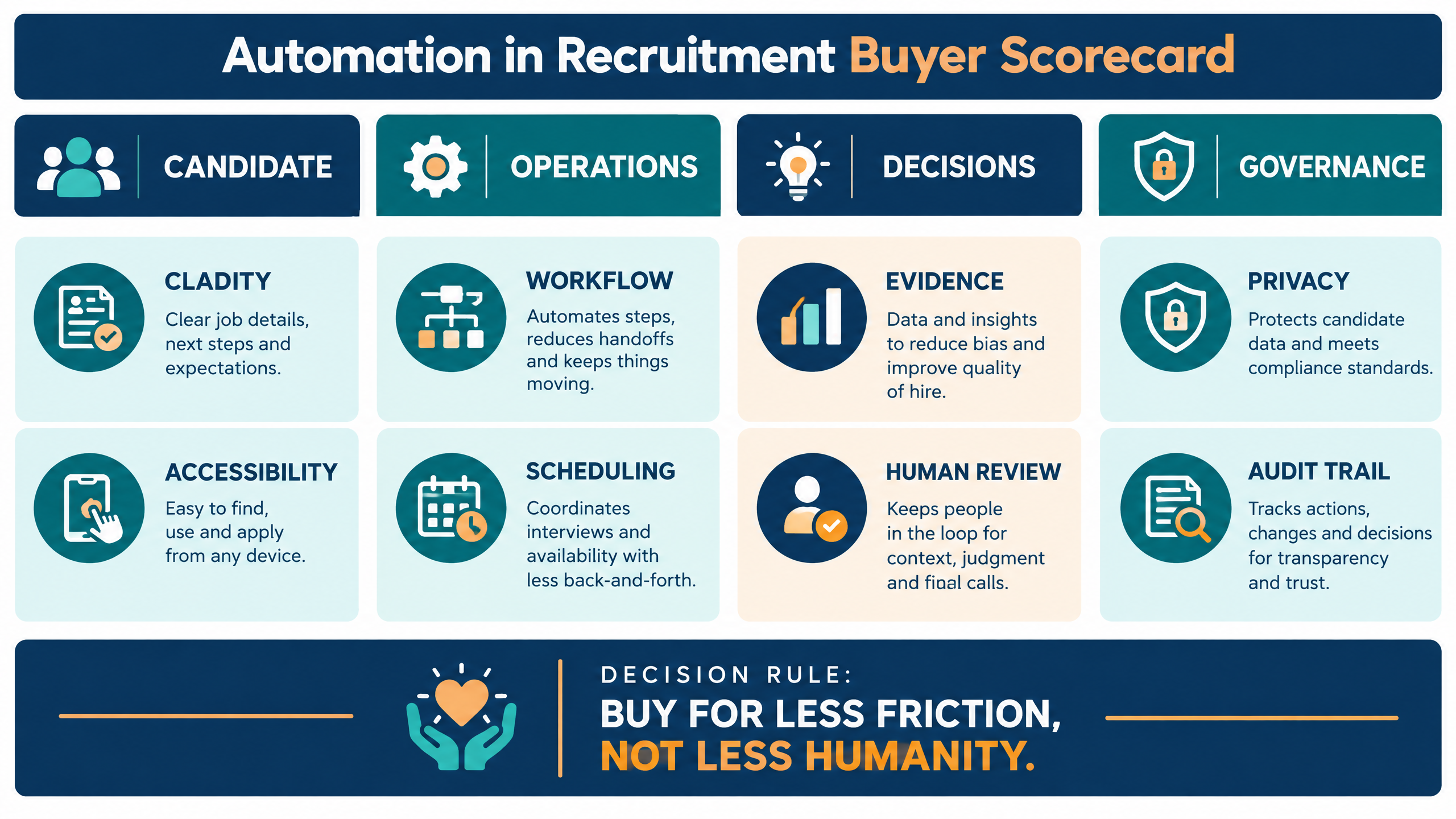
Evaluate the product and the operating model together. A platform may have excellent scheduling features but create poor candidate communication if the implementation does not define message ownership, exception handling, and support.
Automation in recruitment buyer scorecard covering candidate clarity, accessibility, workflow, scheduling, evidence, human review, privacy, and audit trail
Evaluation area
Questions to ask
Suggested weight
Candidate experience
Can the platform provide clear instructions, accurate updates, accessibility, support, and recovery?
20%
Workflow coverage
Does it connect application, screening, assessment, interview, decision, and communication stages?
15%
Scheduling and coordination
Can it manage time zones, availability, reminders, rescheduling, and exceptions?
15%
Human oversight
Can recruiters review, override, escalate, and document decisions?
15%
Reporting and analytics
Can the team see candidate and operational metrics together?
10%
Integration and permissions
Does it connect to the ATS and protect candidate data by role?
10%
Accessibility and privacy
Can the organization test the journey and manage data responsibly?
10%
Scalability and support
Can it handle peak campaigns with dependable support and transparent cost?
5%
Ask the provider to demonstrate one complete workflow using a real role. The demonstration should cover candidate entry, screening or assessment, invitations, reminders, calendar scheduling, interview or evaluation, feedback collection, status updates, exception handling, reporting, permissions, and audit history.
Do not evaluate only the recruiter dashboard. Ask to see the candidate-facing messages and complete the journey on the devices your candidates use.

How to run a recruitment automation pilot

A pilot should test whether automation improves both operating efficiency and candidate experience. Start with one role family, campaign, or hiring stage that has enough volume to reveal friction but is small enough to govern closely.
Define the baseline before launch. Record current scheduling time, recruiter effort, candidate completion, stage delays, support volume, qualified-shortlist rate, and candidate feedback where available.
Pilot dimension
What to measure
Candidate clarity
Whether people understand the stage, effort, timing, data use, and next step.
Access and reliability
Device support, loading, delivery, failures, recovery, and accommodation handling.
Communication
Accuracy, timing, channel consistency, replies, and status visibility.
Coordination
Scheduling time, time-zone errors, rescheduling, reminders, and no-shows.
Human support
Response time, escalation volume, resolution, and ownership of exceptions.
Operational efficiency
Recruiter hours, duplicate data entry, stage delays, and reporting effort.
Hiring quality
Qualified shortlist, interview conversion, reviewer confidence, and downstream outcomes.
Governance
Permissions, consent, retention, auditability, and manual overrides.
Include edge cases such as an incomplete application, failed message, expired link, candidate without a suitable time slot, lost connectivity, accessibility request, duplicate profile, disputed status, missing interviewer feedback, and delayed hiring-manager decision.
At the end of the pilot, document which automations should scale, which need redesign, which actions require human approval, and which candidate metrics will be monitored continuously.

How futuremug supports automated hiring workflows

futuremug’s describes smart automation for scheduling, reporting, and candidate workflows alongside AI assessments, expert-led interviews, custom hiring workflows, and enterprise-grade security positioning.
Its published workflow information also describes automated scheduling across time zones, structured evaluation reports, candidate updates through email, SMS, and WhatsApp, assessment and interview coordination, progress tracking, and support for global hiring operations.
For interview coordination, futuremug’s describe 24/7 auto-scheduling, customizable interviews, structured feedback, candidate status updates, performance analytics, and a dedicated account-management model. This can be relevant for teams that need both software and operational support during high-volume hiring.
The workflow can also connect to futuremug’s , , and when recruitment automation needs to coordinate assessments, interviews, reports, and next steps.
Buyers should verify current features, integrations, notification channels, support responsibilities, candidate-data handling, access controls, service levels, implementation effort, and pricing during a live evaluation.
A useful futuremug demo should use one real hiring workflow. Ask the team to show candidate intake, stage triggers, assessment or interview invitations, scheduling, reminders, multi-channel updates, candidate support, exception handling, evaluation reports, recruiter dashboards, permissions, and a practical pilot plan.

Request a recruitment automation demo

If recruiters are spending too much time chasing availability, repeating messages, moving candidate data between systems, waiting for feedback, or answering preventable process questions, automation in recruitment can create a more connected operating model.
Bring one live workflow, candidate volume, hiring stages, current systems, communication channels, support expectations, candidate-experience requirements, and reporting goals to the conversation.
to review automated scheduling, candidate workflows, assessments, interviews, reporting, multi-channel updates, exception handling, and a practical implementation plan.

Frequently Asked Questions

What is automation in recruitment? ▼

Automation in recruitment is the use of software to coordinate, trigger, route, record, evaluate, or report on repeatable hiring activities. It can support applications, screening, assessments, interviews, scheduling, reminders, feedback, status updates, and reporting.

Does recruitment automation hurt candidate experience? ▼

It can if the process becomes unclear, inaccessible, impersonal, or impossible to correct. Well-designed automation can improve candidate experience by reducing delays, sending accurate updates, simplifying scheduling, providing consistent instructions, and making support easier to find.

What recruitment tasks should be automated first? ▼

Start with repetitive, rules-based tasks such as application acknowledgments, scheduling, reminders, assessment invitations, feedback prompts, status updates, reporting, and routine data handoffs. Keep context-heavy decisions, exceptions, accommodations, disputes, and final judgments reviewable by people.

How can automation improve candidate communication? ▼

It can trigger timely confirmations, interview details, assessment instructions, reminders, delay notices, progression messages, and next-step guidance. Messages should be stage-specific, accurate, easy to understand, and connected to a reply or support path.

How should recruiters handle automated rejection? ▼

Define the decision rule, review exceptions, maintain an escalation path, and ensure the candidate’s record is accurate. Sensitive, disputed, borderline, or accommodation-related cases should not be rejected solely because an automated condition fired without appropriate review.

What should a recruitment automation platform include? ▼

Useful capabilities may include candidate workflow management, ATS integration, scheduling, reminders, assessments, interview coordination, feedback collection, status updates, reporting, permissions, audit trails, candidate support, and exception handling.

How does automation support high-volume hiring? ▼

It can coordinate large candidate groups, bulk invitations, time-zone-aware scheduling, reminders, assessments, interviews, status updates, and reports. High-volume workflows still need capacity planning, candidate support, quality checks, and human escalation.

How can automation protect accessibility? ▼

Test the candidate journey with assistive technologies, keyboard controls, different devices, browsers, and network conditions. Provide clear instructions, support, accommodations, alternate routes, and a human contact. Review the actual workflow against relevant accessibility standards.

What metrics show whether recruitment automation is working? ▼

Use a balanced set of metrics: scheduling time, recruiter effort, stage delays, completion, technical failure, support requests, rescheduling, candidate drop-off, candidate feedback, qualified-shortlist rate, interview conversion, and downstream hiring quality.

Should recruitment automation include AI? ▼

AI can help with matching, question generation, interview assistance, summaries, and analytics. It should be used for a defined purpose with role relevance, privacy, monitoring, human review, and a clear distinction between a model signal and a final hiring decision.

What should be shown in a recruitment automation demo? ▼

Ask for a complete candidate journey from intake to decision. The provider should demonstrate triggers, messages, assessments or interviews, scheduling, reminders, candidate support, rescheduling, exception handling, feedback, reporting, permissions, integrations, and audit history.

Leave a Reply

Your email address will not be published.