
What to Look for in a Candidate Assessment Platform Without Creating Candidate Drop-Off
What is a candidate assessment platform?
A candidate assessment platform is software that helps hiring teams create, deliver, monitor, evaluate, and report candidate tests through a digital workflow.
Depending on the hiring use case, a platform may support multiple-choice questions, coding tasks, descriptive responses, work samples, aptitude tests, domain assessments, language assessments, psychometric measures, proctoring, and AI-assisted evaluation.
The best platform is not necessarily the one with the largest question bank. It is the one that produces useful, job-relevant evidence without making candidates abandon the process before they can demonstrate their ability.
That means the platform should make four things work together:
- Validity: The assessment measures capabilities relevant to the role.
- Usability: Candidates understand what to do and can complete it reliably.
- Integrity: The employer has reasonable confidence in the result.
- Governance: Automated scores and flags can be reviewed by accountable people.
A candidate assessment platform sits between the job requirement and the hiring decision. It should not become an opaque filter that candidates and hiring managers cannot understand.
Why candidate drop-off happens
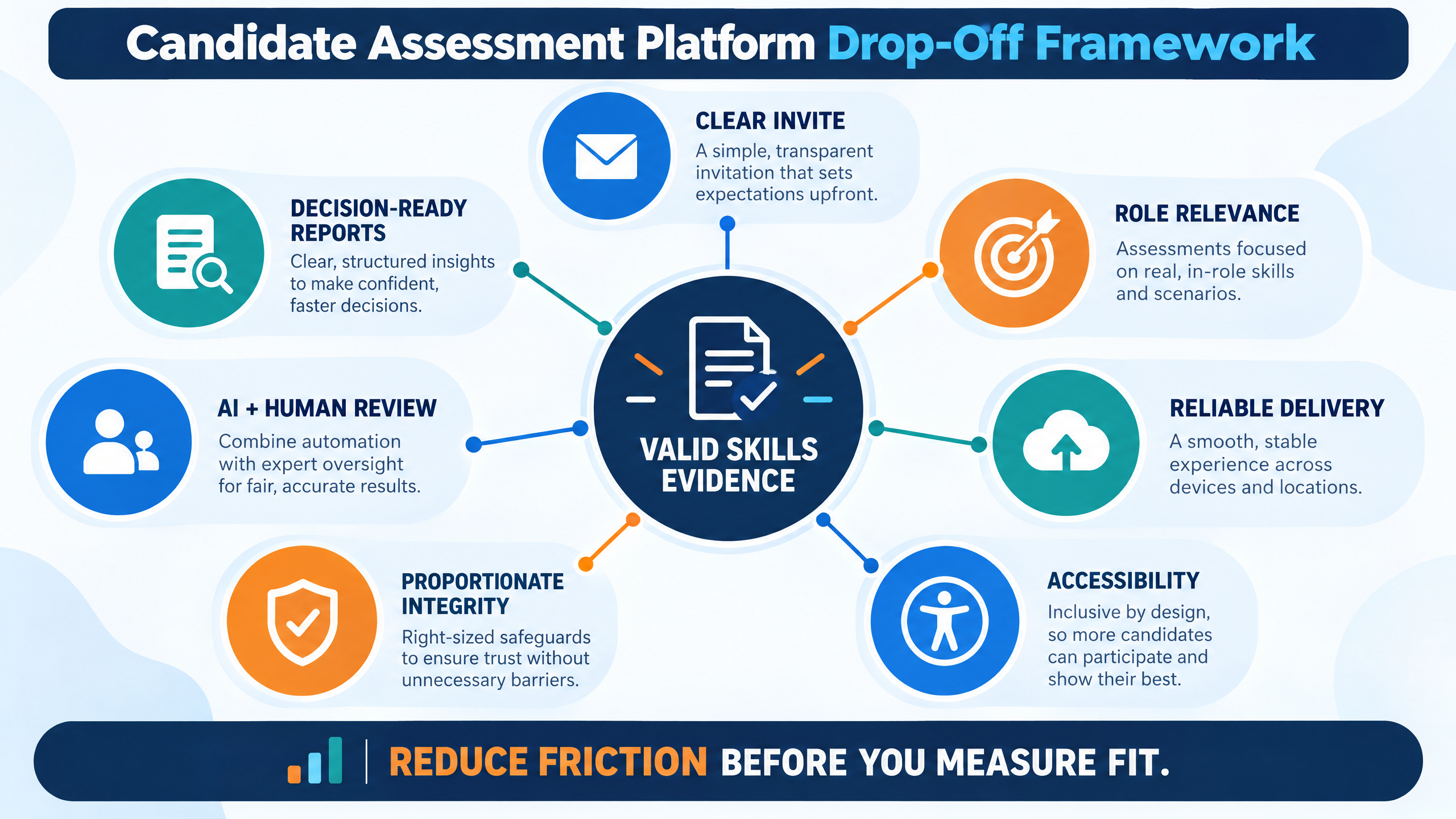
Candidate drop-off rarely has one cause. It is usually the result of friction across the assessment journey.
Candidates may receive an invitation with incomplete information, discover that they must repeat data already provided, encounter a difficult sign-in flow, or begin a timed test without knowing the question types or rules.
Technical problems can have an even greater effect. A candidate may lose answers after a connection interruption, use an unsupported browser, misunderstand proctoring requirements, or be unable to complete the assessment on the available device.
The assessment design itself can also cause abandonment. A test may be too long, too repetitive, poorly calibrated, unrelated to the role, or difficult to complete without special knowledge that the role does not require.
Hiring teams should therefore ask a broader commercial question:
Can this candidate assessment platform collect reliable skills evidence while protecting completion, accessibility, trust, and human review?
8 features to look for in a candidate assessment platform
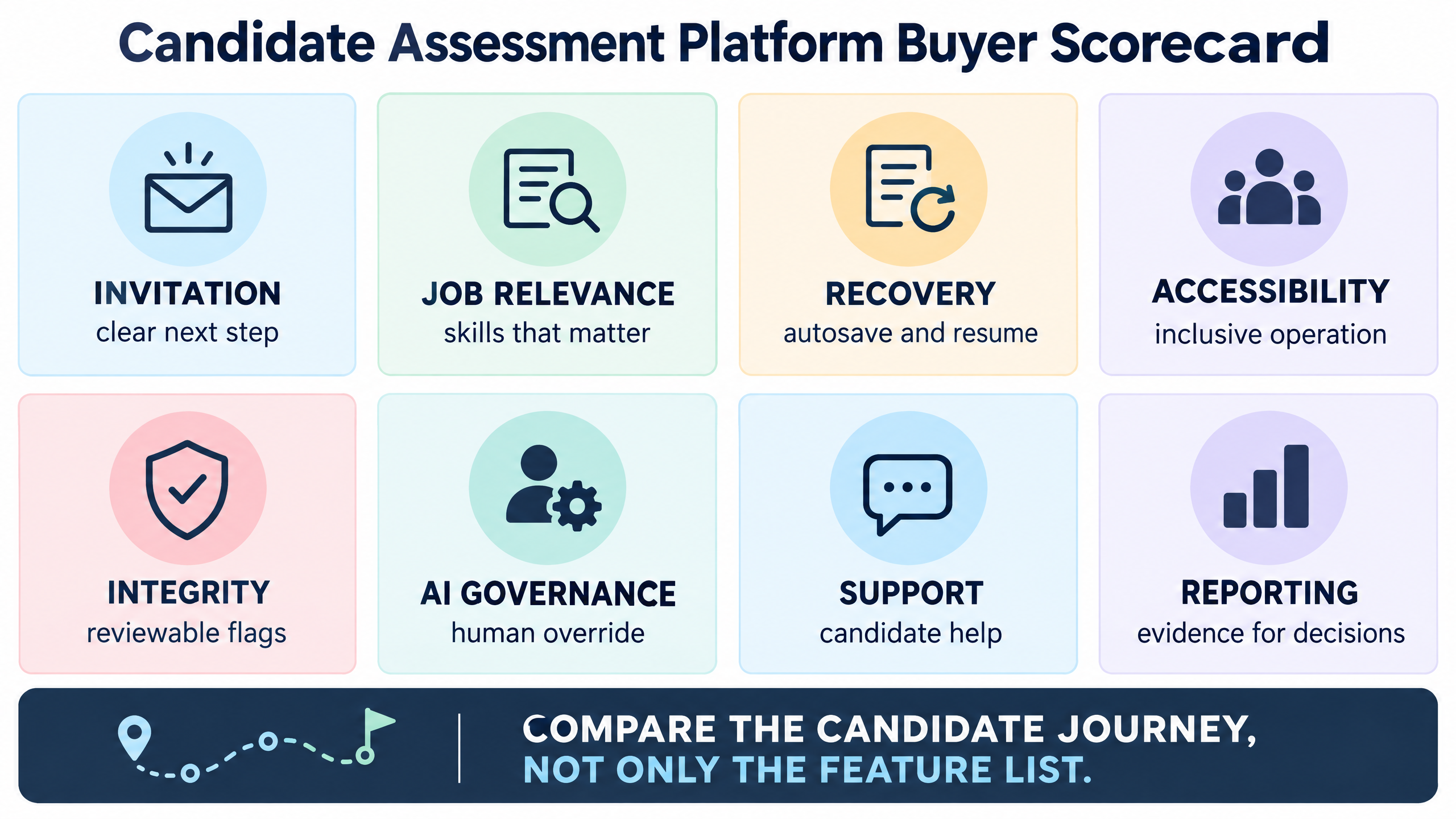
1. A simple invitation and registration journey
The first assessment experience begins before the first question. Candidates should understand who is inviting them, which role or program the assessment relates to, the expected duration, the deadline, supported devices, and what happens after submission.
A strong platform should support:
- Branded or clearly identified invitations.
- Mobile-friendly registration.
- Minimal repeated data entry.
- Secure candidate authentication.
- Clear deadline and duration information.
- Preview or practice instructions.
- Resend and reminder controls.
- Bulk candidate upload.
- Candidate status visibility.
- A clear support route.
Every additional field and unclear instruction creates another opportunity for a candidate to stop. Ask vendors to demonstrate the invitation-to-start journey using a real candidate profile.
2. Role-relevant assessment design
Assessment content should measure capabilities that matter for the role. A software engineering role may need coding, debugging, data structures, or system-design evidence. A customer-facing role may need communication, judgment, language, or scenario-based responses.
The U.S. Office of Personnel Management’s guidance on work samples explains that work samples mirror tasks or work activities performed on the job and are most appropriate when applicants are expected to possess the relevant competencies at entry .
Use a design process like this:
- Identify the outcomes the role requires.
- Separate must-have capabilities from trainable skills.
- Select an assessment format that can produce evidence for each capability.
- Define the scoring rule before reviewing candidates.
- Pilot the test with representative reviewers.
- Remove questions that do not support a hiring decision.
- Recheck the assessment when the role changes.
A shorter, relevant assessment usually creates a better candidate experience than a longer test that measures everything the platform happens to support.
3. Reliable delivery and recovery
A candidate should not lose a valid attempt because of a temporary technical problem. Ask how the candidate assessment platform handles:
- Autosave.
- Session recovery.
- Temporary network interruptions.
- Browser refresh.
- Device changes.
- Timer behavior after an interruption.
- Submission confirmation.
- Duplicate attempts.
- Support escalation.
- Assessment status after a failure.
Run a live test with the browsers and devices used by your candidate population. Test the assessment at the expected concurrency, not only with one internal user.
The vendor should also explain what recruiters can see during the assessment. Live status, candidate activity, and technical issue alerts can help the team intervene before a completion problem becomes a rejection.
4. Accessible candidate experience
Accessibility should be assessed as part of the product and the assessment design. W3C’s Web Content Accessibility Guidelines 2.2 cover principles such as perceivable information, keyboard operation, readable content, input assistance, and alternative ways to interact .
Ask whether the platform supports:
- Keyboard navigation.
- Visible focus states.
- Descriptive labels and instructions.
- Sufficient text contrast.
- Screen-reader-friendly structure.
- Clear error messages.
- Flexible orientation and responsive layouts.
- Captions or alternatives for audio and video.
- Reasonable time-extension workflows.
- Candidate accommodation requests.
Do not treat accessibility as a final compliance check. It affects whether candidates can understand, operate, and complete the assessment.
5. Proportionate integrity controls
Assessment integrity matters, but an aggressive control can create candidate distrust or unnecessary drop-off. A platform may support question randomization, time controls, browser restrictions, identity checks, proctoring, off-tab monitoring, activity tracking, or auto-disqualification rules.
The right control depends on the role, assessment risk, candidate population, and business context. Ask:
- What behavior triggers a flag?
- Does a flag automatically reject the candidate?
- Can a trained reviewer inspect the evidence?
- Are candidates told what is monitored?
- Is consent collected where required?
- Can legitimate accessibility or technical behavior be distinguished from misconduct?
- Is the control necessary for this assessment?
A flag should be treated as a signal for review unless the organization has validated a different decision rule. The platform should make the reason and evidence understandable to authorized reviewers.
6. Transparent scoring and AI evaluation
Candidate assessment platforms increasingly use AI to generate questions, score responses, classify skills, summarize evidence, or recommend next steps. These features can reduce manual work, but they also introduce governance questions.
Evaluate whether the platform provides:
- Configurable scoring rules.
- Section and competency scores.
- Manual review options.
- AI-generated-question controls.
- AI-assisted scoring with human override.
- Evidence linked to a score.
- Version history for tests and rubrics.
- Audit logs for changes.
- Confidence or uncertainty indicators.
- Exportable reports.
- Role-based permissions.
The hiring team should be able to explain how an assessment result was produced. A score that cannot be reviewed is difficult to defend and difficult to improve.
The EEOC’s guidance on employment tests and selection procedures states that selection procedures should be job-related and appropriate for the employer’s purpose . Organizations should obtain appropriate local legal and compliance advice for their hiring context.
7. Candidate support and status visibility
Candidates should know whether they are invited, registered, started, submitted, under review, shortlisted, or waiting for the next stage. Clear status information reduces repeated support requests and helps recruiters identify where the funnel is weakening.
Look for:
- Candidate-facing status messages.
- Email, SMS, or WhatsApp notifications where appropriate.
- Reminder scheduling.
- Helpdesk or escalation workflow.
- Technical issue triage.
- Rescheduling or retake rules.
- College or recruiter access to approved statuses.
- Completion and drop-off dashboards.
A good support process distinguishes a candidate who lacks interest from a candidate who encountered a preventable problem.
8. Decision-ready reports and workflow integration
Reports should help hiring managers make the next decision. A report that contains only a total score may be insufficient for a technical or role-specific hiring decision.
Evaluate whether reports show:
- Candidate identity and assessment version.
- Completion and timing information.
- Section and competency scores.
- Coding or work-sample output.
- Manual reviewer notes.
- AI-generated summaries with evidence.
- Integrity flags and review status.
- Recommended next step.
- Shortlist and comparison views.
- Download, API, or ATS integration.
- Role-based access controls.
The platform should also connect to the next stage. For example, a candidate who completes a coding assessment may move into an AI interview, an expert technical panel, or a hiring-manager review.
How to connect assessments with AI interviews
A candidate assessment platform is often one part of a broader hiring stack. The assessment can validate defined skills, while an interview explores reasoning, communication, problem-solving, motivation, or role context.
A useful sequence may be:
- Define the role and evidence requirements.
- Use an assessment for capabilities that benefit from standardized testing.
- Use an AI or human interview for deeper evidence and follow-up.
- Route uncertain or borderline cases to human review.
- Make the hiring decision using relevant evidence rather than a single automated score.
futuremug’s AI interview platform describes automated scheduling, video interviews, coding workflows, AI-generated questions, resume-to-JD matching, candidate dashboards, AI-generated transcripts, summaries, and interview reports. It also describes candidate and interviewer notifications through email, SMS, and WhatsApp.
AI interview capabilities should be configured around the assessment result. If the assessment shows a gap in a required skill, the next interview can probe that capability. If the assessment is inconclusive, the workflow can route the candidate to an expert interviewer instead of applying an automatic rejection.
How to evaluate a candidate assessment platform
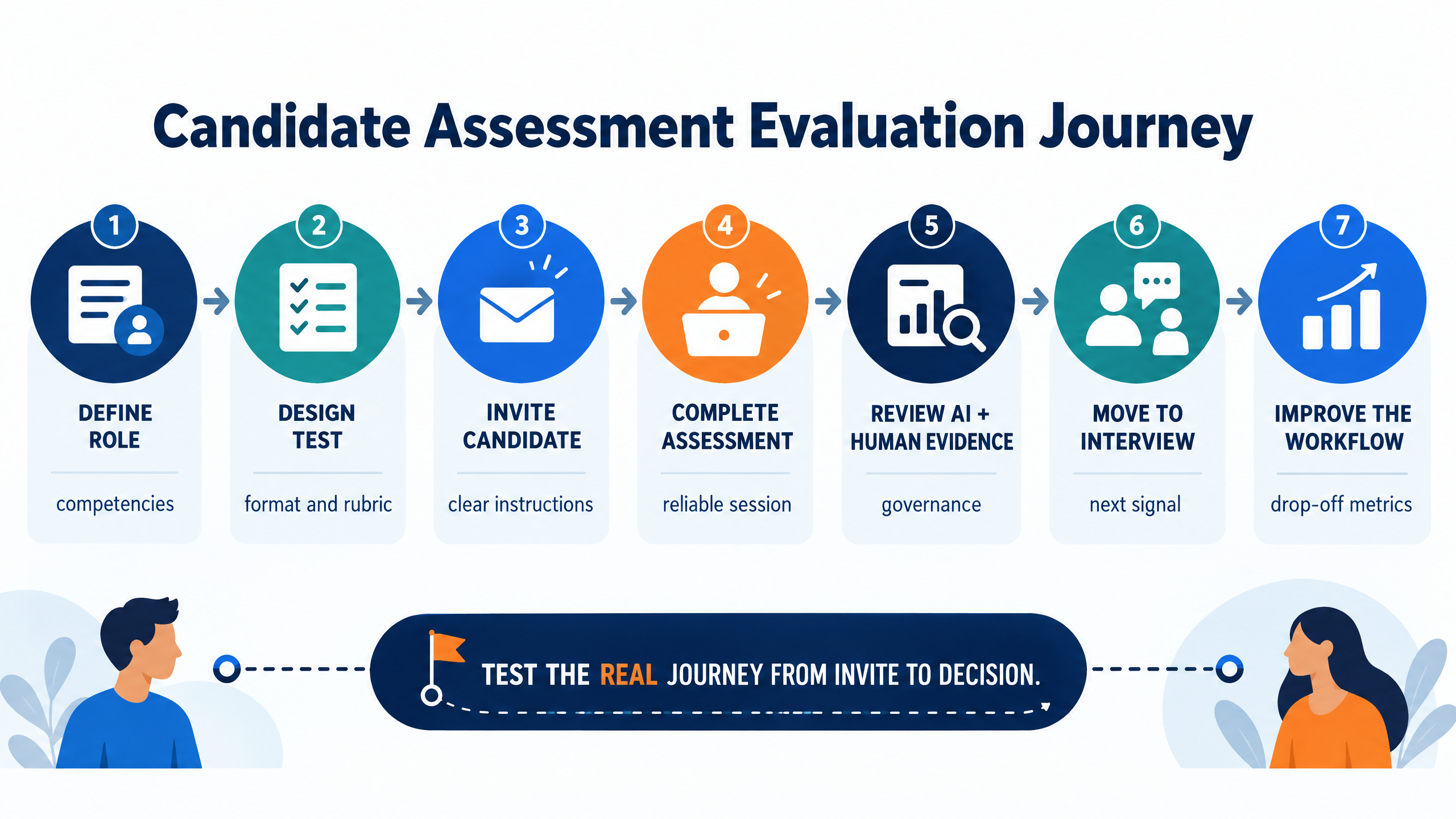
Start with a real role
Do not evaluate only with a generic demo. Give the vendor a representative job description, candidate volume, assessment type, device mix, deadline, and next-stage workflow.
Test the candidate journey
Ask a small group to complete the journey from invitation to submission. Measure instruction clarity, sign-in effort, time to start, technical errors, support response, and completion behavior.
Inspect the evaluator journey
Create a test, invite candidates, review results, inspect flags, compare candidates, export a report, and move a candidate to the next stage. Note how many manual steps are required.
Run a governance review
Ask who can create or change questions, rubrics, scoring rules, access permissions, AI settings, and disqualification rules. Confirm that changes are logged and reports identify the assessment version.
Compare the full commercial model
Normalize pricing across candidate volume, assessment attempts, credits, AI evaluation, proctoring, support, integrations, implementation, data retention, and custom branding. A low headline price may not be the lowest total cost if it creates support work or repeat testing.
Define pilot success criteria
A useful pilot can measure:
- Invitation-to-start rate.
- Assessment completion rate.
- Technical issue rate.
- Candidate support volume.
- Assessment-to-interview conversion.
- Reviewer time per candidate.
- Report turnaround.
- Human-review disagreement.
- Candidate feedback.
- Shortlist quality and downstream conversion.
How futuremug supports candidate assessment
futuremug’s AI-powered assessment platform describes MCQ, image-based MCQ, descriptive, and coding assessments; AI-generated questions; bulk candidate invitations; proctoring controls; off-tab activity tracking; live candidate tracking; configurable scoring; AI-assisted evaluation; reports; role-based access; and API-triggered tests.
The assessment page currently publishes provider-reported scale indicators including 400K+ completed assessments, 6,000+ single-time assessments, 250+ IT domains, real-time reports, a customizable platform, and proctoring-enabled delivery. Treat these as current provider-published claims and verify the definition, date, plan, and service scope before converting them into campaign copy.
futuremug also describes a free-to-start and pay-as-you-go assessment model, with enterprise bundles for advanced AI evaluation, AI question generation, scoring rules, variation tools, white-label branding, module customization, and user access. Buyers should confirm current pricing and feature availability directly with futuremug.
For technical hiring, connect assessment results with futuremug’s AI interview workflows or expert interviewer capacity. The interview platform page describes AI resume-to-JD matching, integrated coding, AI-generated interview questions, automated scheduling, live video interviews, transcripts, summaries, centralized reporting, and instant interview insights.
The broader futuremug hiring ecosystem also highlights 5,000+ expert interviewers and 250+ IT domains through its interview-outsourcing services. This can be relevant when the assessment should lead to an expert technical panel instead of an automated rejection.
Request a futuremug demo using one real role, one assessment, one candidate communication journey, and one next-stage interview. Ask the team to show how candidate drop-off is detected, how AI output is reviewed, and how a hiring manager receives decision-ready evidence.