
What Is a TPO Portal? How College Placement Portals and ERPs Work
What Is a TPO Portal?
A TPO portal is the website or app a college uses to run campus placements in one place. It replaces notice-board posters, Google Forms and WhatsApp groups with a single system that students, the TPO and recruiters all log in to.
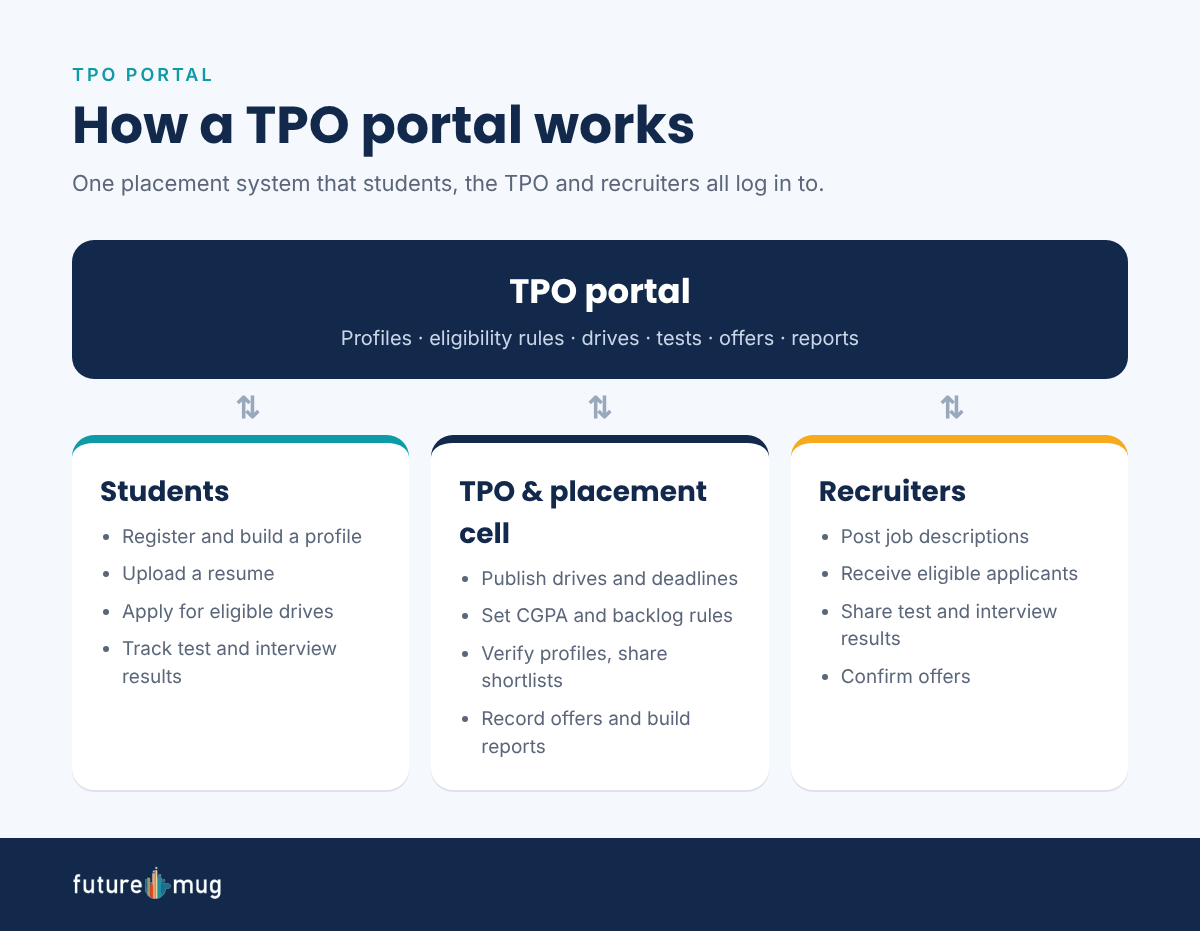
Think of it as the meeting point for three groups:
- Students create a placement profile, upload a resume, see which drives they are eligible for, apply and follow their results.
- The TPO and placement cell publish drives, set eligibility rules, approve student profiles, share shortlists and record every offer.
- Recruiters post job descriptions, receive the list of eligible applicants and send back test and interview results.
Because every action happens in one system, the TPO always knows who applied, who was shortlisted and who got an offer. That record later feeds placement reports for management, NAAC and NIRF.
Why colleges moved to TPO portals
Manual placements break down once a college has hundreds of final-year students and dozens of visiting companies. Spreadsheets get out of date, students miss deadlines and the TPO spends hours checking CGPA and backlog rules by hand. A TPO portal automates those checks and keeps one up-to-date record for every student.
TPO Portal vs Placement ERP vs TPO Dashboard
Students often see these three terms used for the same thing. They overlap, but each one does a different job.
| TPO portal | Placement ERP (TPO ERP) | TPO dashboard | |
|---|---|---|---|
| Main job | Day-to-day placement activity | Placement module inside the college’s wider ERP | One-screen view of placement progress |
| Main users | Students, TPO, recruiters | College admin and the TPO office | TPO, placement director, management |
| What you do there | Register, apply, publish drives, share shortlists | Pull academic records, fees and attendance into placements | Track readiness, applications, offers and placement rate |
| Typical question it answers | “Which drives can I apply for?” | “Is this student’s academic record verified?” | “How many students are placed so far?” |
In short, the portal is where the work happens, the ERP holds the official academic records, and the dashboard shows how placements are going. Many modern platforms combine all three. Read more about how a TPO dashboard helps placement teams, or compare options in our guide to placement management software.
7 Must-Have Features of a TPO Portal
Not every placement portal is built the same. These seven features separate a portal that saves the TPO time from one that just moves the spreadsheet online.
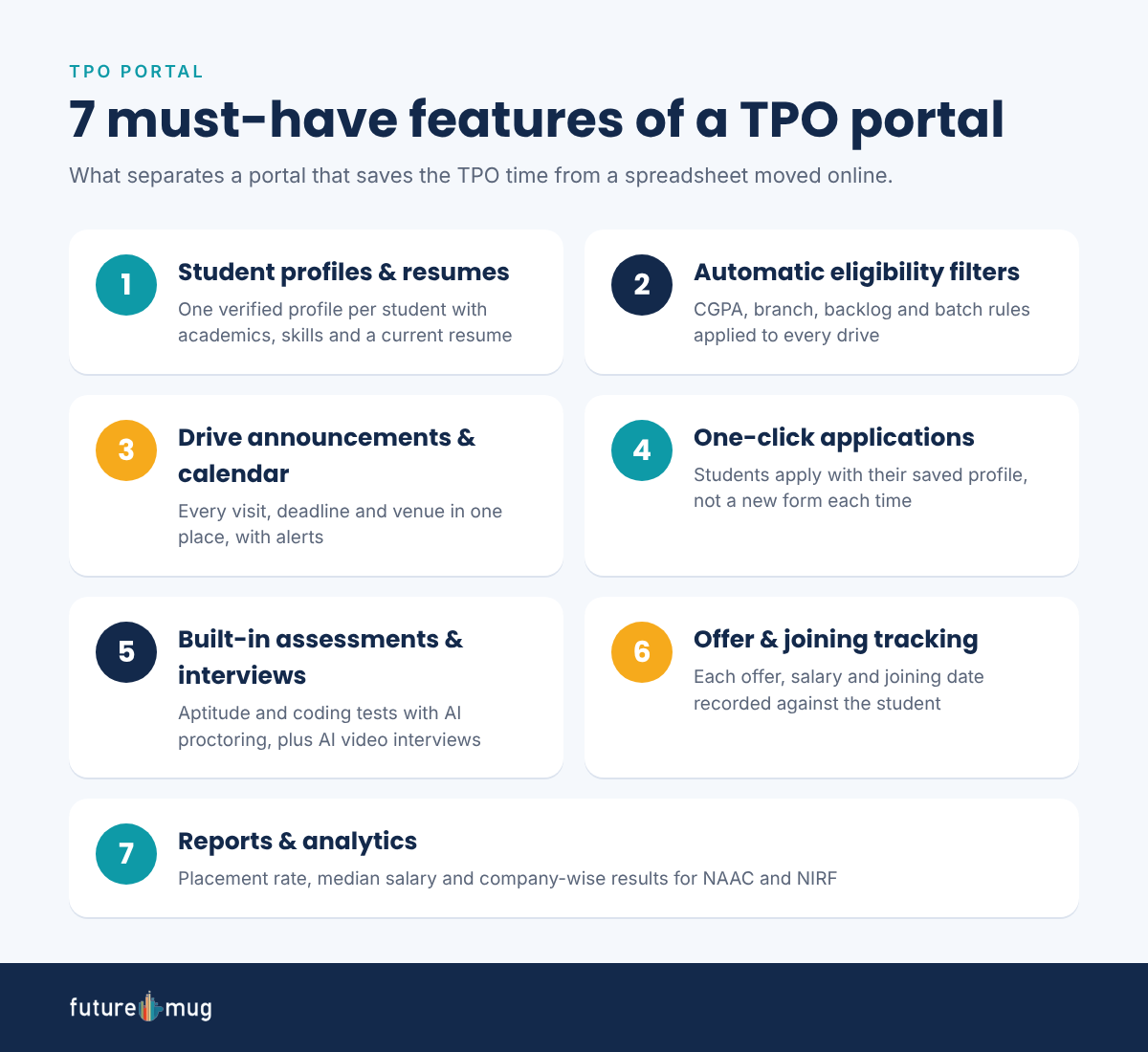
- Student profiles and resumes. One verified profile per student with academics, skills, projects and a current resume.
- Automatic eligibility filters. CGPA, branch, backlog and batch rules applied to every drive, so only eligible students can apply.
- Drive announcements and calendar. Every company visit, deadline and venue in one place, with email or app alerts.
- One-click applications. Students apply with their saved profile instead of filling a new form for each company.
- Built-in assessments and interviews. Aptitude tests, coding tests and interviews run inside the portal. With futuremug, that means online assessments with AI proctoring and AI video interviews across 250+ IT domains.
- Offer and joining tracking. Each offer letter, salary and joining date recorded against the student.
- Reports and analytics. Placement rate, median salary and company-wise results, ready for management reviews, NAAC and NIRF. In NIRF’s Graduation Outcomes parameter, placement plus higher studies and median salary each carry 40 of 100 marks (NIRF framework).
TPO Registration: How to Register on Your College TPO Portal
Every college’s portal looks a little different, but TPO registration almost always follows these six steps.
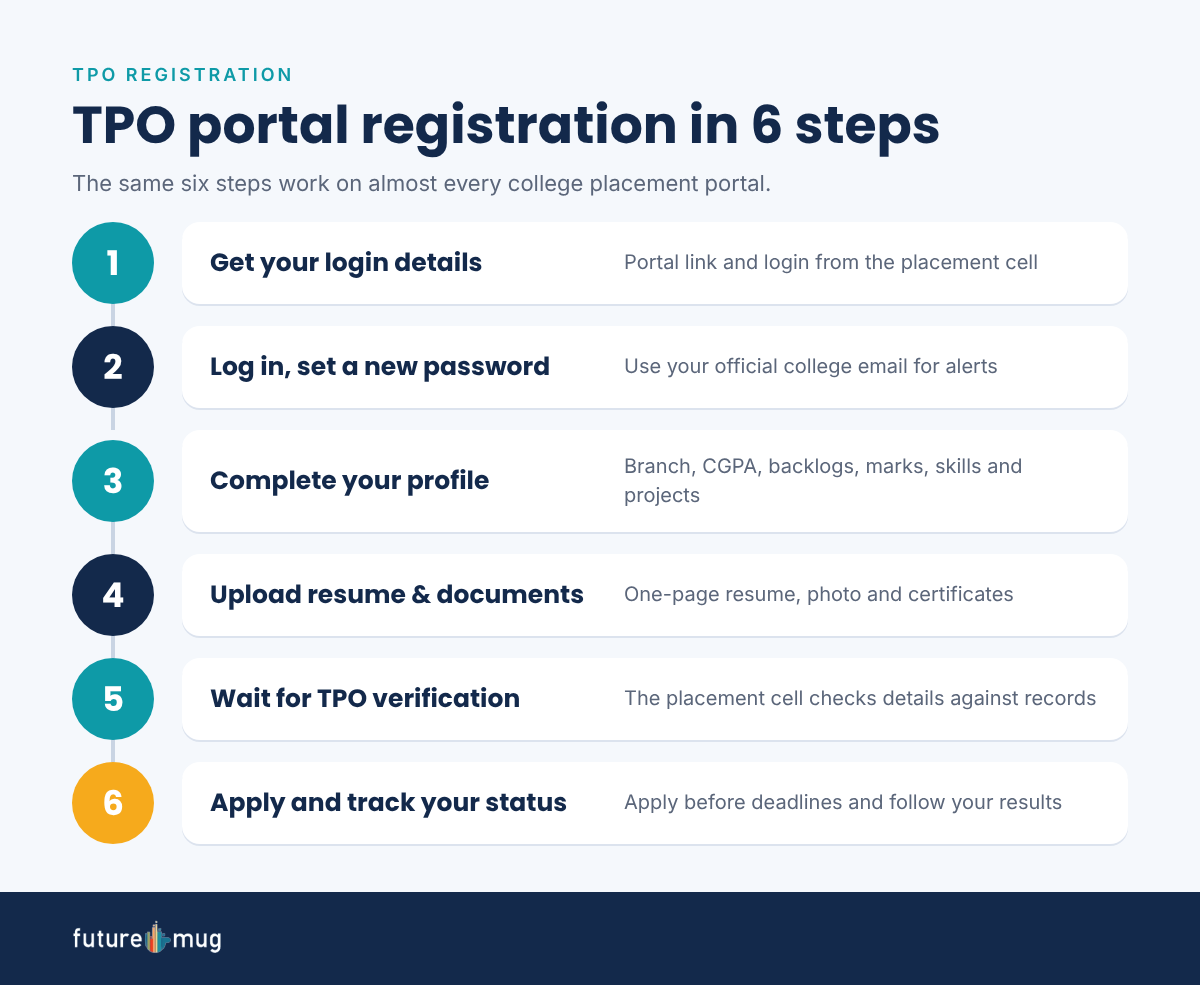
- Get your login details. The placement cell shares the portal link and your login, usually your college email or roll number, at the start of placement season.
- Log in and set a new password. Use your official college email so drive alerts reach you.
- Complete your profile. Enter your branch, CGPA, backlogs, 10th and 12th marks, skills and projects exactly as they appear in college records.
- Upload your resume and documents. Add a one-page resume, a photo and any certificates the TPO asks for.
- Wait for TPO verification. The placement cell checks your details against college records and approves your profile.
- Apply for drives and track your status. Open each new drive, check eligibility, apply before the deadline and follow your test and interview results.
Tips for a smooth TPO registration
- Register early. Some portals close registration once the first drive is announced.
- Keep your profile honest. A CGPA or backlog mismatch can get your application rejected after you clear the tests.
- Update your resume after every project or internship, not only before a drive.
- Turn on email or app notifications so you never miss a deadline.
How TPOs and Placement Directors Choose a Portal
For a TPO, the right portal is the one that cuts manual work and gives students more chances to get hired. Ask these questions before you choose:
- Does it check eligibility automatically? Manual CGPA and backlog checks are the biggest time drain in placement season.
- Can students take tests and interviews inside it? Sending students to separate tools for every company slows drives down.
- Does it show readiness before placement season? The best time to fix weak skills is months before the first company arrives.
- Can recruiters use it without training? A portal that is hard for HR teams means fewer companies return.
- Are reports ready for NAAC, NIRF and management? Placement data should be exportable in a few clicks, not rebuilt every year.
FutureReady: TPO portal and dashboard in one
futuremug’s FutureReady gives colleges a Candidate Dashboard for students and a College/TPO Dashboard for the placement team, so the portal and the dashboard live in one place. Students can practise with AI video interviews and take skills assessments with AI proctoring across 250+ IT domains. For technical rounds, colleges can also draw on futuremug’s panel of 5,000+ expert interviewers through interview outsourcing.
See how it works for your college on our campus placement services page.
Common TPO Portal Problems and How to Fix Them
| Problem | Fix |
|---|---|
| Can’t log in | Use the official portal link from your college website, not an old bookmark. Ask the placement cell to reset your password. |
| Profile stuck “pending verification” | Check that your marks match college records, then contact your department’s placement coordinator. |
| Not eligible for a drive | Read the drive’s CGPA, branch and backlog rules. If you think it’s an error, raise it with the TPO before the deadline. |
| Missed a drive alert | Turn on email or app notifications and check the portal at least once a day in placement season. |
| Resume won’t upload | Save it as a PDF under the size limit, usually a few MB, with a simple file name. |
Conclusion
A TPO portal is the college’s online placement system: the place where students register, TPOs run drives and recruiters find the right candidates. For students, a complete and honest profile is the first step to getting placed. For TPOs, the right portal turns placement season from paperwork into progress you can measure.
If you run placements at your college, book a FutureReady demo to see a TPO portal and dashboard built for Indian campuses.



Frequently Asked Questions
A TPO portal is a college's online placement system. Students register and apply for campus drives on it, the TPO publishes drives and shortlists, and recruiters receive eligible applicants.
Get your login from the placement cell, complete your profile with accurate marks, upload your resume and wait for the TPO to verify it. Once approved, you can apply for drives you are eligible for.
Use the portal link on your college website or the one shared by the placement cell. Your username is usually your college email or roll number. If you can't log in, ask the placement cell to reset your access.
A TPO ERP is the placement module inside a college's ERP system. It connects placement work with official academic records such as marks, attendance and fees.
Yes. TPO portal, placement portal and T&P portal are different names for the same system, run by the Training and Placement Cell.
The Training and Placement Officer and the placement cell manage it. Department placement coordinators often help verify student profiles and share drive updates.
Yes. Recruiters use it to post job descriptions, see eligible applicants, share test and interview results and confirm offers.