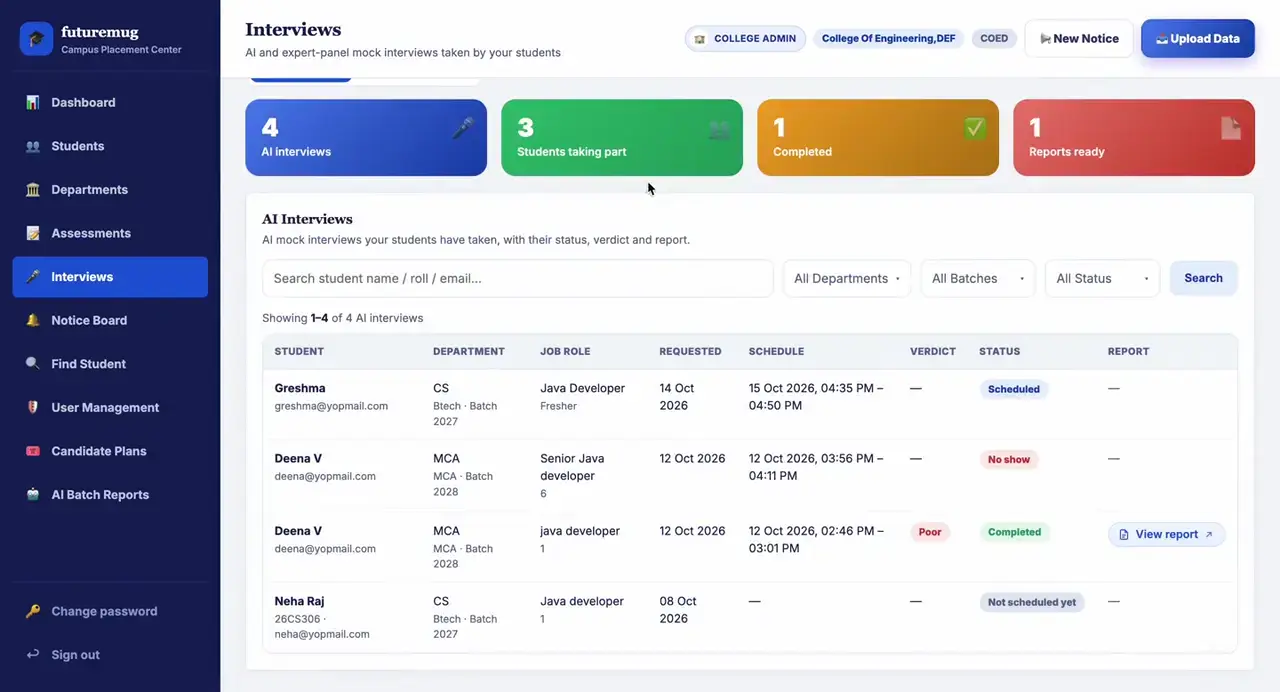
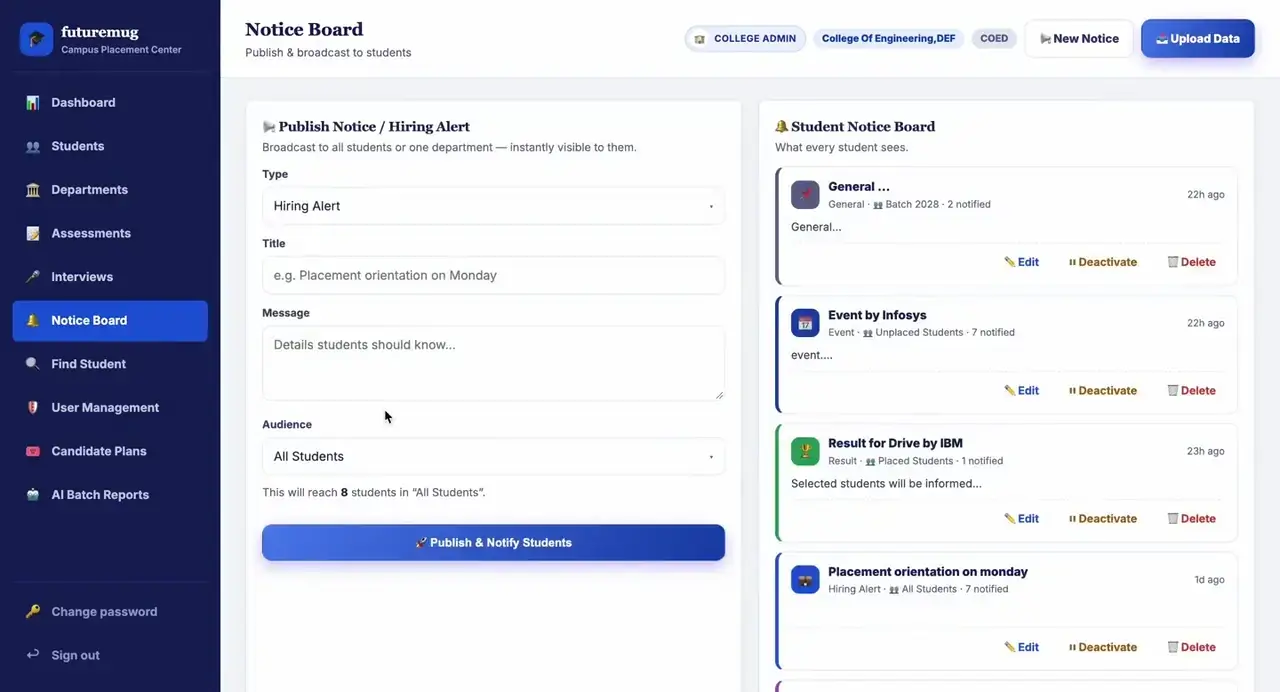
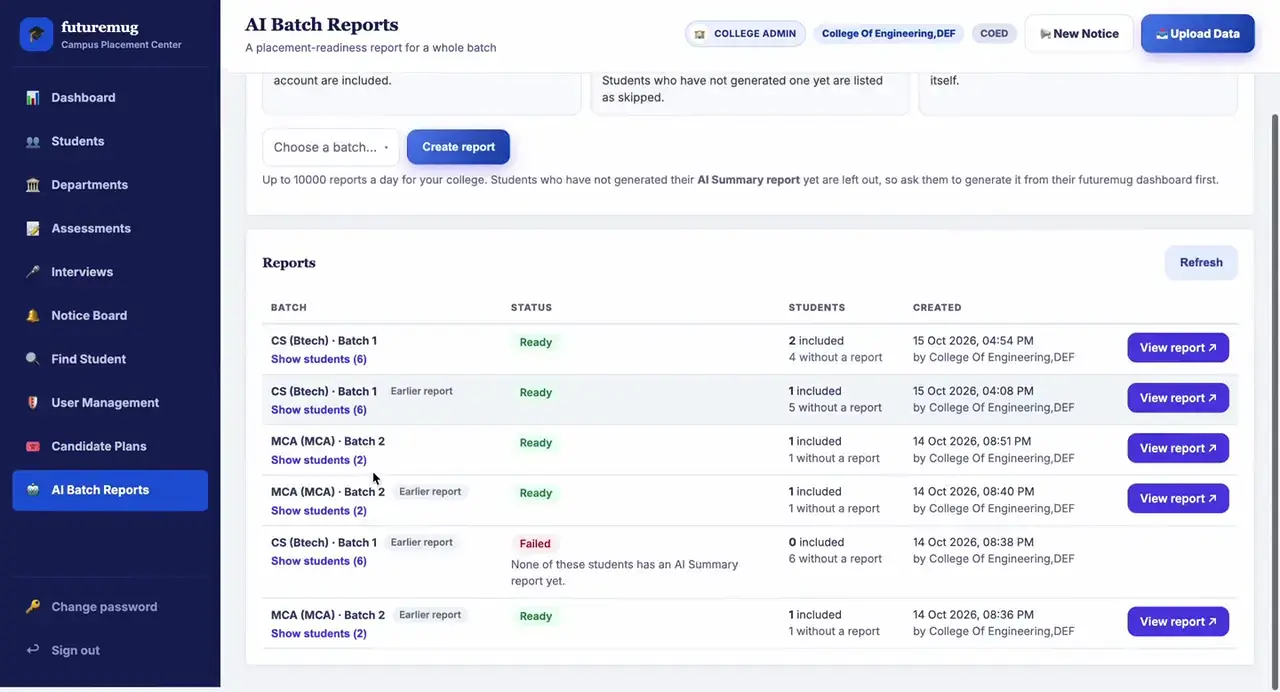
Placement readiness platform for colleges & universitiesKnow every student's placement readiness before drive day.
futuremug shows your placement cell which students are ready and who needs support, flags skill gaps early, and gives every student AI mock interview practice, so more students walk into drives prepared.
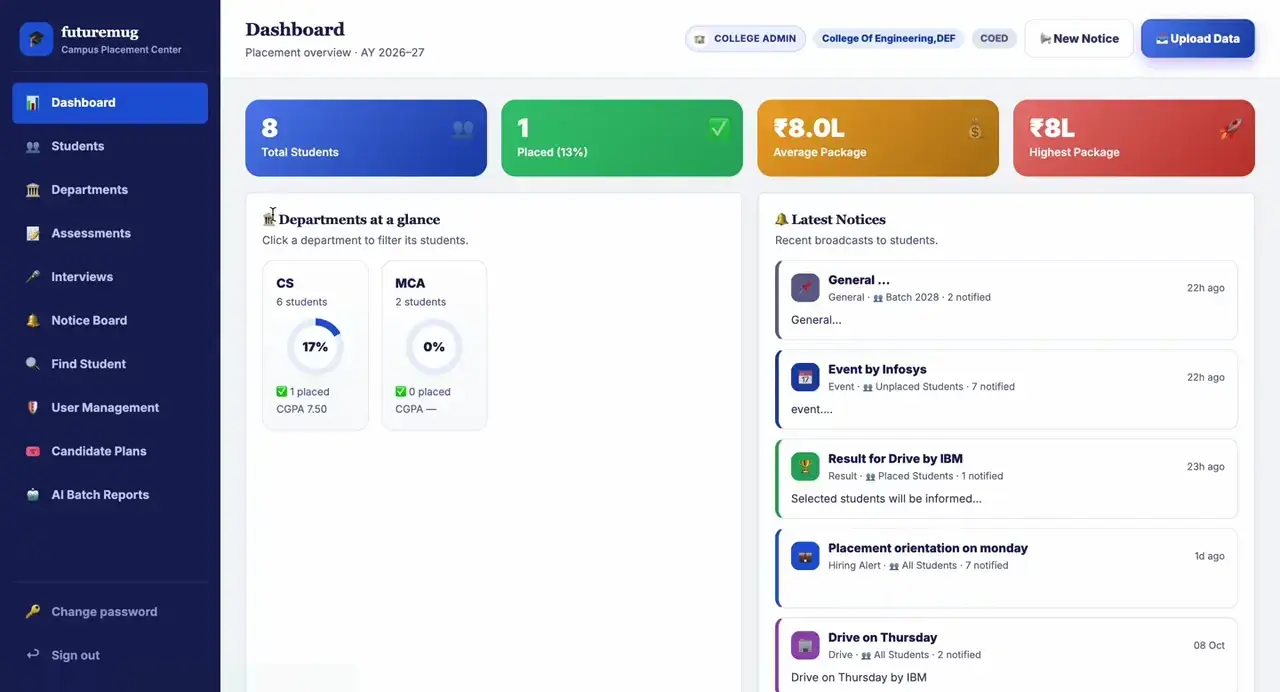
Complete visibility: see who is ready and who needs support, by batch and department
Proactive guidance: spot skill gaps and act before placement drives
Better preparation: students practice and approach opportunities with confidence
Help every student become placement-ready, not just eligible.
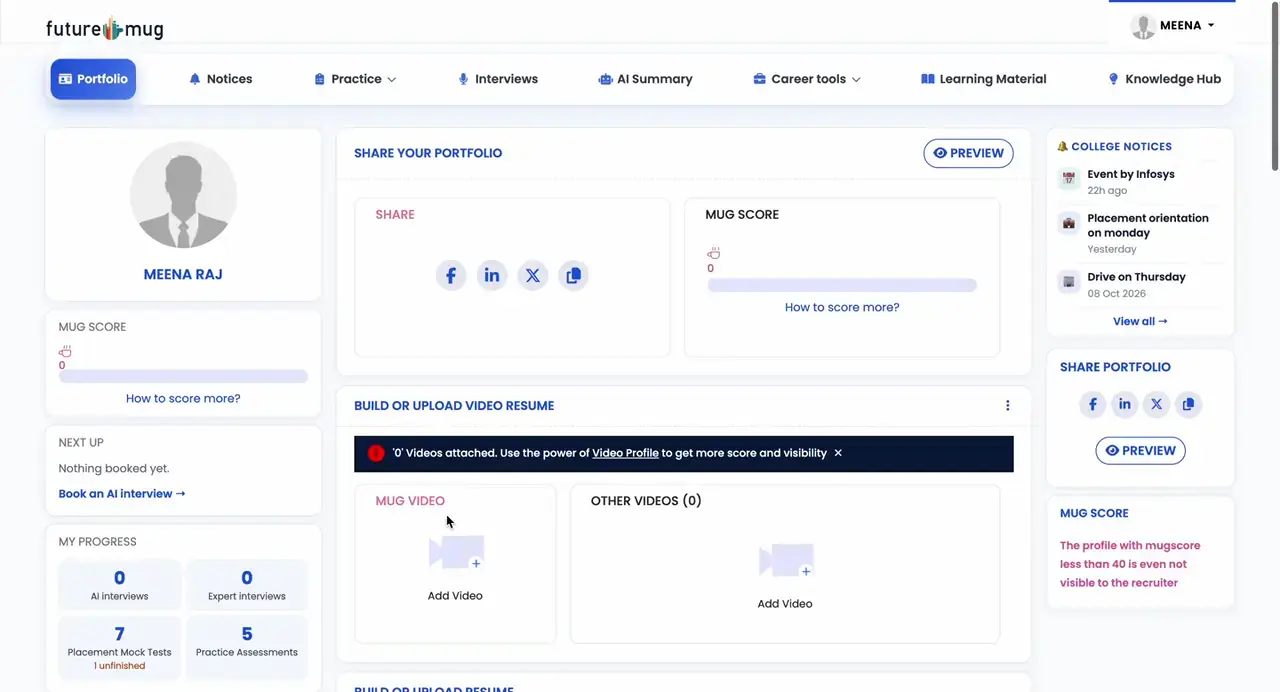
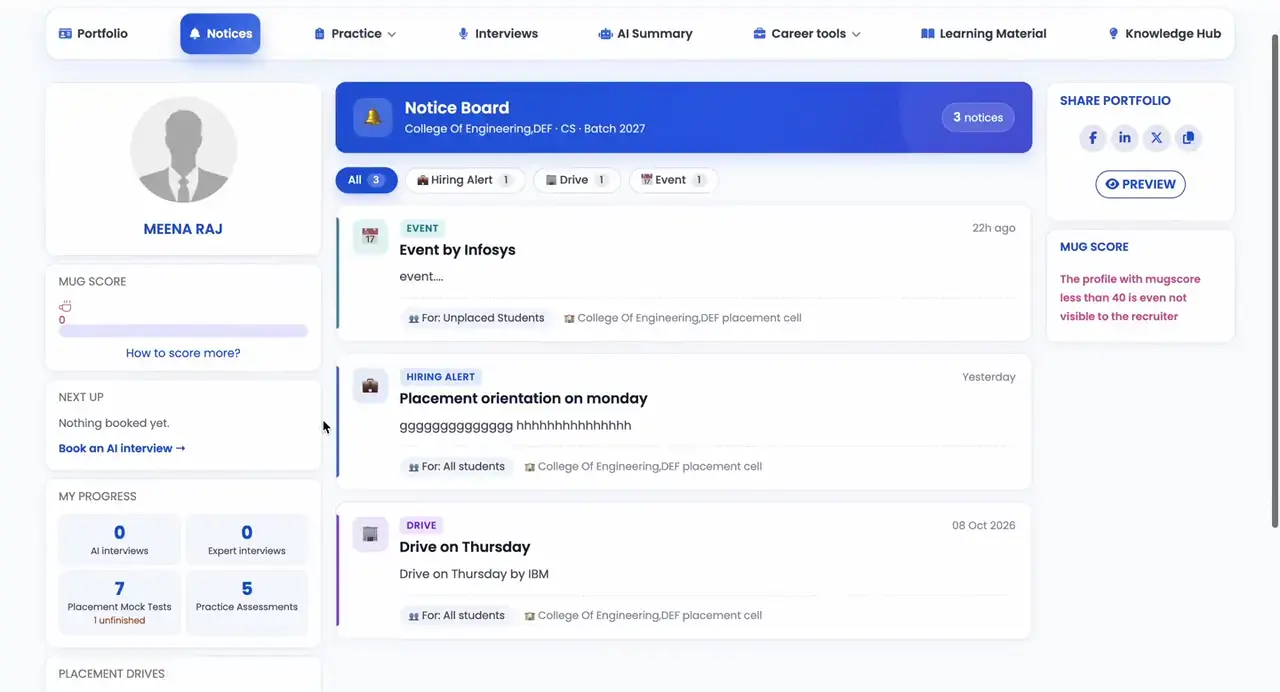
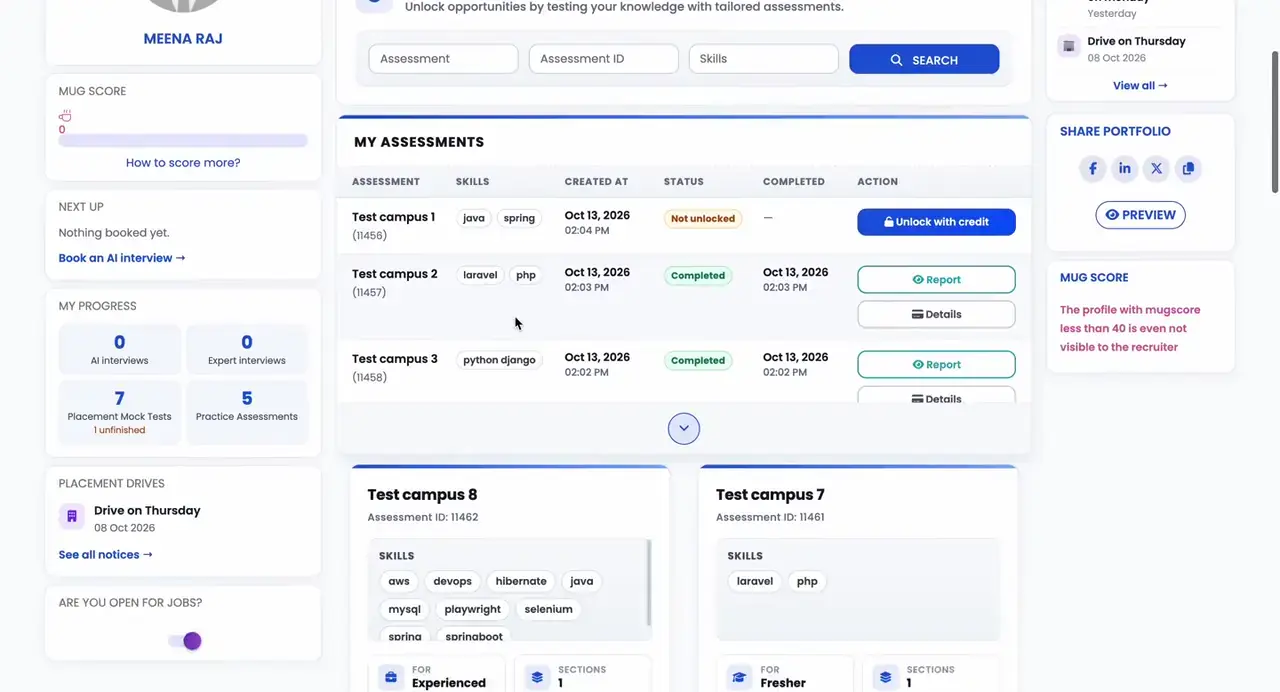
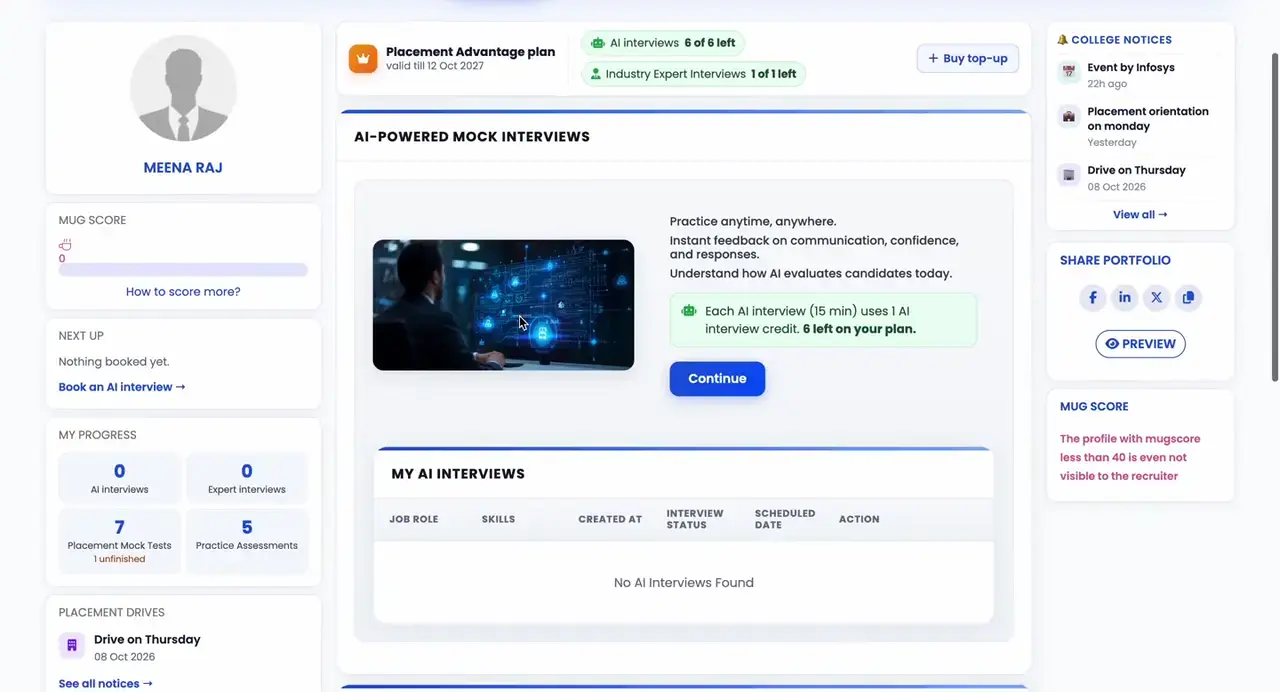
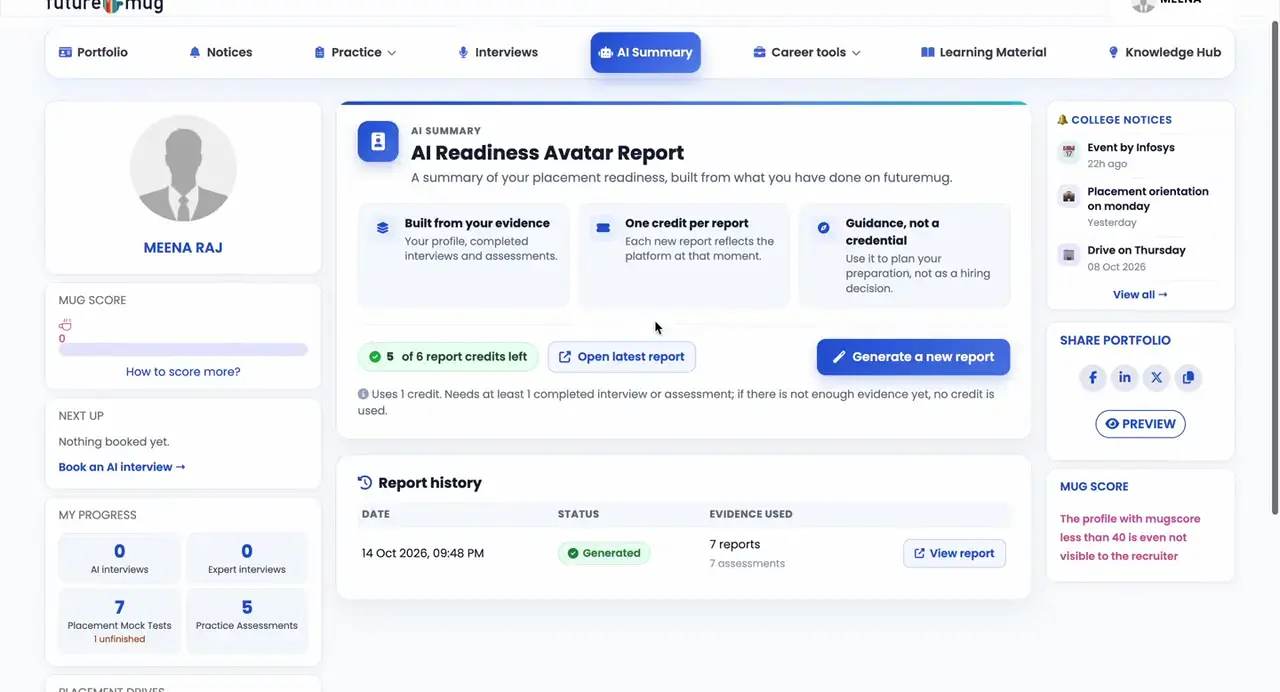
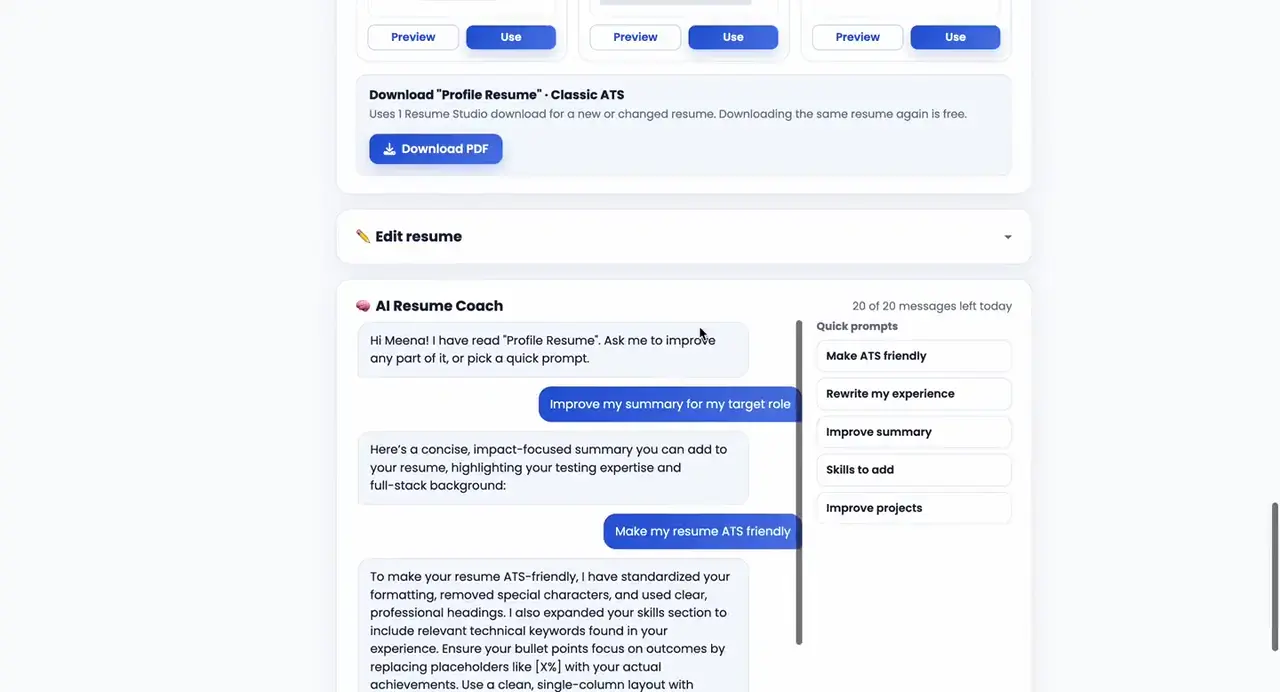
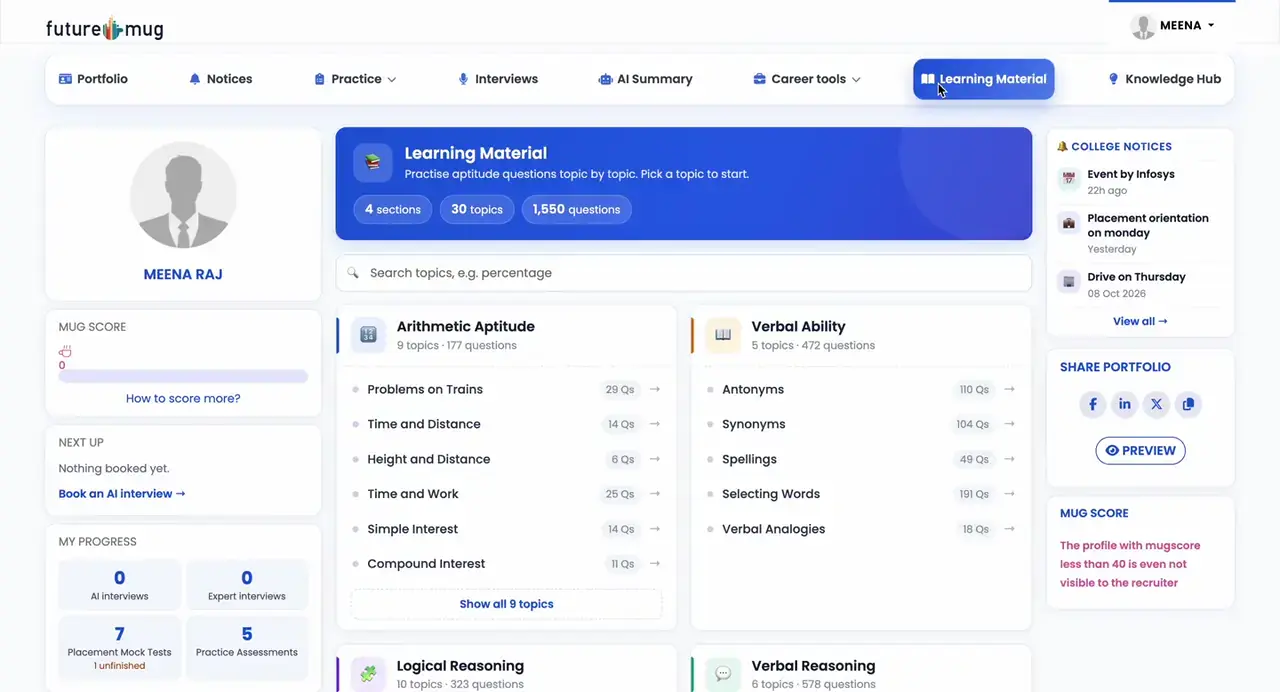
Follow one student through her FutureReady dashboard. Every screen below is the real product your students will use, and everything she does rolls up to your Campus Placement Center.
The readiness meter is illustrative. Real readiness comes from each student's AI Readiness Report.
Agentic AI for placement cells
Your AI-powered placement partner, from planning to action.
The AI practices with every student, scores their work and summarises each batch, so your team can plan training and drives with evidence. Your team still makes every decision.
Starts
The placement cell uploads a batch, or a student logs in to their FutureReady dashboard.
Understands
The AI uses each student's portfolio, mock tests, practice assessments and AI interviews.
Acts
It runs AI mock interviews with follow-up questions and instant feedback, scores tests and coaches resume rewrites.
Delivers
An AI Readiness Report for each student and an AI Batch Report for the TPO: top students, students who need attention and skill gaps.
People decide
Your team plans training and drive shortlists. Reports are guidance, not credentials, and employers make every hiring decision.
Benefit
Students know what to practice next, and your team sees who is ready before drive day.
AI-generated test scores, interview feedback and verdicts, readiness and batch reports · Automated logins, notices and reminders · People decide training plans, drive shortlists and every hiring decision.
Problem & solution
From placement challenges to a clear, actionable workflow.
The gaps placement officers tell us about most, what futuremug does about each, and what changes for your team.
Challengefuturemug workflowOutcome
Readiness is invisible until drive dayBatch assessments and AI Batch ReportsKnow who is ready weeks earlier
Data sits in spreadsheets and chatsOne Campus Placement Center for students, scores and noticesOne source of truth for the cell
Mock interviews do not scaleAI mock interviews for every student, any timePractice without extra staff time
Training is planned on guessworkSkill gaps by student, batch and departmentTraining goes where it is needed
Students miss drives and alertsNotices and hiring alerts on every student's dashboardEvery eligible student hears in time
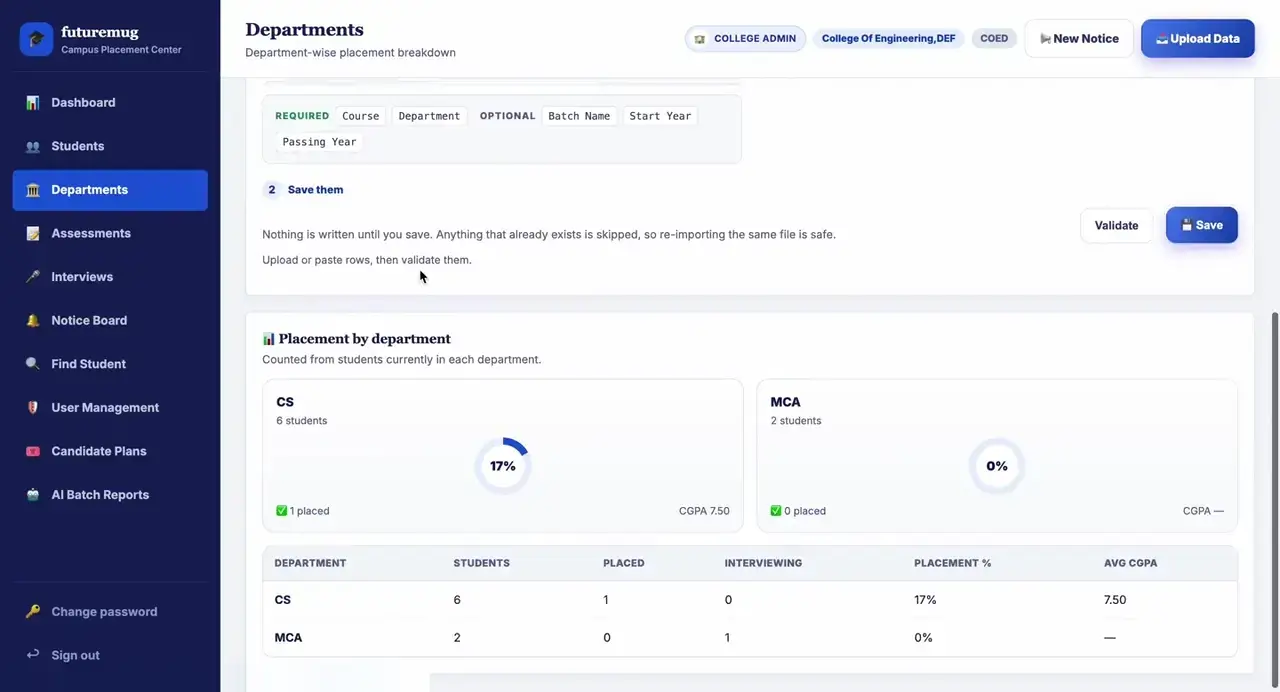
Management wants evidencePlacement by department and batch reports on demandReport progress in minutes
1
Set up in one upload
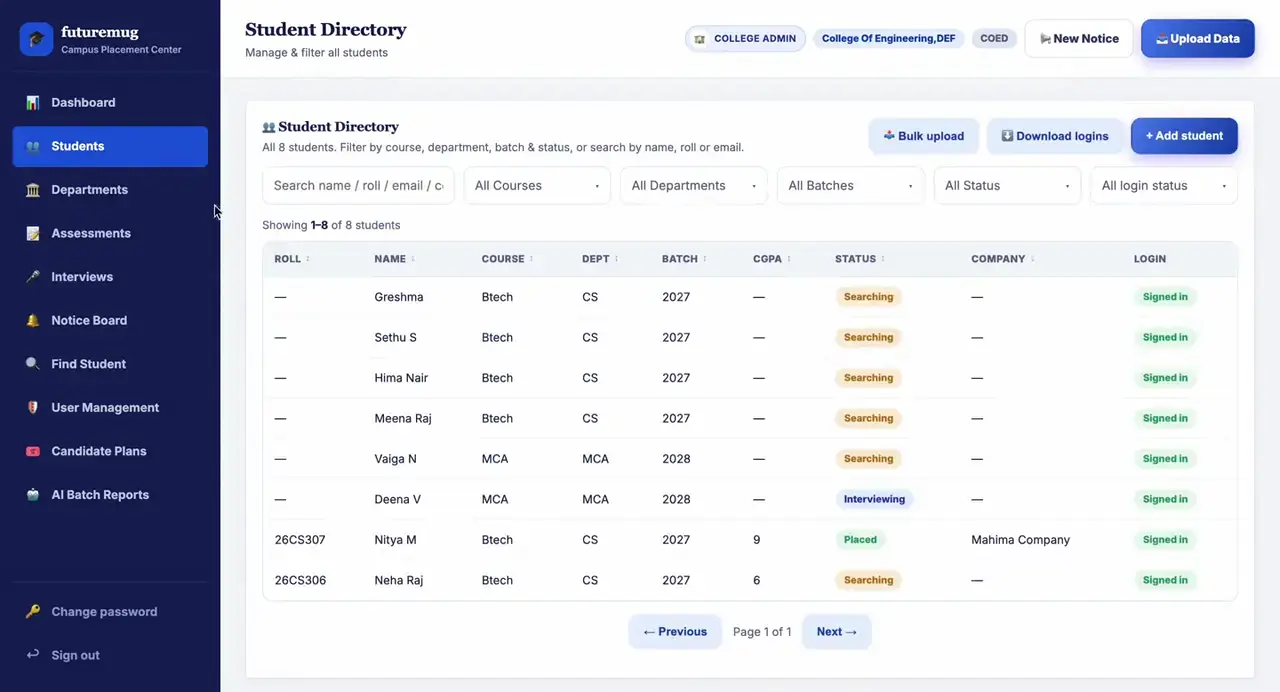
Download the Excel template, upload courses, departments, batches and students, then send logins in bulk.
Benefit: no manual data entry for each student.
2
Assess and practice
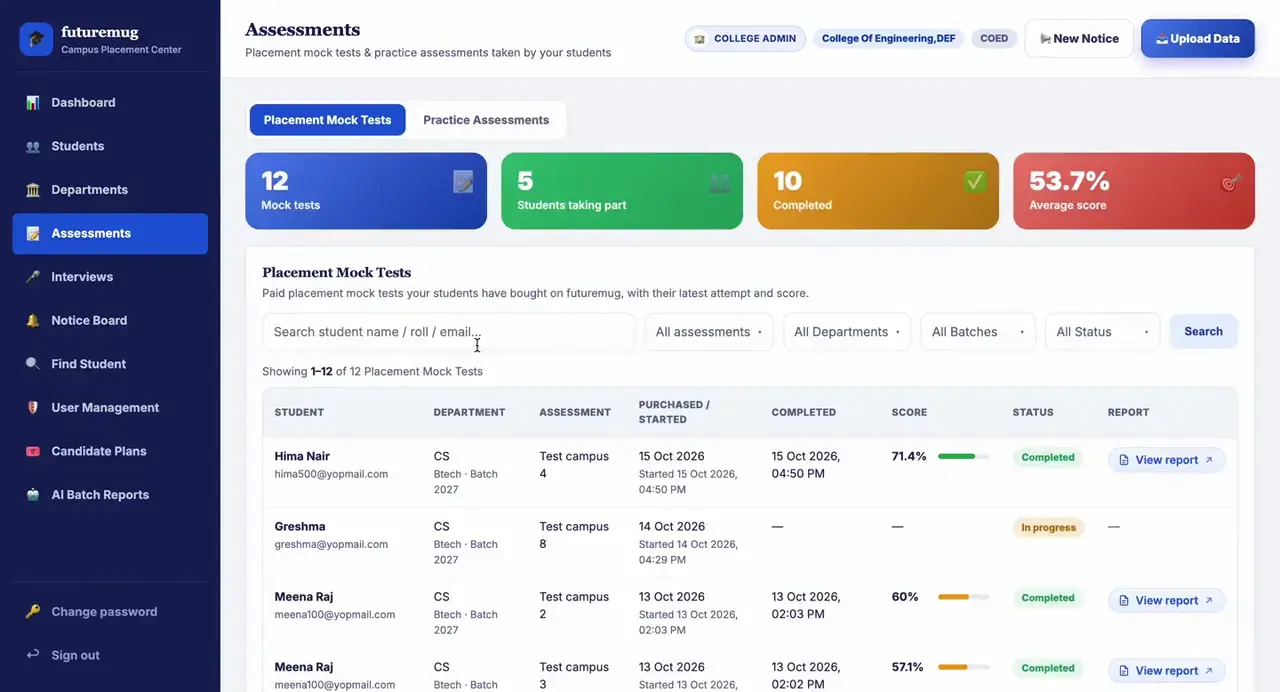
Students take placement mock tests, practice assessments and AI mock interviews from their own dashboard.
Benefit: practice happens without extra staff time.
3
See the gaps
Track scores, AI interview verdicts and placement by department. Create an AI Batch Report for any batch.
Benefit: training goes where it is needed.
4
Prepare and place
Publish drives and hiring alerts, shortlist ready students and track placements by department.
Benefit: the right students are ready when employers arrive.
How futuremug compares with other approaches
Comparison of placement approaches
Need
Spreadsheets & separate tools
Placement-tracking software
futuremug
Student readiness view
Manual, after each test
Placement tracking, limited readiness data
Batch and department readiness with AI Batch Reports
Interview practice
A few mock sessions per year
Varies; often a separate tool
AI mock interviews for every student, any time
Student-side tools
Separate apps or none
Varies
FutureReady dashboard: portfolio, tests, AI interviews, resume, learning
Employer access
College's own recruiter list
College's own recruiter list
Also connected to futuremug's employer hiring, drives and job fairs
Effort for the placement cell
High: spreadsheets and chats
Medium
One upload, then dashboards and reports
Approach-level comparison based on public information; capabilities of individual products vary.
A good fit if
You run placements for one or more final-year batches
You want to see readiness before drives, not after
Your team cannot run mock interviews for every student
Management asks for placement progress by department
Not the right fit if
You only need a job board for students
You want a vendor to guarantee placements; no platform can
Trusted by educators. Built around student success.
What partners who run campus programmes and hire students with futuremug say.
“Quest Global has been associated with futuremug for the past two years for Campus and Off Campus Hiring.”
“Scaling Kerala IT Job Fair 2026 to 7,000 candidates and 30+ companies required flawless execution.”
Implementation & support
Get your Campus Placement Center ready without the complexity.
Book a demoA placement specialist walks through the Campus Placement Center with your batch in mind. Bring your TPO, one department coordinator and, if possible, management.
Upload your dataUse the Excel template for courses, departments, batches and students. Nothing is saved until you validate it, and re-importing skips existing records.
Start with one batchShare logins, choose student plans and run the first mock tests and AI interviews.
Review and expandCreate an AI Batch Report, agree next steps with your team and roll out to more batches.
Data protection & access
Role-based accessCollege Admin, TPO, Department Coordinator and Management accounts each see only what their role needs.
Department scopingDepartment coordinators see only the students of their own departments.
Student-owned loginsEach student signs in with their own credentials to their own dashboard.
Records kept on deactivationDeactivating an account removes access but keeps the record, so placement history is not lost.
Validated importsNothing is written until an upload is validated and saved; re-importing skips existing records.
Available on request before you sign: Where data is hosted, how long data is kept, and how to request deletion, how student consent is recorded, data-processing agreement for your institution. See our privacy policy.
What happens when you book a demo
Before the callTell us your college type, number of final-year students and when your next drives are.
In the demoA placement specialist shows the Campus Placement Center, the student dashboard, AI Batch Reports and setup, using your batches as the example.
After the demoYou get a quote for your students, a setup plan for one pilot batch and the one-page brief to share internally.
Length: about 30 minutes, onlineWho should attend: TPO, one department coordinator and, if possible, managementCost: free, no commitment
Pricing & plans
Choose the right placement readiness plan for your students.
Your college gets the Campus Placement Center. Students use FutureReady plans, which the college can allocate or students can buy. Your quote depends on student numbers and the plans you choose.
Practice
Foundation · Practice Plus
For early years and students building basics.
Practice assessments
Placement mock tests
Resume Studio and JD Match
Readiness
Readiness
For pre-final and final-year students preparing for drives.
Practice assessments and mock tests
AI mock interviews
AI Readiness Reports
Resume Studio and JD Match
Placement
Placement Advantage · Placement Accelerator
For final-year students in active placement season.
More mock tests and AI interviews
Industry expert interview (selected plans)
AI Readiness Reports
Resume Studio and JD Match
Every college plan includes the Campus Placement Center: student directory, departments and batches, assessment and AI interview tracking, notice board, user roles and AI Batch Reports.
A placement readiness platform helps a college see whether students are ready for campus placements before drives begin. It combines aptitude and technical assessments, interview practice and readiness reports, so the placement cell can find skill gaps by student, batch and department and act early.
What is futuremug for colleges?
futuremug gives a college's placement cell the Campus Placement Center, a TPO dashboard for students, departments, assessments, AI mock interviews, notices and AI Batch Reports. Students get their own FutureReady Candidate Dashboard to practice mock tests and AI interviews, build a portfolio and improve their resume.
How long does it take to set up?
You download the Excel template, upload courses, departments, batches and students, then share logins with students. The Campus Placement Center is ready once the upload is validated and saved. Your account team confirms a timeline for your batch size during the demo.
Does the AI decide which students are placement-ready?
No. The AI scores tests, asks follow-up questions in mock interviews and writes readiness reports. Students' AI Readiness Reports are guidance, not credentials. Your placement team decides training and drive shortlists, and employers make every hiring decision.
What do students get?
Each student gets the FutureReady Candidate Dashboard: a portfolio with video resume and Mug Score, college notices, placement mock tests, practice assessments, AI mock interviews, an AI Readiness Report, Resume Studio with an AI Resume Coach, JD Match, Learning Material and the Knowledge Hub.
Who in the college can use the dashboard?
The Campus Placement Center supports College Admin, TPO, Department Coordinator and Management accounts. Department coordinators see only the students of their own departments. Accounts can be deactivated without deleting the record.
How is pricing decided?
Pricing depends on the number of students and the student plans you choose. Colleges can allocate plans or top-ups to students, or students can buy their own. Book a demo and we will send a quote for your batch size.
Which assessments and interviews are included?
Placement mock tests and practice assessments, including coding, aptitude and verbal topics, plus AI mock interviews. Industry expert interviews are available on selected student plans.
Can futuremug bring employers to our campus?
futuremug also runs assessments and interviews for employers and organises campus drives and job fairs. Ask in your demo how employer drives can be arranged for your students; drives depend on employer demand and are not guaranteed.
Where is student data kept and who can see it?
Only accounts your college creates can see student data, and each role sees only what it needs: department coordinators see only their own departments. Ask for futuremug's data-protection details, including hosting and retention, during your demo.
Can students pay instead of the college?
Yes. Colleges can allocate plans or top-ups from their own budget, or students can buy plans themselves. Many colleges start with a college-funded pilot for one batch.
How do we measure whether it worked?
Set a baseline in the first month from the Campus Placement Center: students assessed, practice completed, AI interview verdicts and placement % by department. Review the same figures and an AI Batch Report at the end of the semester.
Make every student's placement journey count.
In the demo, a placement specialist shows the Campus Placement Center and the student dashboard, answers questions on setup and plans, and agrees a one-batch pilot if it fits.

 Placement cellTPO · Batch 2026On track
 Management viewPrincipal · all departments
 CSE departmentCoordinator · Batch 2026
 Meena RajFinal-year B.Tech · CSE